10
AIDA64 Extreme Monitoring Interface Setup Guide
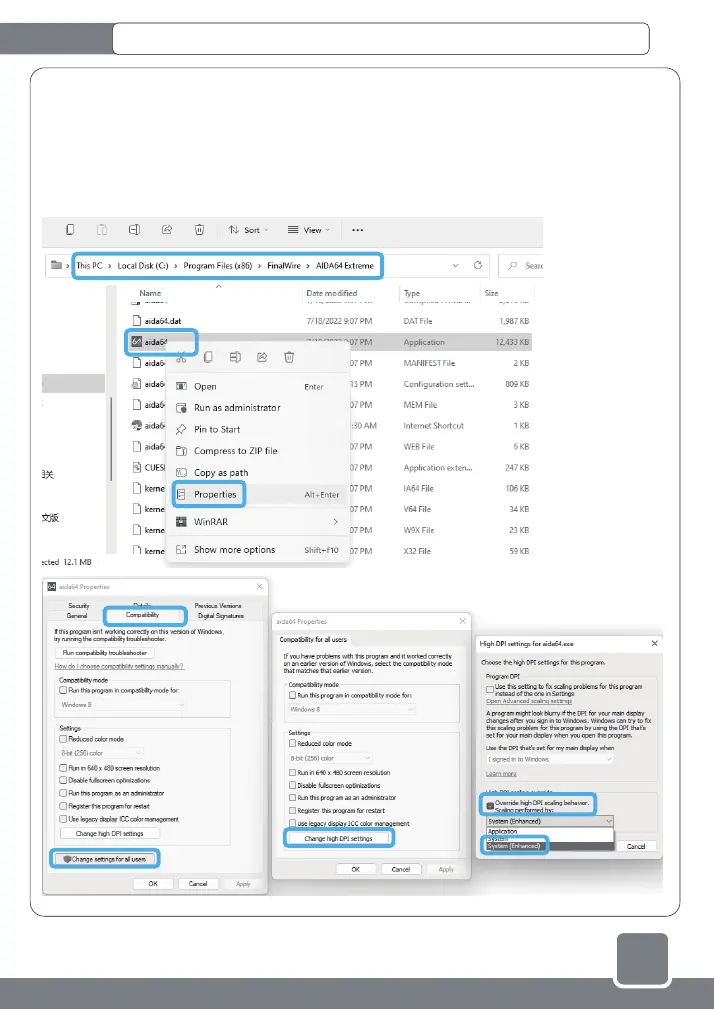
6.Under different display (main screen) resolutions/scaling ratios, the icons and texts of the monitoring interface
may be displayed in dislocation. Adjustment method: Open the AIDA64 installation directory, the default installation
address is:" C:\Program Files (x86)\FinalWire\ AIDA64 Extreme", Right-click the icon of the main program "aida64.exe",
and select "Properties"-"Compatibility"-"Change settings for all users"-"Change high DPI settings"-check "Override high
DPI scaling behavior" in the pop-up menu .scaling performed by:" - Select "System (Enhanced)" and step by step
"Apply" the modified settings menu. Finally, right-click the AIDA64 program icon in the lower right corner of the desktop,
select "Exit" and restart the program.
①
②
③
④
⑤
⑥
⑦
⑧



 To Next Page