Two-stage angle
adjustment
2
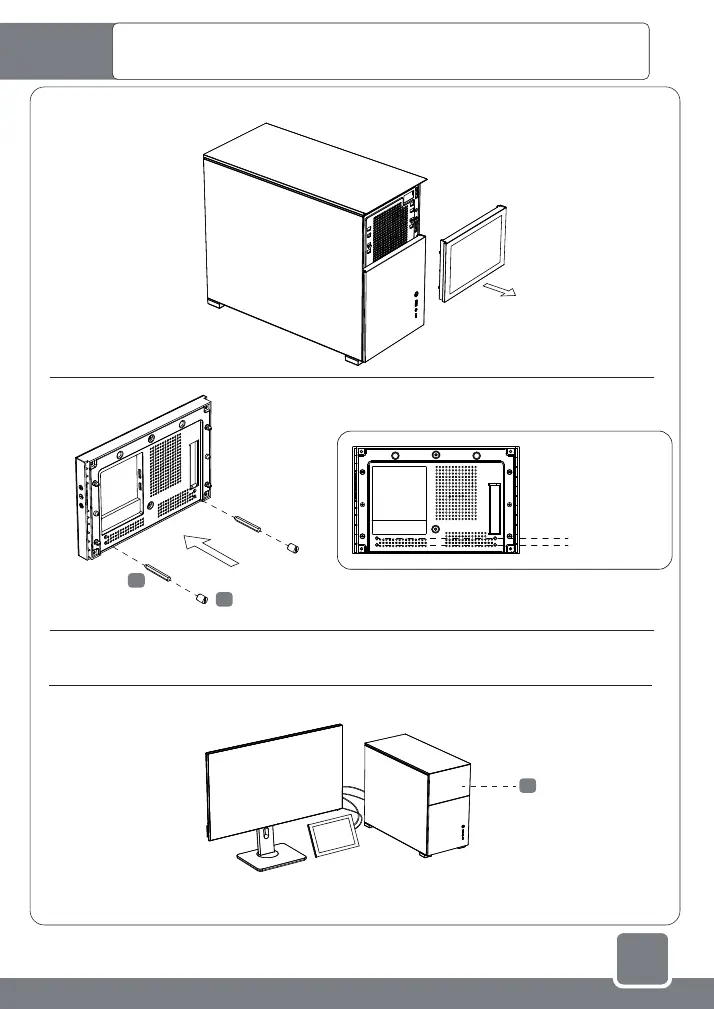
Secondary screen installation: can be used independently or
externally, or installed on the chassis panel
Steps for using the secondary screen externally
1-1
1-2
1-3
1-4
Complete the installation of computer hardware and operating system software by referring to the "Case
Installation Instructions". When Microsoft Windows system is started for the first time, don’t connect the
secondary screen to the system, so as to prevent the host from misidentifying the main display.
* The LCD secondary screen needs to be connected to the HDMI port x1 of the graphics card.
If the number of host ports is insufficient, you need to purchase a suitable adapter cable, such
as "DisplayPort male to HDMI female".
After the system starts up and the main monitor displays normally, connect the secondary screen
MINI-HDMI and TYPE-C interfaces.
F
Replacement case front bezel
C
Long standoff
B
HEX wrench socket



 To Next Page