4
1.The secondary screen manual will be updated in real time based on user feedback. Please visit
https://www.jonsbo.com/en/products/D31.html, or scan the QR code below to get detailed graphic instructions.
D31_SCREEN_USER_GUIDE.PDF D31_SCREEN_USER_GUIDE.DOC
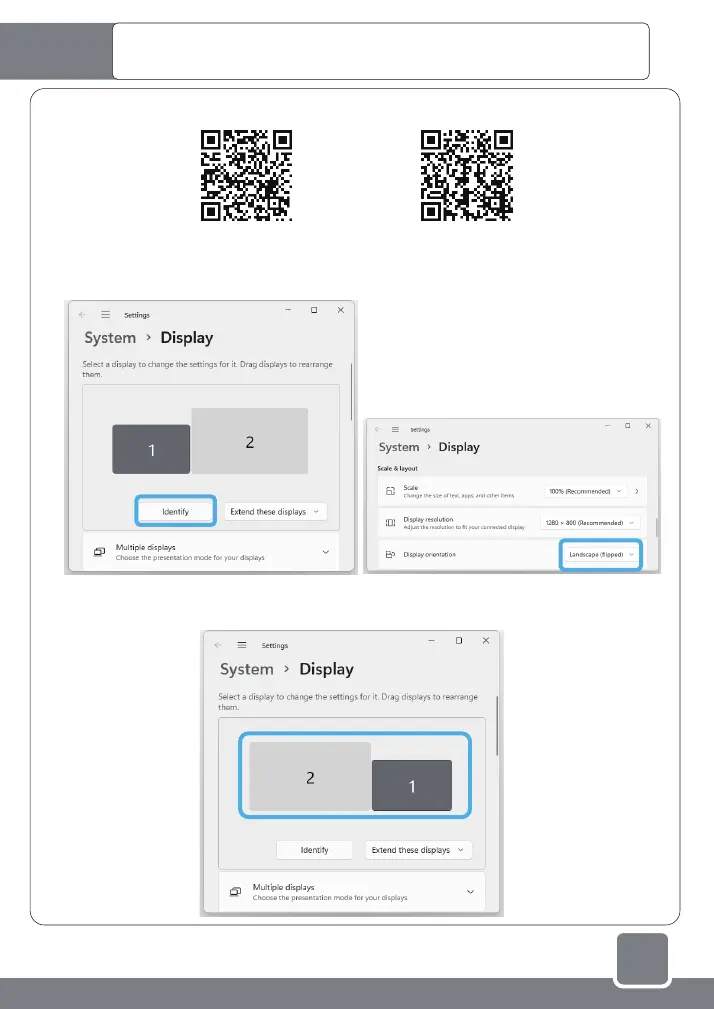
2.Vertical to horizontal display settings for the secondary screen : right-click the desktop of the main screen to pop
up a menu, click "Display settings" - ”Identify", select the icon whose serial number is the secondary screen, slide
down the menu, and change the "Portrait" in the display direction to For "Landscape (flipped)", and finally "Keep changes".
3.Select the secondary screen indicator icon in the settings menu, you can drag it around the main screen for
positioning, which is usually consistent with the actual position of the main/secondary screen. After adjustment,
click "Apply".
Start the system and set the secondary screen display in
the Microsoft WINDOWS system
①
②



 To Next Page