8
AIDA64 Extreme Monitoring Interface Setup Guide
1.Install AIDA64 Extreme software and register for activation.
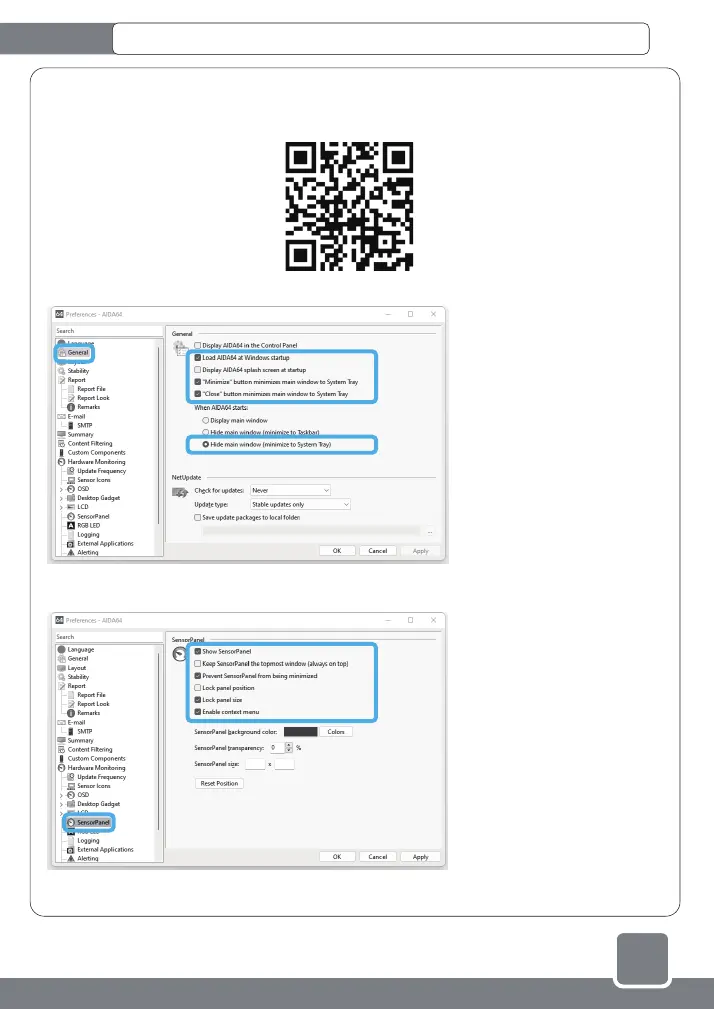
2.Through https://www.jonsbo.com/Upfiles/down/sensorpanel.zip or the QR code below, download the
configuration file with the suffix format "xxxxxx.sensorpanel".
3.In the "File" - "Preferences" - "General" settings, check the following items, and click "Apply":
4.In "Hardware Monitoring" - "SensorPanel" setting, check the following items and click "Apply":
●Load AIDA64 at Windows startup
●"Minimize" button minimizes main window to System Tray
●"Close" button minimizes main window to System Tray
●Hide main window (minimize to System Tray)
●Show SensorPanel
●Prevent SensorPanel from being minimized
●Lock panel size
●Enable context menu
①
②
①
②



 To Next Page