Slow stop is activated after travel setting, if slow stop speed is too slow, please adjust ‘TR1’ to
increase. If slow stop speed is too fast, please adjust ‘TR1’ to decrease.
Note: If the door is no need to be fully opened, please install the limit stopper at the proper
position.
Auto Learning transmitters:
It’s possible to learn transmitters quickly without using the base menu. To insert a new transmitter
transmit3 times with the new remote, making at least 1 second pause between each transmission.
Than transmitter already in memory and then once with the new. When programmation is done, the
blinker flash once. Attention: function must be enabled, refer to “advance menu ”-auto learning
transmitters. The new code takes the same channel as the one used to insert it.
Board settings
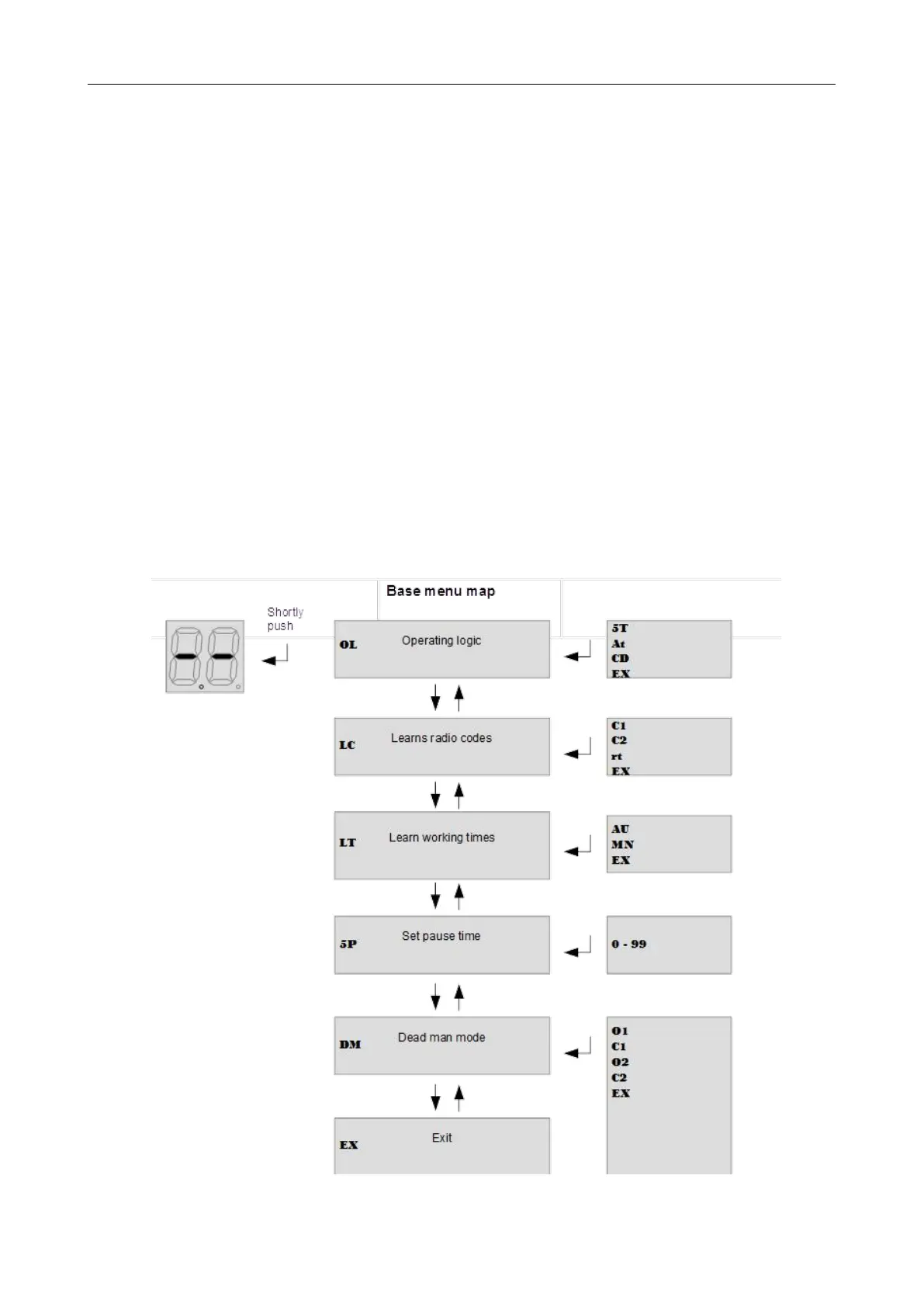
Base Menu
Push enter 1 for at least 1 second to enter base menu.
OL is on the display, with up/down it’s possible to select other functions of this menu.
To exit this menu select EX or push up and down together.
After 2 minutes without actions, the control unit exits itself from this menu.
Figure 19



 To Next Page