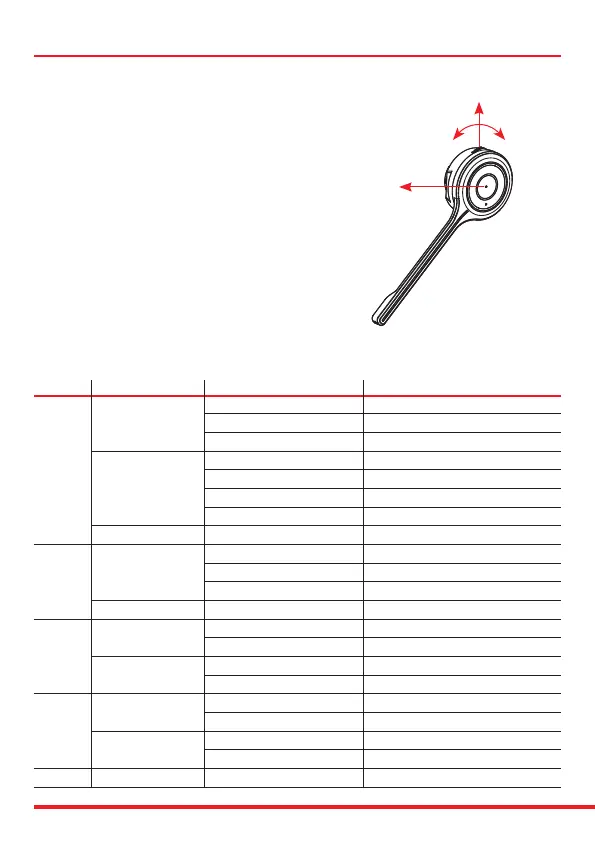
Answer a call
• Press ‘Answer button’ Button 1 briey.
Reject a call
• Press Button 1 for 2 seconds while incoming
call, and “Call rejected” is heard in the speaker.
Make a call
• Dial the number on the mobile phone and press Button 1 briey.
End a call
• Press Button 1 briey, or end the call on the mobile phone.
Last number redialing
• Press Button 1 briey twice and you can hear “Redialling” voice notication in the speaker.
Button Action Condition Function
Incoming Call Accept Call
Short Press On Talk Mode End Call
Idle Connection & Battery Status
Powered On Power O
1 Long Press Power O Power On
Incoming Call Call Reject
Pairing Mode Pairing Cancel
Double Press Sync to BT Host Redial (Smartphone Only)
On Talk Mode Mute On/O
2
Short Press Listen to Music Pause On/O
Microso Teams Optimised Teams Pop Up
Long Press No Condition Pairing Mode
Short Press
On Talk Mode Volume Up
3
Listen to Music Volume Up
Long Press
Listen to Music >>Fast Forward (SmartPhone Only)
Not Sync’d to BT Host Change Voice Prompt’s Language
Short Press
On Talk Mode Volume Down
4 Listen to Music Volume Down
Long Press Listen to Music <<Fast Rewind (SmartPhone Only)
Not Sync’d to BT Host Change Voice Prompt’s Language
1 + 3 Long Press (>3.5 sec) During Power O Reset pairing info.
Button 1
Button 3 Button 4
Button 2
Using the headset


 To Next Page