18
Naming Zones and Areas
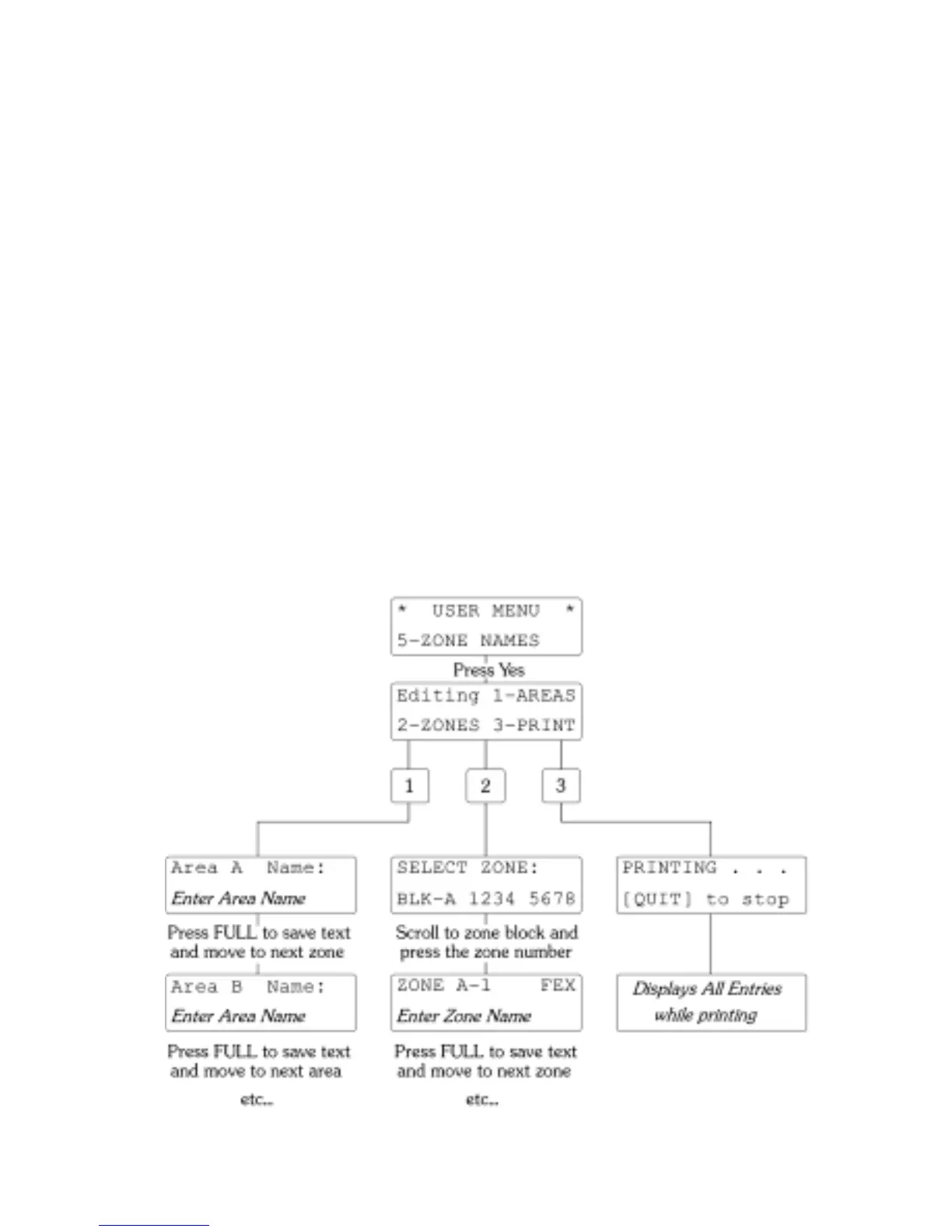
You can use the Text Editor to enter new text or modify existing text using the step by step
procedure illustrated on the Flow Chart below. Start from User Menu “5-ZONE NAMES” and
press [YES/OPTIONS] to display the Editing Selection menu. Enter [1] for the Area Name List
and [2] for the Zone Name List; option [3] will skip over if the printer is not available.
Area Names
The first valid Area Name field will be presented with a Text Cursor. Use the Text Editor to
modify the text to meet your requirements then press [FULL]. The display will then progress to
the next valid Area; continue until all valid Area Name Fields have been edited. The last [FULL]
operation will automatically return you to the Editing Selection menu.
Zone Names
The Zone Selection display allows you to select a Zone Block using the [SCROLL] keys. Select
an individual Zone using a Numeric key; this will bring you into the Zone Name Editing menu.
A valid Zone Name field will be presented with a Text Cursor. Use the Text Editor to modify
the text to meet your requirements then press [FULL]. The display will automatically advance to
the next valid Zone Name. Use [NO/QUIT] to return to the Zone Selection Menu and
[NO/QUIT] to exit.
Printer
All Zone and Area Names will be printed. When printing is completed the program will
automatically exit. You can abandon printing or editing by using the [NO/QUIT] key.



 To Next Page