3
The Text Window
Introduction
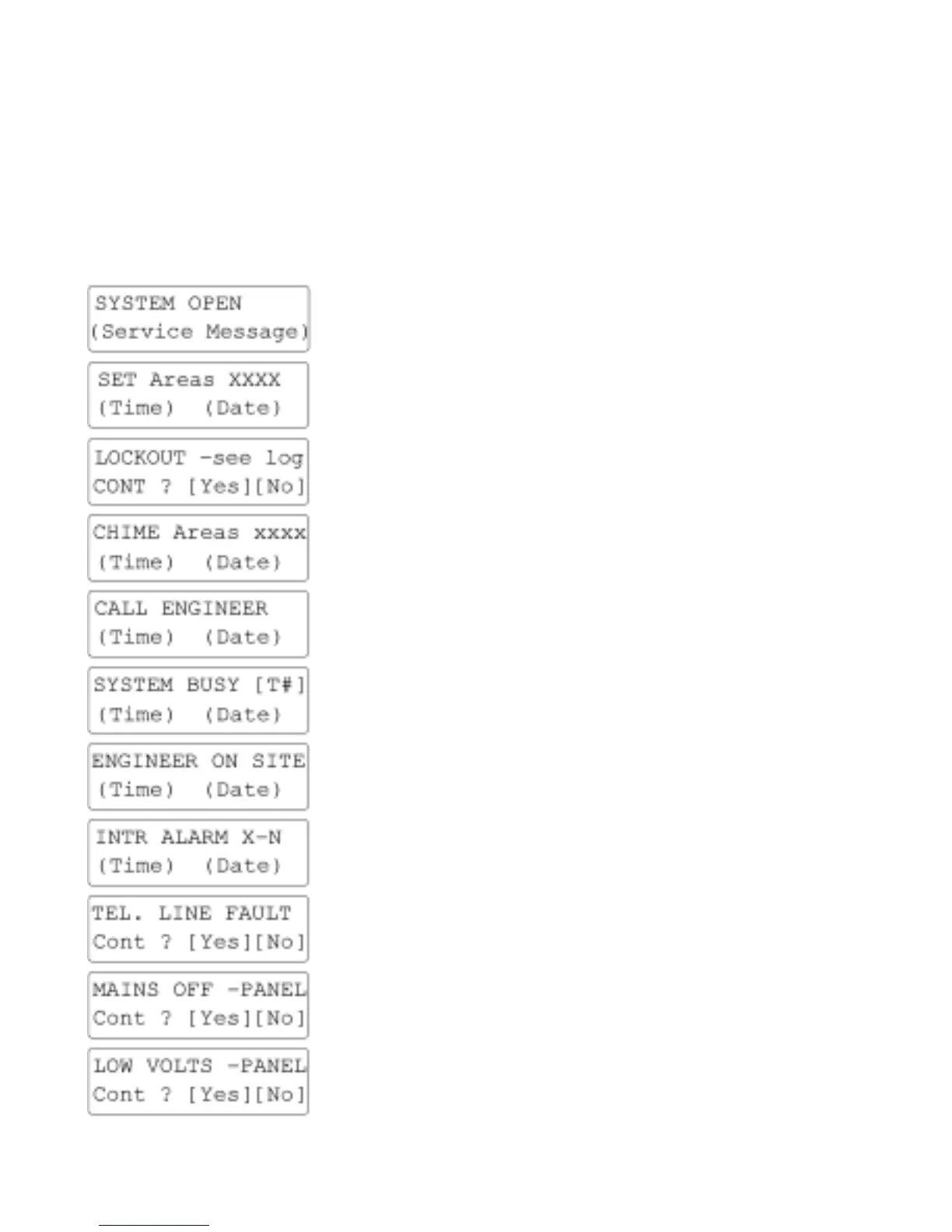
The Text Window is capable of displaying a wide variety of messages; many of these occur as
part of the normal day to day usage of the system and these are dealt with in the appropriate
sections of this guide. However there may be special circumstances which lead to other
messages some of which are explained below; if the Text Window displays a message you are
unable to understand you should contact your alarm installation company.
DISPLAY READS EXPLANATION ACTION REQUIRED
The clock display is replaced
by the Service message.
Enter code to access options.
Call Alarm Company to arrange
a service visit.
Areas shown in upper case
are Set. Areas shown in
lower case are set to Chime.
Enter code change Set state.
Enter code change Chime state.
An activation has caused the
Panel to require a Rest.
Call Alarm Company or Alarm
Receiving Centre
Areas shown are currently set
to Chime.
Enter code to change Chime
state
The Panel requires an
Engineer Reset.
Call Alarm Company.
Another Remote Keypad is
currently being accessed by
another user.
Wait until other user has
finished.
Another Remote Keypad is
currently being accessed by
an Engineer.
Note that the system is not
secure until the engineer
“Signs Off”.
Sample Alarm display
Where X=Block
and N=Zone Number.
Press [YES/OPTION] to each
message until all events have
been reported. Check Zones.
The fitted communicator has
detected a Telephone line
fault.
Check Telephone line.
If fault persists, call your Alarm
Company.
The 230v Mains is currently
not present. The Panel is now
running from Battery only.
Check Mains supply to Panel.
Check spur Fuse OK.
The Panel battery has
become partially flat.
Possible due to No Mains.
Restore Mains power
immediately; if fault persists,
contact your Alarm Company.


 To Next Page
 Loading...