EasyManua.ls Logo

JT T60 - User Manual

JT T60
11 pages
Print Icon
To Next Page IconTo Next Page
Loading...
T60 Matrix Lamp
User Manual V1.0
2022.05
Question and Answer IconNeed help?

Do you have a question about the JT T60 and is the answer not in the manual?

Summary

Using this Manual

Legend

Explains the meaning of icons and symbols used in the manual.

Download DJI PILOT App

Instructions for downloading and installing the DJI PILOT application.

Cautions

Cautions during operation

Provides essential safety guidelines and warnings for operating the T60 Matrix Lamp.

Introduction

T60 Overview

General description of the T60 Hybrid earchlight, its features, and capabilities.

Part Name Identification

Details and diagrams identifying the main components and ports of the T60.

Installation and Preparation

Supported Aircraft

Specifies the compatible aircraft models, such as Matrice 30, and firmware requirements.

Mounting the T60

Step-by-step guide for physically attaching the T60 to the aircraft and connecting cables.

Gimbal Control

Dial 1 Control

Describes the function of Dial 1 for controlling the gimbal's tilt angle.

Dial 2 Control

Describes the function of Dial 2 for controlling the gimbal's pan and tilt angles.

DJI PILOT Controls

Connect DJI Pilot APP

Instructions on how to connect the T60 payload to the DJI PILOT application.

Function Lists

Gimbal Adjustment

Overview of gimbal adjustment features available in the DJI PILOT app.

Light Adjustment

Details on how to adjust the light settings for the T60.

Brightness Adjustment

Information on controlling the brightness level of the T60's light.

Flash Control

Guide to operating the flash function and its settings.

Function Settings

LED Control

Settings for controlling the LED features, including on/off and testing.

Flash Frequency

Configuration options for adjusting the frequency of the flash function.

Function Description

Upgrade Procedure

Instructions for performing firmware upgrades for the T60 using DJI Assistant 2.

Important Operational Notes

Key considerations and advisories for installation, gimbal behavior, and troubleshooting.

Appendix

Technical Specifications

Detailed technical data and parameters for the T60 Matrix Lamp.

Overview

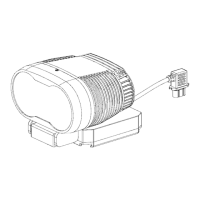
The T60 Matrix Lamp is a hybrid searchlight designed for use with DJI Matrice 30 series aircraft, offering advanced illumination capabilities for various applications. This user manual provides comprehensive information on its features, installation, operation, and maintenance.

Function Description

The T60 Matrix Lamp is equipped with two sets of optical lenses, enabling it to project a 16° uniform light column. This design allows for an illumination distance exceeding 150m and a search area greater than 150 m² when operating at a height of 50m. It is adapted to a standard quick-release bracket, facilitating easy installation and removal.

A key feature of the T60 is its controllable gimbal, which supports pan and tilt linkage with the gimbal camera. This integration allows for precise aiming and coordination with the aircraft's visual systems. The lamp supports control via DJI Pilot, offering brightness adjustment, strong light flash, and other operational modes to suit different mission requirements.

The device incorporates a high-efficiency cooling fan to manage the lamp's temperature during operation, ensuring stable performance and extending its service life. It provides long-distance illumination and search capabilities, making it suitable for tasks such such as surveillance, search and rescue, and inspection.

Important Technical Specifications

  • Product Name: T60
  • Interface: DJI SDK Port
  • Dimensions: 91.4x 88.5x 62.2mm
  • IP Rating: IP4X
  • Weight: 190g
  • Supported Aircraft: Matrice30
  • Max Power: 60W
  • Lighting Mode: Hybrid Zoom
  • FOV (Field of View): 16°
  • Lighting Height and Area:
    • 50m height: 150m² area
    • 100m height: 620m² area
    • 150m height: 1400 m² area
  • Center Illuminance:
    • 46Lux at 50m height
    • 13Lux at 100m height
    • 7Lux at 150m height
  • Gimbal Control Range: 0 to -85° controllable
  • Installation: Quick-release Bracket
  • Operating Temperature: -10°C to 50°C
  • Storage Temperature: -20°C to 60°C

Usage Features

The T60 Matrix Lamp is designed for seamless integration and user-friendly operation with DJI Matrice 30 series aircraft.

  • Installation and Preparation:
    • Ensure the aircraft firmware is updated to the latest version.
    • Before operation, turn on the remote controller first, then the aircraft.
    • Mounting involves sliding the T60's stand into the aircraft's quick-release bracket until a "click" is heard, ensuring it is locked.
    • Connect the payload cable to the aircraft's SDK interface.
    • All mounting operations should be performed while the aircraft is shut down.
  • DJI PILOT Controls:
    • After turning on the aircraft, remote controller, and ground mobile equipment, the DJI PILOT app will recognize the payload as JZ_T60.
    • Gimbal Control: The remote controller features two dials for gimbal manipulation:
      • Dial 1 controls the tilt angle of the gimbal.
      • Dial 2 controls the pan tilt angle.
    • Function Lists in DJI PILOT: The app provides various controls and settings:
      • Gimbal Adjustment: Allows for fine-tuning of the gimbal's position.
      • Light Adjustment: Controls the illumination settings.
      • Real Time Data: Displays operational data such as drive temperature and core temperature.
      • Switch of Pitching with Gimbal Camera: Enables synchronized pitching movements with the aircraft's main camera.
      • Brightness Adjustment: Allows users to modify the light intensity.
      • Flash Control: Activates or deactivates the strong light flash mode.
    • Function Settings in DJI PILOT:
      • Display Real-time Data: Toggles the display of operational metrics.
      • LED Control: Turns the light on or off.
      • LED Brightness: Adjusts the brightness level, typically from 0% to 100%.
      • Flash Control: Turns the flash function on or off.
      • Flash Frequency: Adjusts the frequency of the flash.
      • LED Control Test: Provides options for testing individual light functions.
  • Safety Precautions:
    • Avoid looking directly into the spotlight due to laser radiation (Class IIIR Laser Product).
    • Do not cover or deform the rear cover heatsink.
    • Do not interfere with the gimbal's stability or calibration.
    • Avoid touching the lamp head's main body with bare hands.
    • Minimize prolonged use in extreme environments to extend equipment life.
    • Be aware that this is a high power-consumption device and generates heat during use.
    • After use, store the device in its special safety box to prevent damage.
    • The international version of the product has locked GPS and cannot be used in China (including Chinese Mainland, Hainan Island, Hong Kong, Macao, and Taiwan).

Maintenance Features

Proper maintenance ensures the longevity and optimal performance of the T60 Matrix Lamp.

  • Cleaning: When cleaning the lamp's surface, use a soft cleaning cloth to avoid scratches or damage.
  • Firmware Upgrade:
    • The T60 supports online upgrades when connected to an M30 aircraft.
    • Download the DJI Assistant 2 app on your computer and connect the M30 to the computer.
    • Select the desired firmware for upgrade and wait for the process to complete.
  • Important Considerations:
    • During installation, ensure the gimbal is placed in the correct orientation before connecting.
    • If DJI Pilot occasionally displays issues, restarting the software may resolve them.
    • Slight gimbal swing is normal and should return to normal after power-on or attitude synchronization.
    • If the gimbal exhibits high-frequency noise and vibration while becoming very hot, discontinue use immediately and contact after-sales support for repair.

JT T60 Specifications

General IconGeneral
BrandJT
ModelT60
CategoryDrone & Quadcopter Accessories
LanguageEnglish