–32–
The lamps will be
on alternately.
1 2 TPo _
Po T _ni _
2L 4
3i 1 rEv T
3i 1
2L 4
Po T i n
nE d
1 2 TPo _
List 1
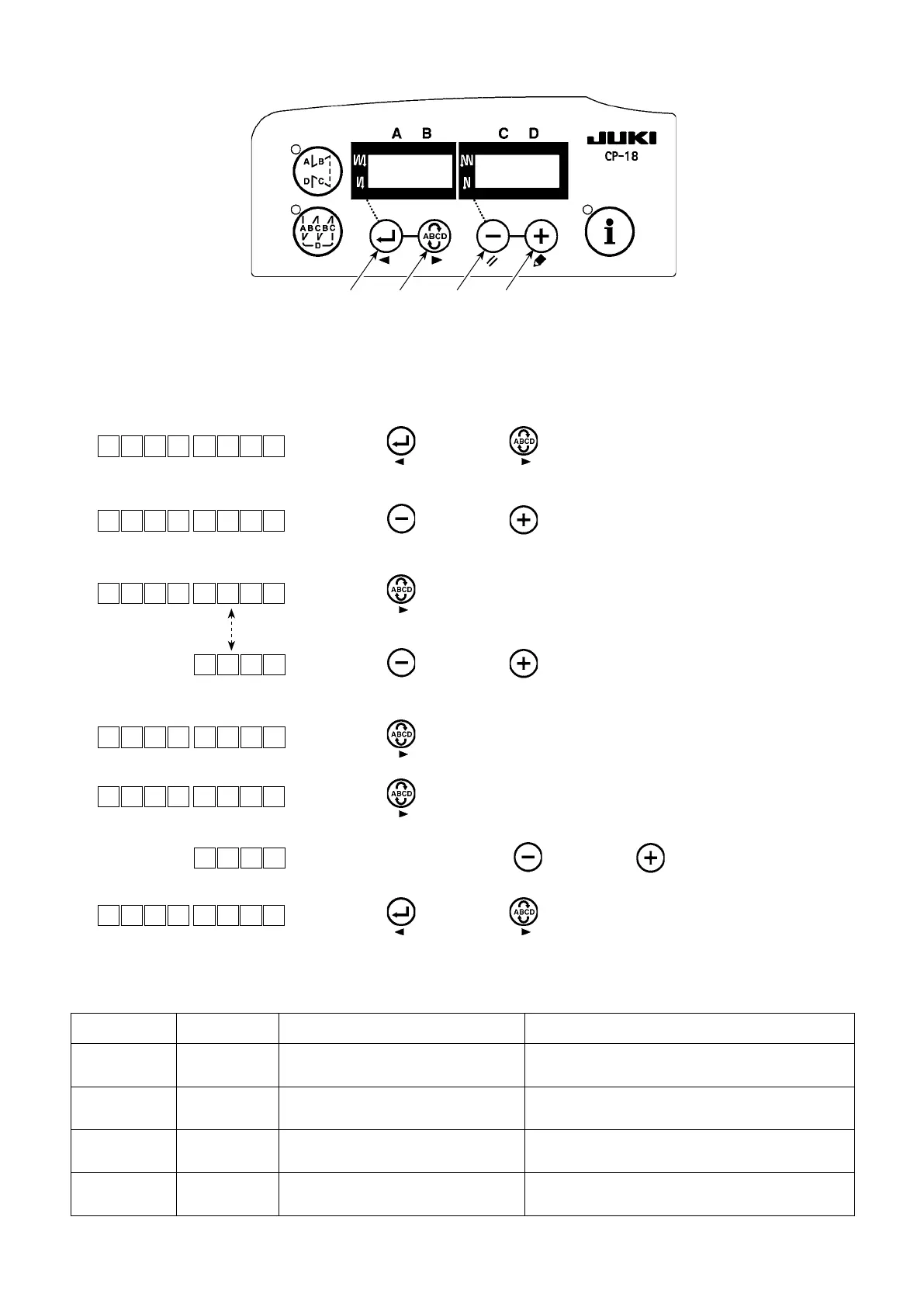
1) Enterthefunctionsettingmodereferringto"6.Settingoffunctionsof
SC-922,1)"intheInstructionManualfortheSC-922.
2) Press switch
❶
or
switch
❷
tocalloutfunctionsettingNo.12
(optioninput/outputfunctionselection).
3) Press switch
❸
or
switch
❹
andselecttheitemfor“in”.
4) Press switch
❷
andselectdisplayNo.i31.
5) Press switch
❸
or
switch
❹
toselectthekneeswitch
function.Refertolist1forthedetailsofthefunctions.
6) Press switch
❷
andxthefunction.
7) Press switch
❷
andendtheoptioninput.
8) Select“End”itemusing switch
❸
or
switch
❹
.
9) Press switch
❶
or
switch
❷
andreturntothefunctionsetting
mode.
Functioncode Abbreviation Functionalitem Remarks
5 FL
Presserlifterswitchfunction PresseroutputwillbeONwhiletheswitchisbeing
pressed.
31 ALFL
Presserlifteralternateswitchfunction Presser outputwill be ONor OFFeachtime the
switchispressed.
24 vErT Alternate vertical movementamount
conversionalternateswitchfunction
Alternateverticalmovementamountoutputwillbe
ONorOFFeachtimetheswitchispressed.
25 vSW Alternate vertical movementamount
conversionswitchfunction
Alternateverticalmovementamountoutputwillbe
ONwhiletheswitchisbeingpressed.
(3) Function setting of the knee switch
❹
❸❷❶
・
CP-18



 To Next Page