After returning the LCD display to standard display by pressing
the temperature value adjusted and set on the external voltage or
current source is displayed in line 1
(Example: Eprog : 50.00 °C).
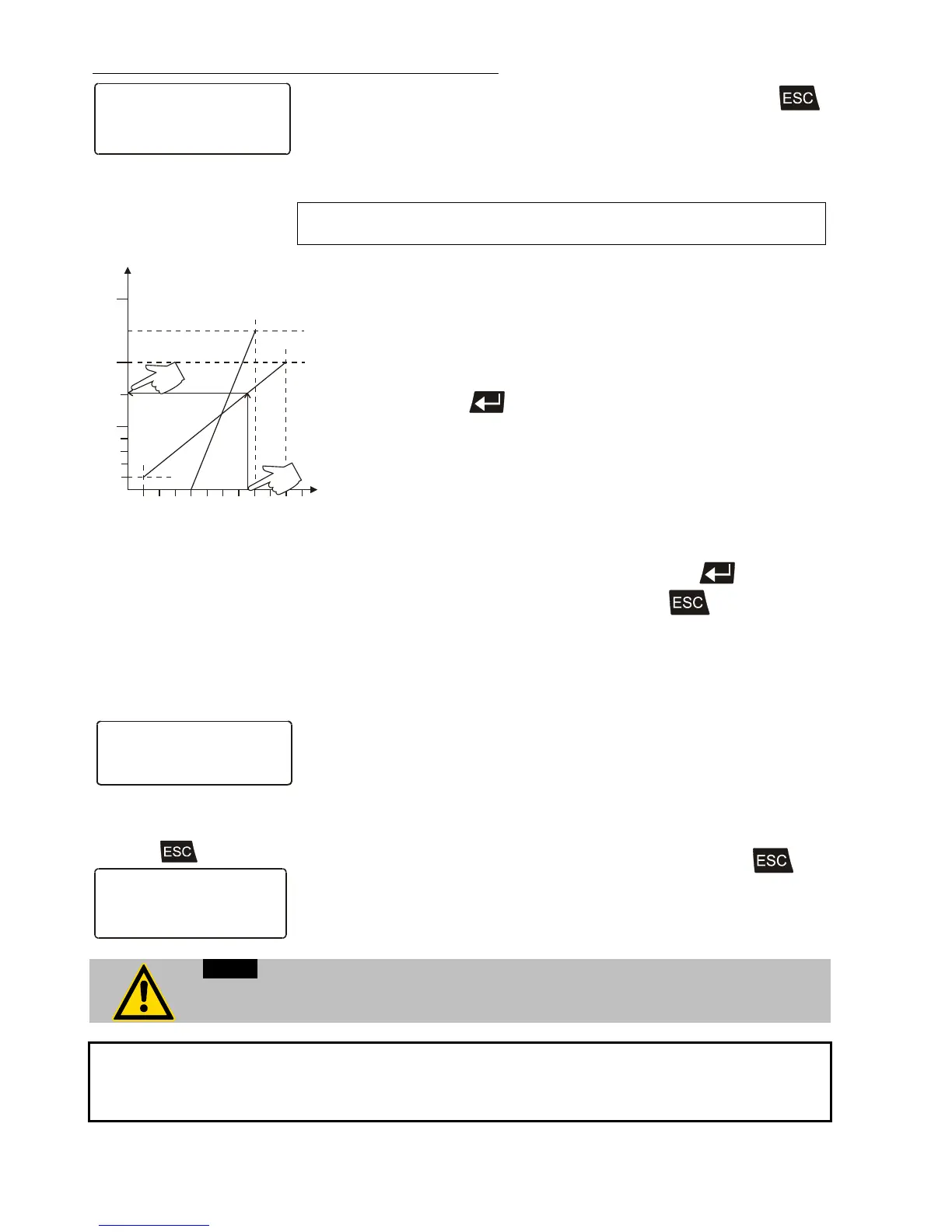
This EPROG input enables the use of different voltage and current
values as program parameters.
20
40
60
80
100
200
300
250
150
°C
1 2
3 4 5
6 7 8 9 10 V
2 4 6
8
10 14 18 20 mA
A
B
• L Value“ - Setting the LOW value: (See below
)
1) Adjust and set the lowest desired value on the voltage or
current source resp. (Example A: 1 V).
Wait appr. 30 seconds.
2) Assign a lower temperature threshold value to this adjusted
voltage/current value by pressing the appropriate buttons on the
keypad of the instrument (Example A: 20 °C ) and set by
pressing enter
.
• „H Value“ - Setting the HIGH value: (See below
)
1) Adjust and set the highest desired value on the voltage or
current source resp. (Example A: 10 V).
Wait appr. 30 seconds.
2) Assign an upper temperature threshold value to this adjusted
voltage/current value by pressing the appropriate buttons on the
keypad of the instrument
(Example A: 200 °C) and set by pressing enter
.
• Return to the standard display by pressing
.
Example B in the diagram serves to illustrate that the end point
values are freely selectable (Ex: 8 mA and 16 mA).
Example out of diagram A:
• Adjusting the voltage source for an output of 7.6 V!
Line 5 of the LCD DIALOG-DISPLAY shows the externally set setpoint
value. The instrument calculates this value from the rise angle of the two
pre-decided end points (in example A: 7.6 V correspond to an external
setpoint temperature of 152.0 °C ).
After returning the LCD display to standard display by pressing
,
this value is displayed in line 1
(Example: EPROG 152.00 °C).
If this adjustment is not correctly performed at two different points, the setpoint setting
will be incorrect.
The usable temperature range between > L Value < and > H Value < is limited to the
configured working temperature range of the Cryo-Compact Circulator resp. of the unit
combination (working temperature range see technical specifications on page 11)









 To Next Page