JA94-N01A Dual Audio Controller - NVG
Installation and Operating Manual
Rev A Page 11
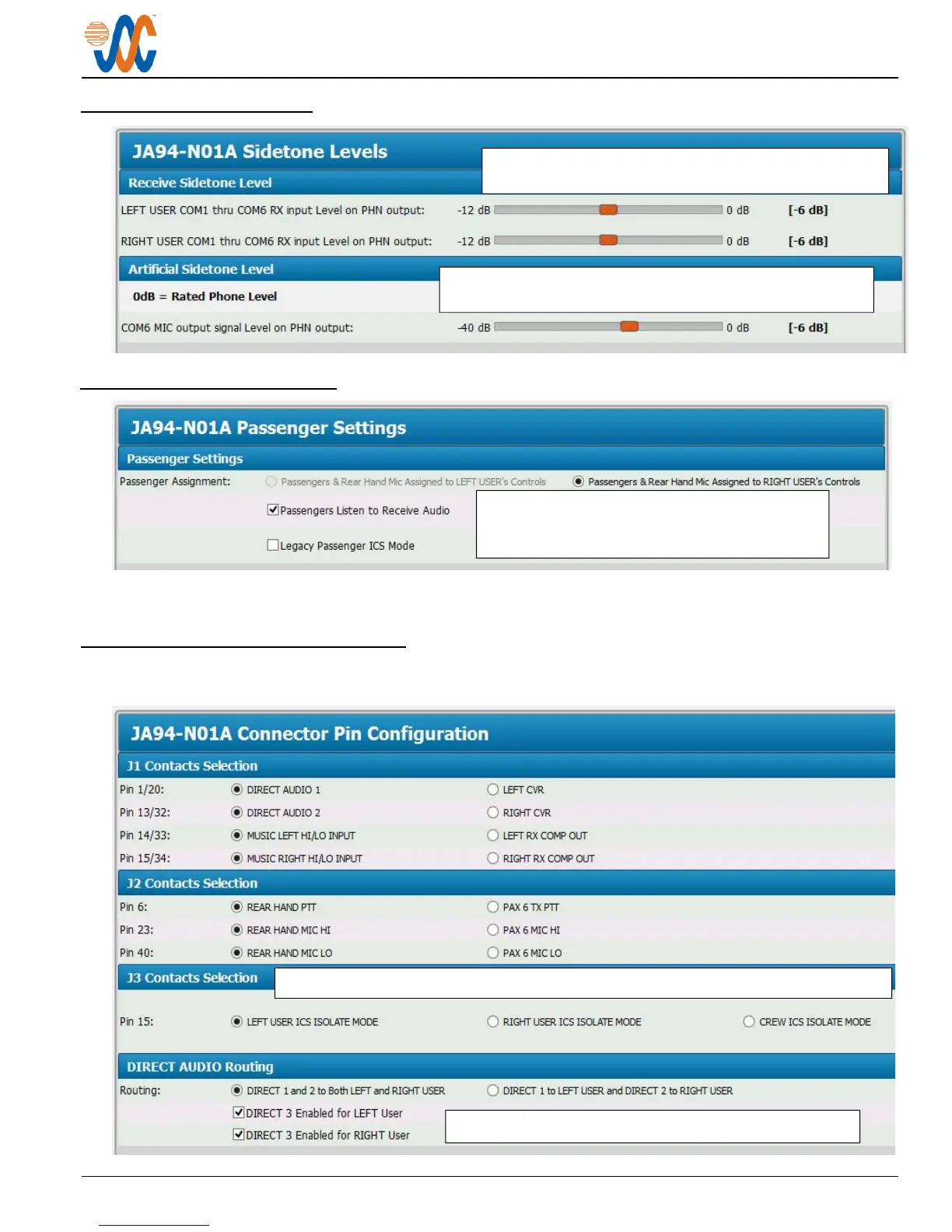
2.5.3.6 Sidetone Levels
2.5.3.7 Passenger Settings
This window is used to assign the passengers to either the RIGHT USER or LEFT USER controls. By checking
the box, passengers will hear the assigned user's Receive Audio.
2.5.3.8 Connector Pin Configuration
Several of the connector pins can be configured to meet the requirements of specific installations. Refer to JA94-
N01A Interconnect sheet 5 of 6. Direct Audio routing can also be selected in this section.
The Receive Sidetone Level can be adjusted from 0 to
-12 dB of the rated
hone Level.
Default -6 dB
The level of the COM6 Artificial Sidetone can be adjusted
from 0 to -40 dB of the rated
hone Level.
Default -6 dB
ICS Isolation Mode can be selected for the Right User, Left User or Crew (both users).
Routing for DIRECT 1 and 2 can be selected as shown.
In Legacy Passenger ICS Mode, the passenger
microphones are always open and should be
controlled by in-line PTT drop-cords.


 To Next Page
 Loading...