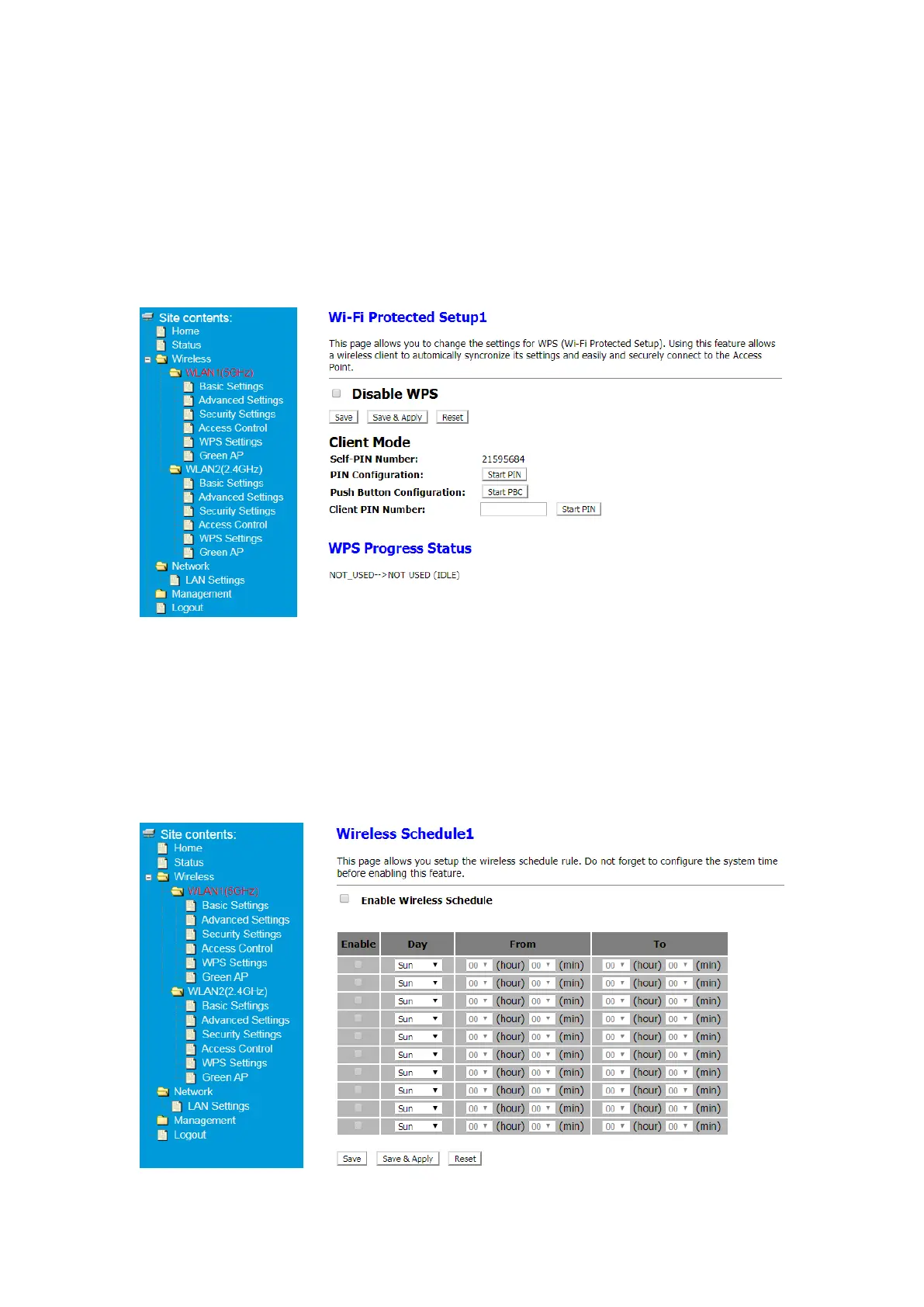
5.2.7 Wi-Fi Protected Setup-WPS setting
This page allows you to change the settings for WPS (Wi-Fi Protected Setup). Using this
feature allows a wireless client to automically & syncronize its settings and easily and
securely connect to the Access Point.
① After Log in to Your Router, Click Advanced button on the top of Web page
② Click Wireless> WLAN1(5GHz)> WPS setting or
Click Wireless> WLAN2(2.4GHz)> WPS setting
Note: You can fill in the Client PIN Number and connect to a specific device.
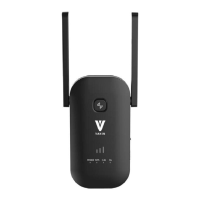
5.2.8 Wireless Schedule-Green AP
This page allows you setup the wireless schedule rule. Do not forget to configure the system
time before enabling this feature.
① After Log in to Your Router, Click Advanced button on the top of Web page
② Click Wireless> WLAN1(5GHz)> Green AP or
Click Wireless> WLAN2(2.4GHz)> Green AP
③ Click Enable Wireless Schedule and set Day and Time


 To Next Page