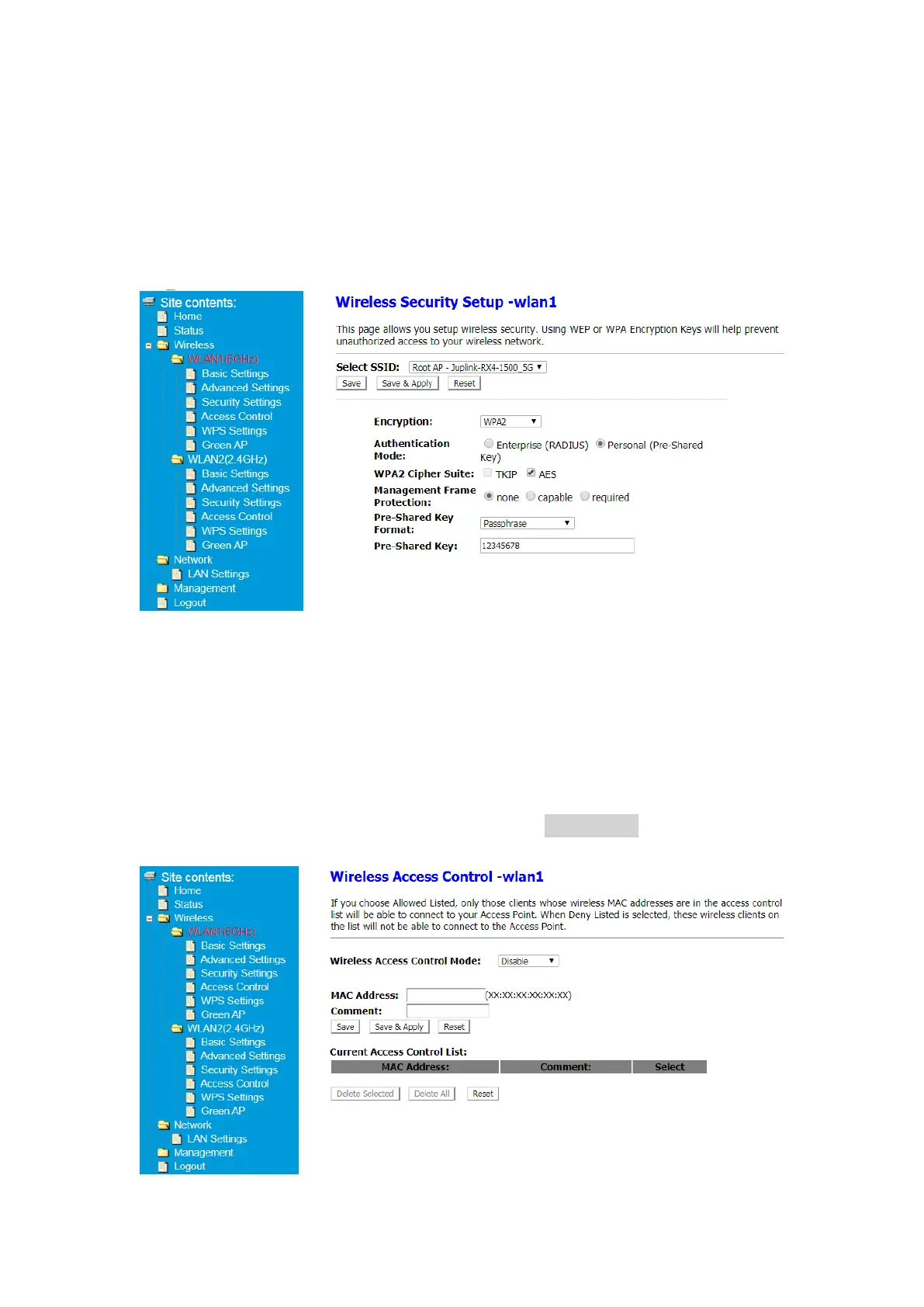
5.2.5 Wireless Security Setup
This page allows you setup wireless security. Using WEP or WPA Encryption Keys will help
prevent unauthorized access to your wireless network.
① After Log in to Your Router, Click Advanced button on the top of Web page
② Click Wireless> WLAN1(5GHz)> Security Setup or
Click Wireless> WLAN2(2.4GHz)> Security Setup
Note: If you cannot connect to your Extender after modification, please try to factory reset.
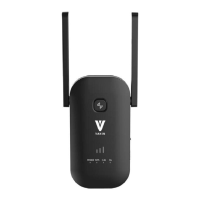
5.2.6 Wireless Access Control
If you choose Allowed Listed, only those clients whose wireless MAC addresses are in the
access control list will be able to connect to your Access Point. When Deny Listed is
selected, these wireless clients on the list will not be able to connect to the Access Point.
① After Log in to Your Router, Click Advanced button on the top of Web page
② Click Wireless> WLAN1(5GHz)> Access Control or
Click Wireless> WLAN2(2.4GHz)> Access Control
③ Fill in the MAC address and Comment blank. click Save&Apply button apply your
change.


 To Next Page