17
Quick Setup
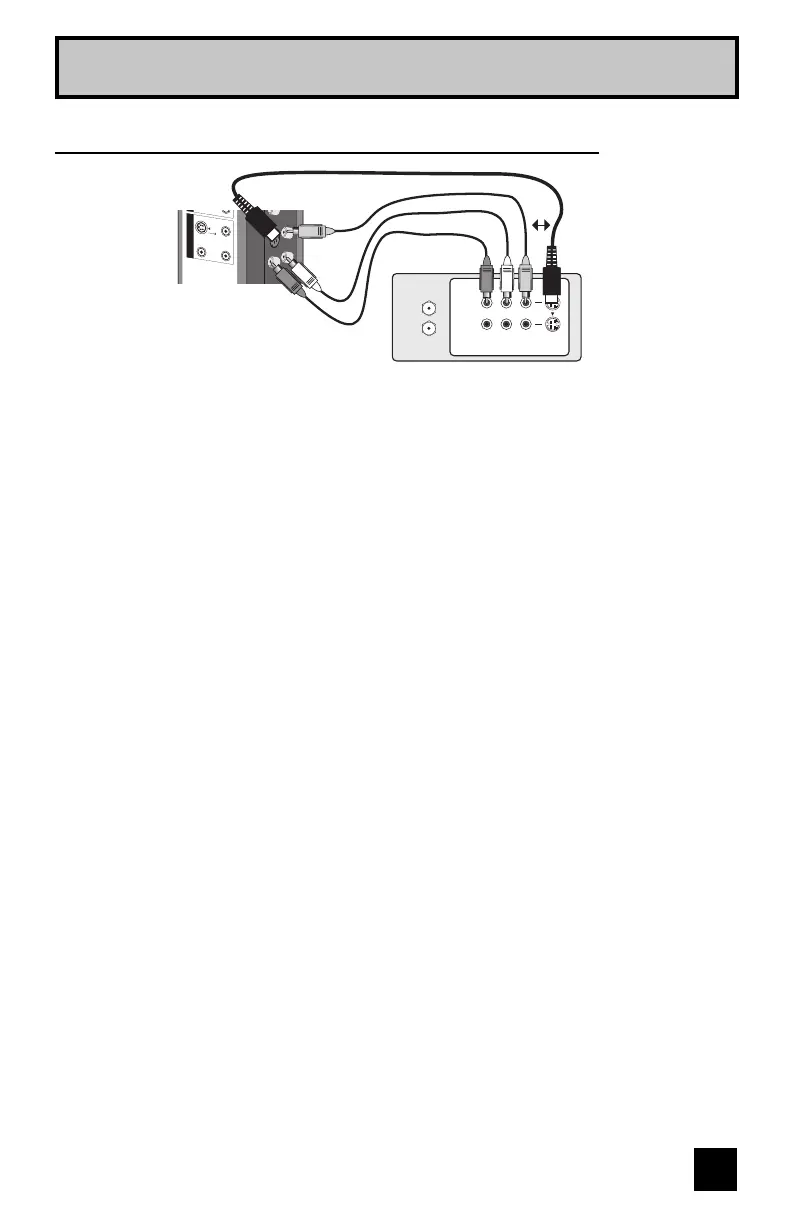
Connecting to Monitor/Recording Output Terminal
Notes:
• When you make this connection, set the Video-1 Monitor Out menu to ON. See page 52.
• If you are receiving ATSC/Digital Cable signal, it can be outputted to the S-Video output
terminal or Video (composite video) terminal.
• If you are receiving Analog TV signal, it can not be outputted to the S-Video output terminal.
• No signal will be outputted through the S-Video output terminal when you are not viewing
images coming from the composite video input terminal.
• No signal will be outputted through the Monitor/Recording output terminal when you are
viewing images from the component video input.
• If you try and record copyright protected programs using a VCR, you will not be able to
record correctly. This is because of the copyright protection system. If you are watching a
copyright protected program using a VCR, the picture will be distorted on the TV. This is due
to the copyright protection system, and is not a malfunction of your TV.
AUDIO OUT
MONITOR / REC OUT
S-
V
IDE
O
VIDE
O
O
VE
R
R -
A
UDI
O - L
VCR
TV Rear Panel
OR
IN
OUT
R L V
IN
OUT
LCT2128-001B-A English.indd 17LCT2128-001B-A English.indd 17 7/6/06 9:37:16 AM7/6/06 9:37:16 AM

 To Next Page
 Loading...