ENGLISH - 9 -
%DVV
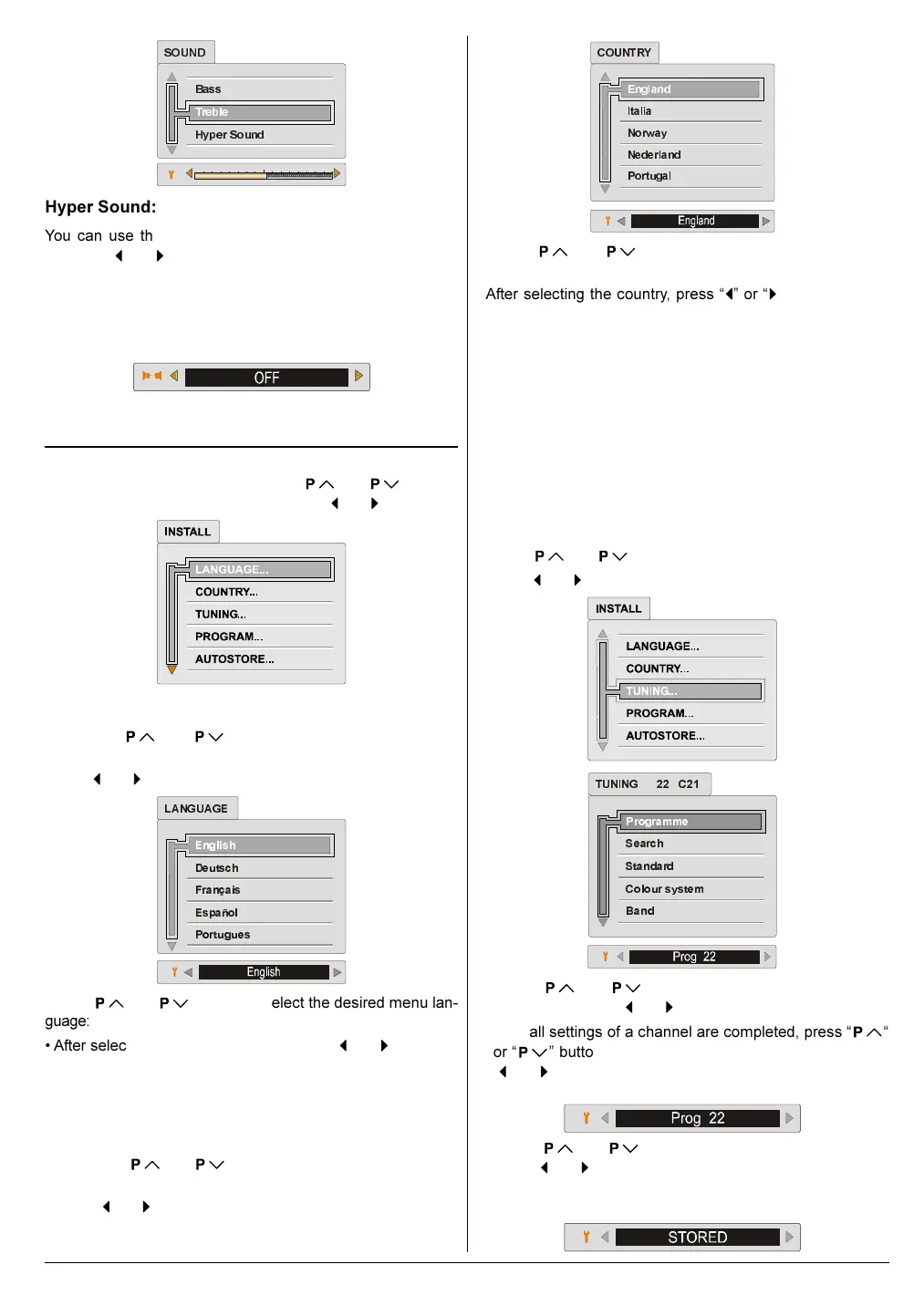
+\SHU6RXQG
7UHEOH
6281'
Hyper Sound:
You can use this feature to switch on or off Hyper Sound.
Pressing
or button will turn on or off this feature. If the
current sound system is MONO and the Hyper Sound is set
ON, then the sound will be heard as if it is STEREO. If the
current sound system is STEREO, switching Hyper Sound on
will make the sound deeper. Switching it off will make no
change in MONO and STEREO.
Hyper Sound can be set On or Off also by GREEN button.
Install (Installation) Menu
Press MENU button, now you are in main menu. In the
main menu, select INSTALL, using
or button.
Then enter the INSTALL menu pressing
or button.
Menu Language Selection:
Press the or button to select LANGUAGE
item.
Press
or button to enter LANGUAGE sub-menu.
(QJOLVK
'HXWVFK
)UDQoDLV
(VSDxRO
3RUWXJXHV
/$1*8$*(
Press or button to select the desired menu lan-
guage:
After selecting the menu language press
or button to
store the selected language.
Press MENU button to return to the INSTALL menu, or
Press PICTURE button to exit the menu.
Country Selection:
Press the or button to select the COUNTRY
item.
Press
or button to enter the COUNTRY sub-menu.
(QJODQG
,WDOLD
1RUZD\
1HGHUODQG
3RUWXJDO
&28175<
Press or button to select the country where
you are now located.
After selecting the country, press
or button to store
the selected country.
Press MENU button to return to the INSTALL menu, or
Press PICTURE button to exit the menu.
Tuning Menu:
You can store a channel manually, or modify the current set-
tings of a channel (for example, changing the channel name).
In an AV mode, you can change only the MODE or CO-
LOUR SYSTEM setting.
If you want to modify the current settings of a channel, se-
lect the channel of which you want to modify the setting.
Then display the main menu on the screen.
Press
or button to select TUNING item.
Press
or button to enter TUNING menu.
3URJUDPPH
6HDUFK
6WDQGDUG
&RORXUV\VWHP
%DQG
781,1*
&
1. Press or to select an item in the TUNING
menu. Then press
or button to change the setting.
2. After all settings of a channel are completed, press
or
button to select Programme item. Then press
or button to select a programme number which you
want to store the setting.
3. Press or button to select Store item. Then
press
or button to store the setting.
The "STORED" appears at the bottom of the menu for 3
seconds. Then T-V LINK menu appears.
01-ENG-2835-AK52-1512UK-16-9-(AV-28GH1&BUF&SUF).p65 21.05.2003, 15:029



 To Next Page