ENGLISH - 8 -
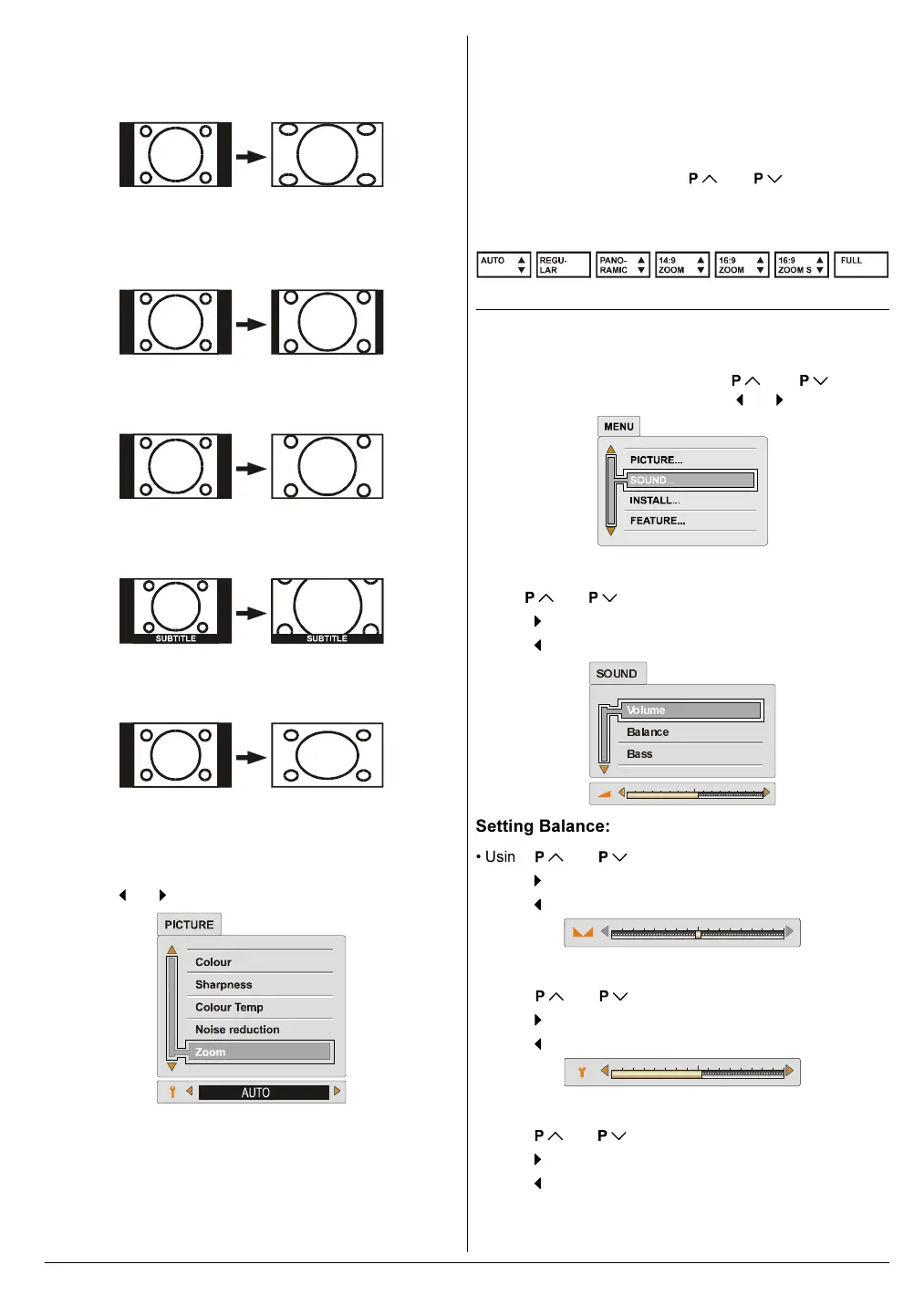
PANORAMIC:
This stretches the left and right sides of a normal picture (4:3
aspect ratio) to fill the screen, without making the picture ap-
pear unnatural.
The top and bottom of the picture are slightly cut off.
14:9 ZOOM:
This zooms up the wide picture (14:9 aspect ratio) to the up-
per and lower limits of the screen.
16:9 ZOOM:
This zooms up the wide picture (16:9 aspect ratio) to the full
screen.
16:9 SUBTITLE:
This zooms up the wide picture (16:9 aspect ratio) with subti-
tles to the full screen.
FULL:
This uniformly stretches the left and right sides of a normal
picture (4:3 aspect ratio) to fill the wide TV screen.
For 16:9 aspect ratio pictures that have been squeezed into
a normal picture (4:3 aspect ratio), use the FULL mode to
restore the picture to its original shape.
Choose the ZOOM mode:
Press the or button to choose a ZOOM mode.
You can choose the ZOOM mode by pressing the ZOOM
(RED) button when no menu appears on the screen.
The ZOOM mode may be automatically changed by the
control signal from an external device. When you want to re-
turn the previous ZOOM mode, choose the ZOOM mode
again.
Adjusting the visible area of the picture:
If subtitles or the top (or bottom) of the picture are cut off, you
can adjust the visible area of the picture manually.
1. Press ZOOM button once.
The ZOOM mode indicator appears. The ZOOM mode will
not be changed.
2. While it is displayed, press
or to change the
position of the picture.
You cannot adjust the visible area in REGULAR or FULL
mode.
Sound Menu
To change sound settings:
Press MENU button, now you are in main menu. In the
main menu, select SOUND using
or button,
then enter the sound menu pressing
or button.
Setting Volume:
Using or button to select Volume.
Press
button to increase volume.
Press
button to decrease volume.
9ROXPH
%DODQFH
%DVV
6281'
Setting Balance:
Using or button select Balance.
Press
button to change balance rightward.
Press
button to change balance leftward.
Setting Bass Level:
Using or button select Bass.
Press
button to increase bass level.
Press
button to decrease bass level.
Setting Treble Level:
Using or button select Treble.
Press
button to increase treble level.
Press
button to decrease treble level.
01-ENG-2835-AK52-1512UK-16-9-(AV-28GH1&BUF&SUF).p65 21.05.2003, 15:028



 To Next Page