To Next Page
R
Reginald RomeroAug 21, 2025
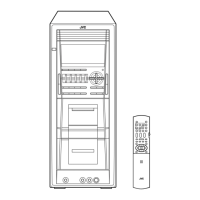
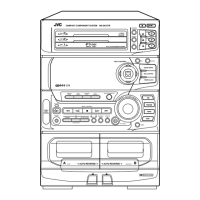
Why is there no sound coming from my JVC CA-DXJ10?
- FfjordanAug 21, 2025
There might be no sound because of incorrect or loose speaker connections, or headphones may be connected.

Why is there no sound coming from my JVC CA-DXJ10?
There might be no sound because of incorrect or loose speaker connections, or headphones may be connected.
Why is no picture displayed on the TV screen, the picture blurred, or the picture divided into two parts on my JVC Speaker System?
The System may be connected to a TV which does not support progressive video input, or an incorrect color system is selected.
Why is the disc sound discontinuous on my JVC CA-DXJ10?
The disc sound may be discontinuous if the disc is scratched or dirty.
What to do if no subtitle appears on the TV screen of JVC Speaker System?
Some discs are programmed to always display no subtitle initially. If this happens, press SUB TITLE after starting play.
Why is it hard to hear broadcasts because of noise on my JVC CA-DXJ10?
It may be hard to hear broadcasts because of noise due to incorrect or loose antenna connections, the AM loop antenna being too close to the System, or the FM antenna not being properly extended and positioned.
Why is it impossible to record with my JVC CA-DXJ10 Speaker System?
It might be impossible to record if small tabs on the back of the cassette are removed or Karaoke Scoring is in use. If small tabs on the back of the cassette are removed, cover the holes with adhesive tape.
Why no picture appears on the screen of my JVC Speaker System?
The video cord connections may be incorrect or loose.
Why are the operations disabled on my JVC CA-DXJ10?
Operations may be disabled because the built-in microprocessor may malfunction due to external electrical interference. Unplug the AC power cord and then plug it back in to resolve this.
Why won't my JVC Speaker System play the disc?
The disc might not play if you have inserted a DVD Video whose Region Code is not correct, or the disc is placed upside down. If the disc is upside down, place it with the label side up.
Precautions to reduce risk of electrical shocks, fire, and damage.
Important safety information for Class 1 Laser Products.
Ensures adequate airflow to prevent overheating.
Lists supported disc and file formats for playback.
Explains symbols and indicators used in the manual.
Guidelines for installing the system in a suitable location.
Precautions for handling the AC power cord.
Precautions for preventing overheating due to poor ventilation.
Lists all accessories supplied with the system.
Connects system to TV, digital audio equipment.
Connects AM/FM antennas and speakers.
Voltage selector and AC power cord connection.
Detailed instructions for connecting video outputs to TV/monitor.
Detailed instructions for connecting AM/FM antennas.
Instructions for connecting speaker cords and polarity.
Instructions for connecting auxiliary audio equipment.
Instructions for connecting USB storage devices.
Match video output to TV color system and scanning mode.
Explains indicators for sources, operations, and modes.
Explains indicators for timers, repeat, and playback modes.
Instructions for turning the system on and selecting playback source.
Instructions for adjusting volume and using headphones.
How to tune into stations and store them.
Tips for improving FM reception quality.
Instructions for inserting discs and connecting USB devices.
General guide for playing discs and USB devices.
How to select discs, titles, chapters, or tracks.
How to navigate and operate using the disc menu.
Instructions for inserting tapes and controlling playback direction.
Adjust speaker balance, bass sound, and VARIO BASS effect.
How to select and create custom sound modes.
How to create a 3D sound effect.
How to select and adjust picture tones.
Instructions for setting the system's clock.
How to adjust the brightness of the display.
How to select different audio tracks or languages.
How to select subtitle languages or turn them on/off.
How to select different camera angles for playback.
How to pause and advance playback frame by frame.
How to zoom in on JPEG/ASF files.
How to arrange playback order of chapters/tracks/files.
How to play contents in a random order.
How to set repeat playback modes (track, disc, all).
How to lock disc trays to prevent ejection.
Explains playback information shown on the on-screen bar.
Step-by-step guide to using the on-screen bar for playback control.
How to change the time displayed during playback.
How to set repeat playback modes for various file types.
How to search for specific chapters or tracks.
How to search for playback by specifying elapsed time.
On-screen control for DVD-VR playback.
On-screen control for AV files and JPEG files.
How to start playback for different file types.
Instructions for recording audio onto a cassette tape.
How to record from tape A to tape B.
How to record and play simultaneously.
Instructions for singing along with microphones.
How to adjust vocal tracks for karaoke.
How the system scores karaoke performance.
Adjust echo, key, scoring level, and fanfare for karaoke.
How to adjust the microphone volume level.
How to program song playback order for karaoke.
How to set Daily Timer or Recording Timer.
How timers work, priority, and automatic power off.
How to set language and picture menu options.
Settings for audio output, resume, and screen guide.
Troubleshooting for common system and remote control issues.
Solves issues with no sound, disc playback, and strange sounds.
Troubleshooting for file, tape, and karaoke playback problems.
Solves issues with discontinuous disc sound and subtitles.
Technical specifications for the amplifier and cassette deck.
General specs including power, dimensions, and weight.
Technical specifications for tuner and disc/file playback.
Technical details of optical digital output signals.
Instructions for setting the AC line voltage selector.
 General
| Brand | JVC |
|---|---|
| Model | CA-DXJ10 |
| Category | Speaker System |
| Language | English |