EasyManua.ls Logo

JVC ca-mx55mbk - Page 10

JVC ca-mx55mbk
27 pages
Print Icon
To Next Page IconTo Next Page
To Previous Page IconTo Previous Page
Loading...
CA-MX55MBK
|
Installing
Batteries
in
the
Remote
Controller
AC
power
connection
8
10
(No.
20342)
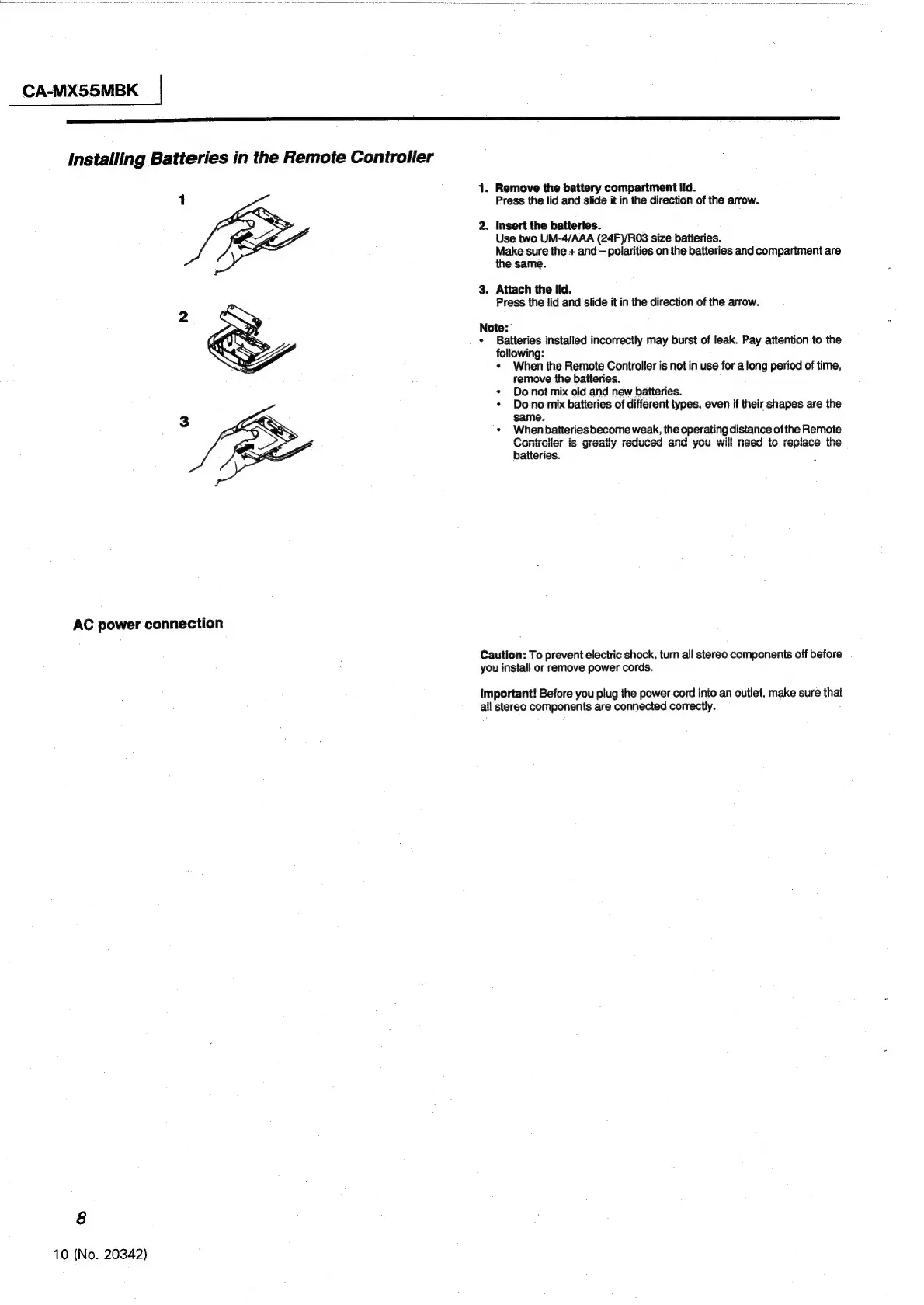
1.
Remove
the
battery
compartment
lid.
Press
the
lid
and
slide
it
in
the
direction
of
the
arrow.
2.
Insert
the
batteries.
Use
two
UM-4/AAA
(24F)/RO3
size
batteries.
Make
sure
the
+
and
polarities
on
the
batteries
and
compartment
are
the
same.
3.
Attach
the
Ild.
Press
the
lid
and
slide
it
in
the
direction
of
the
arrow.
Note:
¢
Batteries
installed
incorrectly
may
burst
of
leak.
Pay
attention
to
the
following:
¢
When
the
Remote
Controller
is
not
in
use
for
a
long
period
of
time,
remove
the
batteries.
¢
Donot
mix
old
and
new
batteries.
*
Dono
mix
batteries
of
different
types,
even
if
their
shapes
are
the
same.
*
When
batteries
become
weak,
the
operating
distance
ofthe
Remote
frantesilar
memanths
eneliinad
HH
mand
th
raningan
tha
WVYVUHUUNTL
is
greauy
reaucsea
and
you
Wit
Hite
Ww
lGpliave
iG
batteries.
Caution:
To
prevent
electric
shock,
turn
all
stereo
components
off
before
you
install
or
remove
power
cords.
Important!
Before
you
plug
the
power
cord
into
an
outlet,
make
sure
that
all
stereo
components
are
connected
correctly.

Other manuals for JVC ca-mx55mbk

Related product manuals