EasyManua.ls Logo

JVC ca-mx55mbk - Getting Started: Connections

JVC ca-mx55mbk
27 pages
Print Icon
To Next Page IconTo Next Page
To Previous Page IconTo Previous Page
Loading...
CA-MX55MBK
|
Tssaiiate
me)
lace
Connecting
the
System
Components
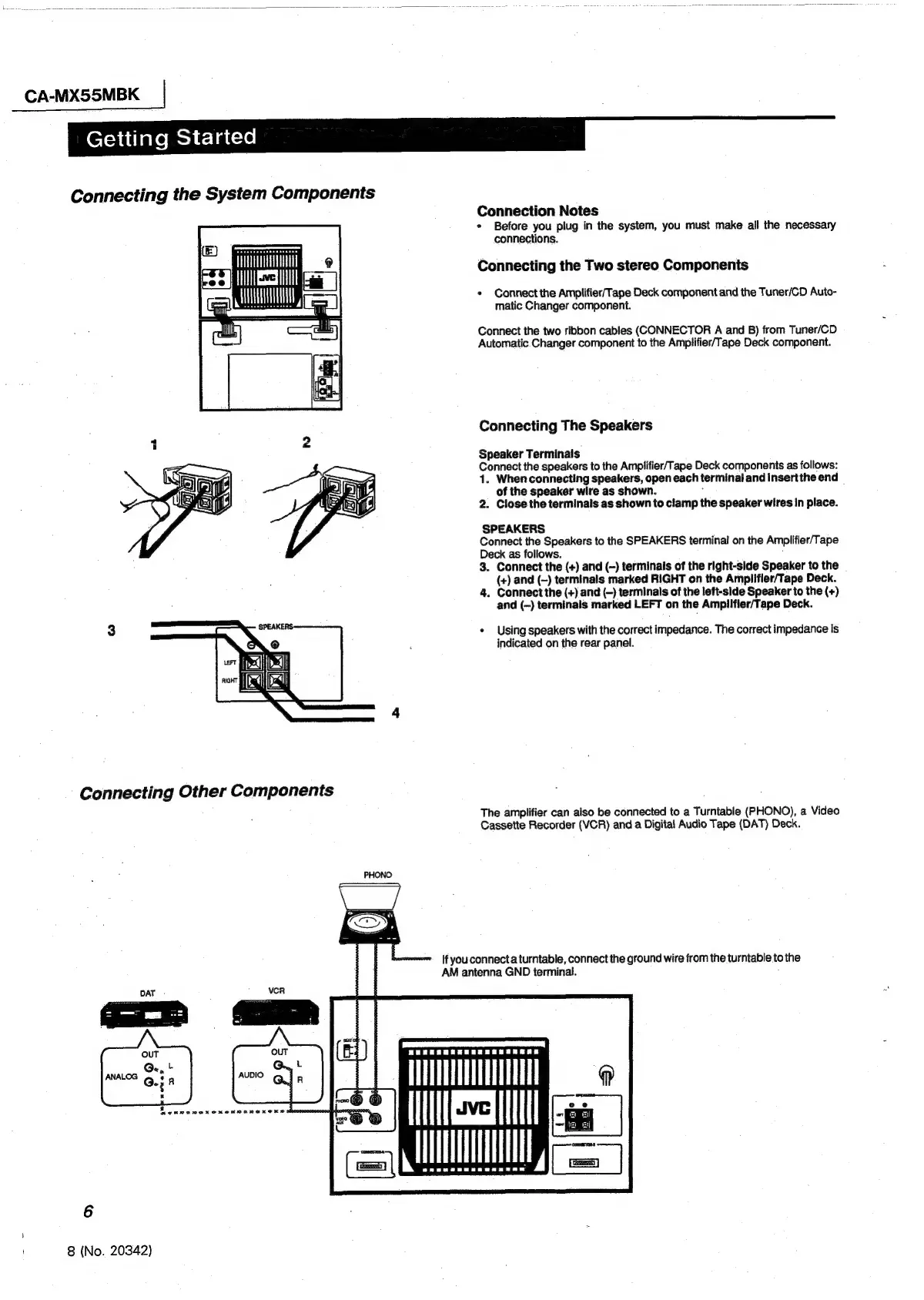
Connection
Notes
¢
Before
you
plug
in
the
system,
you
must
make
all
the
necessary
connections.
Connecting
the
Two
stereo
Components
*
Connect
the
Amplifier/Tape
Deck
component
and
the
Tuner/CD
Auto-
matic
Changer
component.
Connect
the
two
ribbon
cables
(CONNECTOR
A
and
B)
from
Tuner/CD
Automatic
Changer
component
to
the
Amplifier/Tape
Deck
component.
Connecting
The
Speakers
Speaker
Terminals
Connect
the
speakers
to
the
Amplifier/Tape
Deck
components
as
follows:
1.
When
connecting
speakers,
open
each
terminal
and
Insertthe
end
of
the
speaker
wire
as
shown.
:
2.
Close.
the
terminals
as
shown
to
clamp
the
speaker
wires
In
place.
SPEAKERS
Connect
the
Speakers
to
the
SPEAKERS
terminal
on
the
Amplifier/Tape
Deck
as
follows.
;
3.
Connect
the
(+)
and
(-)
terminals
of
the
right-side
Speaker
to
the
(+)
and
(~)
terminals
marked
RIGHT
on
the
Amplifler/Tape
Deck.
4.
Connect
the
(+)
and
(-)
terminals
of
the
left-side
Speaker
to
the
(+)
and
(—)
terminals
marked
LEFT
on
the
Amplifier/Tape
Deck.
«
Using
speakers
with
the
correct
impedance.
The
correct
impedance
Is
indicated
on
the
rear
panel.
Connecting
Other
Components
The
amplifier
can
also
be
connected
to
a
Turntable
(PHONO),
a
Video
Cassette
Recorder
(VCR)
and
a
Digital
Audio
Tape
(DAT)
Deck.
If
you
connect
a
turntable,
connect
the
ground
wire
from
the
turntable
to
the
AM
antenna
GND
terminal.
Mv
UT
THT,
6
8
(No.
20342)

Other manuals for JVC ca-mx55mbk

Related product manuals