EasyManua.ls Logo

JVC ca-mx55mbk - Timer Recording and Tape Deck Care; Setting Up Timer Recordings

JVC ca-mx55mbk
27 pages
Print Icon
To Next Page IconTo Next Page
To Previous Page IconTo Previous Page
Loading...
|
CA-MX55BK
Recording
with
the
Timer
Care
and
Handling
The
Tape
Deck
can
be
set
up
to
record
a
tape
automatically.
This
is
You
must
handle
your
cassette
tapes,
and
tape
deck
carefully
to
preserve
especially
useful
for
recording
broadcasts
when
you
are
not
around,
or
late
the
full
length
of
their
life-times.
:
at
night
when
you
are
asleep.
*
Ifa
tape
is
loose
in
its
cassette,
take
up
the
slack
by
inserting
a
pencil
1.
Insert
a
cassette
for
recording
In
to
deck
B.
in
one
of
the
reels
and
rotating
it.
:
If
a
tape
is
loose,
it
may
get
stretched,
cut,
or
caught
in
the
cassette.
2.
Set
the
timer,
by
following
the
steps
in
“Setting
the
Timers”.
¢
Donot
touch
the
tape
surface.
3.
Select
one
of
the
following
sources:
¢
Donot
store
the
tape:
TUNER
TIMER
REC
Records
TUNER
preset
stations
In
dusty
places
--
TIMER
REC
Records
from
the
source
selected
before
Indirect
sunlight
or
heat
turning
off
the
system.
In
moist
areas
Ona
TV
or
Speaker
Nearamagnet
~
*
The.use
of
C-120
or
thinner
tape
is
not
recommended.
Tape
Deck
*
Ifthe
head,
capstans,
or
pinch-rollers
of
the
tape
deck
become
dirty,
the
i
following
may
occur:
Impaired
sound
quality
Discontinuous
sound
Fading
incomplete
erasure
Impossible
to
record
*
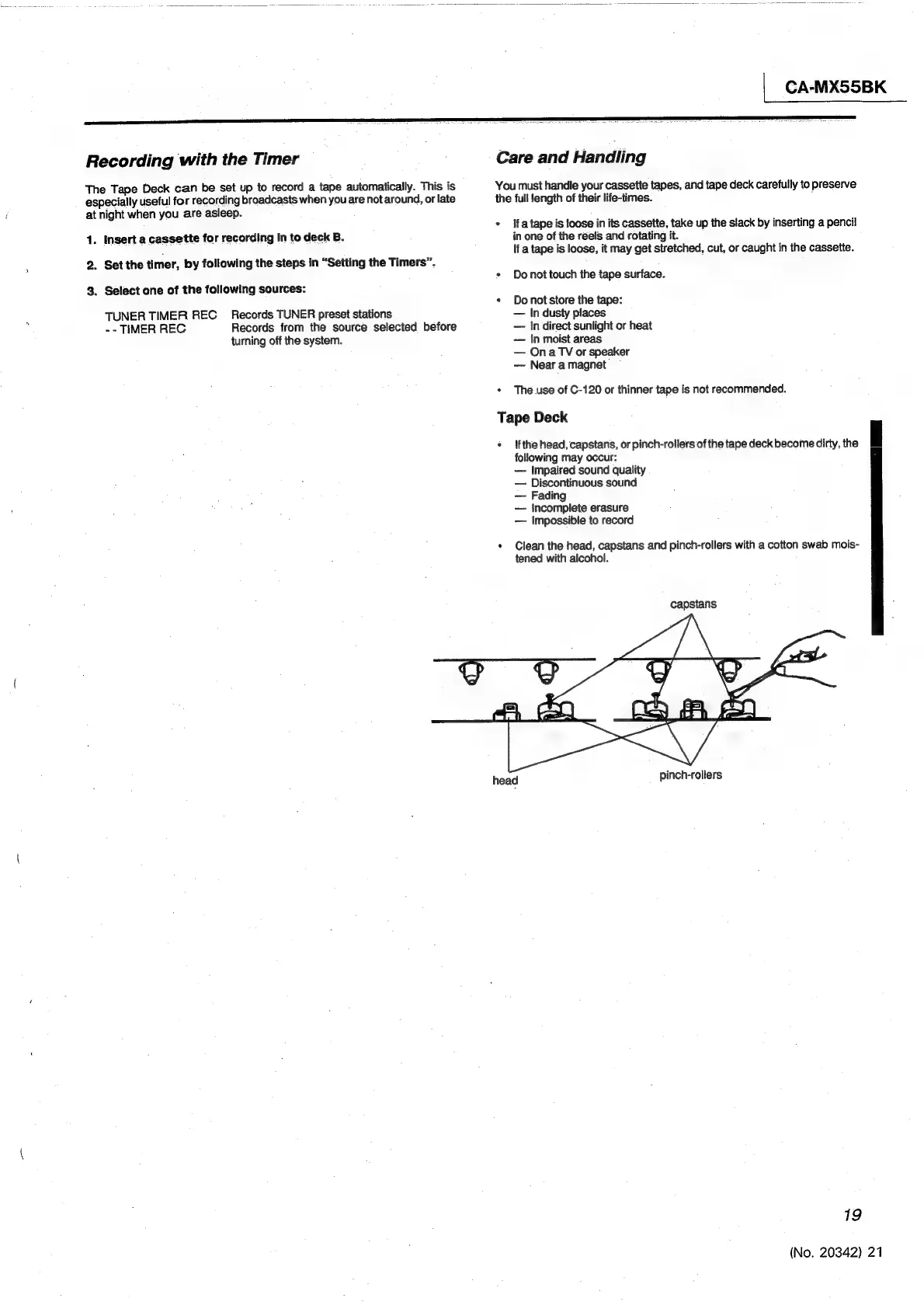
Clean
the
head,
capstans
and
pinch-rollers
with
a
cotton
swab
mois-
tened
with
alcohol.
capstans
head
pinch-rollers
19
(No.
20342)
21