EasyManua.ls Logo

JVC CA-NXF30 - Part Description

JVC CA-NXF30
72 pages
Print Icon
To Next Page IconTo Next Page
To Previous Page IconTo Previous Page
Loading...
3
Introduction
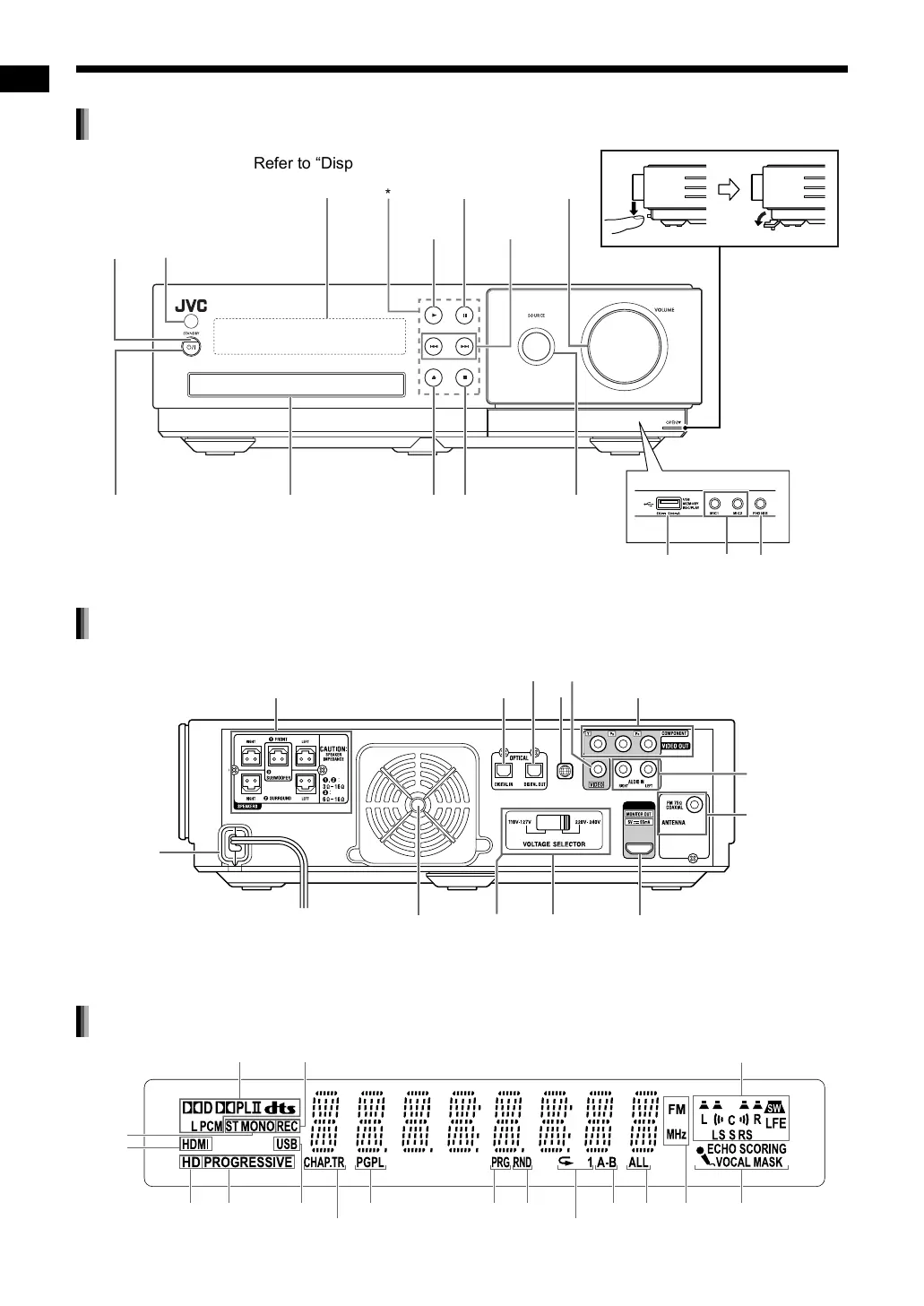
The numbers refer to the pages in which the parts are explained.
Front view
PHONES
MIC 1
MIC 2
Refer to “Display
window” below.
*
Touch sensor panels
Remote control sensor
16, 21, 22,
26–28, 49
26, 27
19, 20
15, 19,
20
10, 15, 20,
26, 48
12, 16,
18–20
10, 12, 41 15, 19, 20
STANDBY
lamp
12, 13, 42
20 14, 25
41
Rear view
HDMI
Cooling fan
9
8, 11, 33, 38, 39, 57
9, 18
5
7, 10
7, 10
60
8, 18
6
*
The voltage selector is located on the rear of the main unit sold in countries/areas other than
Thailand.
9
*
8, 39, 42
Display window
48, 49
25 14, 25
31, 36
3111 163136
16
11
11 20
21–23, 30
27
29, 30,
47
41–47
Part description
NX-F30[U].book Page 3 Tuesday, April 21, 2009 6:23 PM

Table of Contents