12
Preparation
DD-8 and DD-3 can output uncompressed digital
video signals to a TV compatible with HDMI (High
Definition Multimedia Interface).
Select “HDMI” for the monitor out type. (Refer to
page 14.)
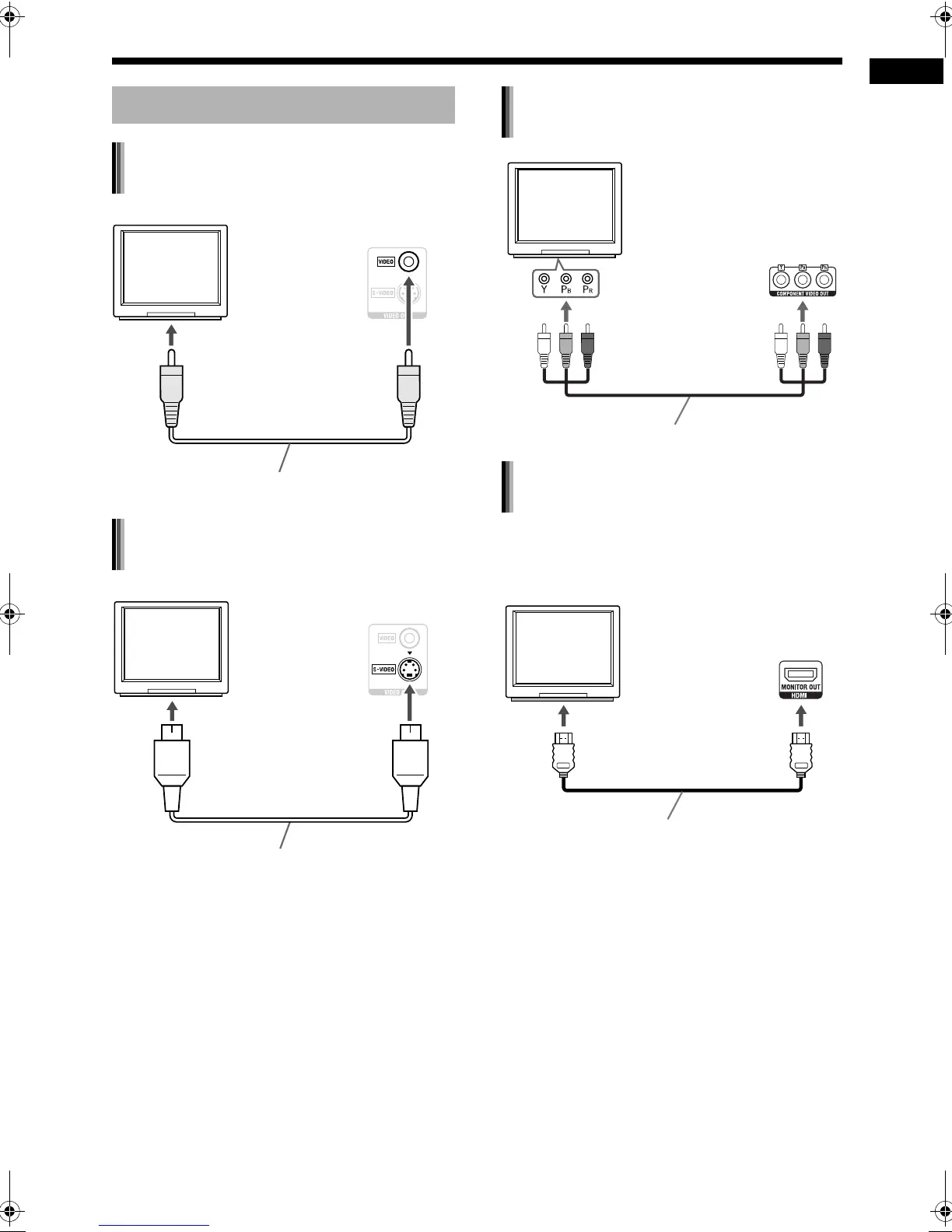
Connecting a TV
Connecting a TV with the [VIDEO]
terminal
TV
To a video terminal
Composite video cable (supplied)
Main unit
(rear view)
Connecting a TV with the [S-VIDEO]
terminal
TV
To an S-video terminal
S-video cable (not supplied)
Main unit
(rear view)
Connecting a TV with the
[COMPONENT VIDEO OUT] terminals
TV
Main unit
(rear view)
To component
terminals
Component video cable (not supplied)
Connecting a TV with the [HDMI]
terminal (not available for DD-1)
Main unit
(rear view)
TV
HDMI cable (not supplied)
To an HDMI terminal
DD-831[A_Ux]-03.fm Page 12 Monday, September 11, 2006 10:07 AM


 To Next Page