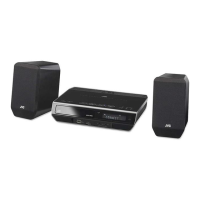

 To Next Page
K
kellykevinAug 20, 2025
Why is my JVC EX-AK1 remote control not working?
- CcollinserinAug 20, 2025
If the remote control for your JVC Stereo System isn't working, the batteries may be low. Try replacing them.

Why is my JVC EX-AK1 remote control not working?
If the remote control for your JVC Stereo System isn't working, the batteries may be low. Try replacing them.
What to do if my JVC EX-AK1 produces no sound?
If your JVC Stereo System isn't producing any sound, there could be several reasons: * The speakers might not be connected correctly, so ensure they are properly connected. * Headphones might be connected, so disconnect them. * The sound might be muted, so restore the sound. * If “NO AUDIO” is displayed, the disc may be an illegal copy; check with the store where you bought it.
How to fix a JVC Stereo System that does not turn on?
If your JVC Stereo System isn't powering on, the power cable might not be properly connected to the AC outlet. Make sure the power cable is correctly connected.
What to do if my JVC EX-AK1 Stereo System produces no picture?
If your JVC Stereo System isn't producing a picture, the cables might be improperly connected. Ensure that all cables are connected properly.
How to resolve distorted sound on a JVC Stereo System?
If the sound from your JVC Stereo System is distorted, the volume might be too high. Try turning down the volume.
How to eliminate noise interference in JVC EX-AK1 Stereo System radio broadcast?
If a radio broadcast on your JVC Stereo System has noise interference, the antennas might not be connected correctly. Ensure that the antennas are properly connected.
What to do if I cannot operate my JVC Stereo System with the remote control?
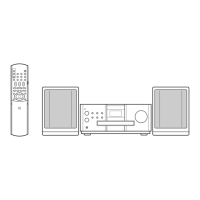
If you can't operate the main unit of your JVC Stereo System using the remote control, check the remote control mode selector. If it's slid to TV, slide it to AUDIO.
Why is the picture distorted on my JVC EX-AK1?
If the picture on your JVC Stereo System is distorted: * A video cassette recorder might be connected between the main unit and the TV. Connect the main unit directly to the TV. * The video signal type setting might not be appropriate. Select the video signal type suitable for your TV.
What to do if my JVC Stereo System won't play a disc?
If your JVC Stereo System won't play a disc: * If “REGION CODE ERROR!” appears, the disc's region code isn't compatible. Confirm the compatible region code. * If “CANNOT PLAY THIS DISC” appears, the disc type isn't supported. Confirm the playable disc types. * The disc might be upside down. Place it with the printed surface facing up. * Moisture might have condensed on the lens. Leave the unit on for 1-2 hours.
How to stop a whirring noise from my JVC EX-AK1?
If you hear a whirring noise from your JVC Stereo System, it might be too close to a TV, computer, or other electric appliance. Try placing it away from such devices.
Guidelines to prevent electrical shock, fire, and damage, including ventilation and battery handling.
Information regarding Class 1 laser product safety, including warnings about opening the unit.
Instructions for correct ventilation and placement to ensure safe operation and prevent overheating.
Specific electrical safety instructions for users in the UK, including plug and fuse replacement.
Information on the correct disposal of electrical and electronic equipment in the EU.
Information for business users and guidance for disposal outside the European Union.
Key 'Dos and Don'ts' for operating the equipment safely and effectively.
Statement on compliance with European directives and standards for safety and compatibility.
Cautions regarding system installation, power cord handling, and preventing system malfunctions.
Precautions on handling discs, moisture, dust, high temperatures, and ventilation.
List of accessories supplied with the system and instructions if any are missing.
Details on compatible disc types, file formats, and potential playback issues.
Information on DVD region coding and a list of discs that cannot be played back.
Compatibility and notes for playing media files like MP3, WMA, WAV, JPEG, and MPEG.
Explanation of the hierarchical structure of DVD VIDEO and DVD AUDIO discs (titles, chapters, groups, tracks).
Description of the structure for CD, VCD, SVCD, and media files (tracks, folders, groups).
Identification and function of buttons and indicators on the front panel.
Explanation of the various symbols and text displayed on the system's display window.
Overview of the connection terminals and jacks available on the rear panel.
Explanation of the design of the main unit's feet and studs for stability and sound quality.
Instructions for correctly inserting batteries into the remote control and important cautions.
Guidance on how to operate the remote control effectively and factors affecting signal reception.
Steps to set the manufacturer's code to operate a TV using the system's remote control.
Instructions for setting up and connecting the supplied AM loop antenna for optimal reception.
Guidance on connecting the FM antenna, including options for communal or outdoor antennas.
Detailed instructions on how to connect the speakers to the main unit's speaker terminals.
Information on magnetic shielding effects on TVs and how to clean the speaker cabinets.
Instructions for connecting an amplifier-built-in subwoofer for enhanced bass sound.
Guidance on connecting other audio devices via AUX IN and digital devices via optical output.
How to connect the system to a TV using AV (SCART) or Component Video terminals.
Instructions for connecting the power cord and the indicator for standby mode.
Steps to select the appropriate video signal type (RGB, Y/C, PROGRESS) for your TV.
Steps for loading a disc and starting playback, including turning the unit on.
Explanation of various messages displayed on the TV screen during disc playback.
Details on how playback information like track number, chapter, and elapsed time is displayed.
How to switch the display between elapsed time, track/chapter numbers, and group information.
Instructions for stopping playback, pausing, and advancing picture frame-by-frame.
How to use fast forward/reverse search and number buttons to select playback items.
Functions for quickly replaying the last 10 seconds and for slow-motion playback.
How to skip to selection beginnings, intervals, and use number buttons for navigation.
How to adjust the display window brightness (DIMMER) and the system volume.
Adjusting bass and treble, fading sound, and enhancing playback with the K2 function.
Steps to load a disc and select groups or tracks for MP3, WMA, WAV, JPEG, MPEG files.
Explanation of the on-screen display for media files, including group/track numbers and tag information.
How to set repeat playback for tracks, groups, or all files, and how to cancel repeat.
Specific instructions for playing JPEG files in a slide-show format.
How to pause playback and resume from the stopped scene, including function limitations.
How to display and select scenes from original programs or play lists on DVD VIDEO/AUDIO discs.
Steps to input a specific time to start playback for a title, chapter, or track.
How to program a sequence of tracks or chapters for playback in a desired order.
How to set the system to play tracks or chapters randomly, and how to cancel the mode.
Setting repeat for chapters, titles, programs, tracks, or all files for various disc types.
How to set start (A) and end (B) points to repeatedly play a specific segment of a title or track.
How to change audio language, subtitle display, and camera view angles on compatible discs.
How to enlarge the picture using ZOOM and adjust picture quality with VFP settings.
How to activate surround sound effects for speakers and headphones.
How to adjust the playback level for DVD VIDEO and DVD AUDIO discs.
Instructions for playing the special 'Bonus Group' content on DVD AUDIO discs, including PIN entry.
How to view and navigate still pictures (B.S.P.) included on some DVD AUDIO discs.
How to display and use the status bar and menu bar for system information and control.
Explanation of the various indicators and information displayed on the status bar for different media types.
How to set menu language, audio language, subtitle language, and picture display mode.
Selecting output signal types (PCM ONLY, DOLBY DIGITAL/PCM, STREAM/PCM) for digital audio.
Configuration options for Resume playback and On Screen Guide display.
How to select between FM and AM radio bands on the system.
Instructions for automatic and manual tuning to find radio stations.
How to store up to 30 FM and 15 AM stations into memory for quick tuning.
How to select and tune into stored radio stations using preset numbers.
How the system receives and displays RDS data like station names and program types.
Explanation of how the system responds to emergency alarm signals received via RDS.
How to cycle through and view PS, PTY, and RT information on the display.
How to locate stations broadcasting specific program types using PTY codes.
A list of PTY codes and their corresponding program type descriptions for FM stations.
How to temporarily switch to TA, News, or Info broadcasts from other stations.
How to connect and play sound from other audio devices via AUX IN or TV terminals.
How to activate, deactivate, and understand the Auto Standby function for power saving.
How to set the Sleep Timer to automatically turn off the system after a specified time.
Instructions for locking and unlocking the disc tray to prevent accidental ejection.
Solutions for issues like the unit not powering on or the remote control not working.
Troubleshooting steps for problems like no picture, distorted picture, or no sound output.
Solutions for region code errors, unplayable discs, dirty discs, and file type issues.
Troubleshooting for MP3/WMA/WAV playback and issues related to disc ejection lock.
A comprehensive list of two-letter language codes used for audio and subtitle selection.
Technical details including power source, consumption, dimensions, weight, and audio output.
Specifications for the FM/AM tuner, supported disc types, and speaker characteristics.
 General
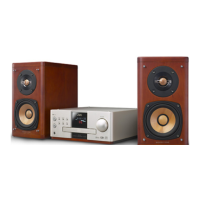
| Type | Micro Component System |
|---|---|
| Output Power | 20 W x 2 (RMS) |
| Speaker Type | 2-Way Bass Reflex |
| CD Player | Yes |
| FM Tuner | Yes |
| AM Tuner | Yes |
| Bluetooth | No |
| USB Port | No |
| Headphone Output | Yes |
| Remote Control | Yes |
| Power Consumption | 25W |
| Frequency Response | 40 Hz - 20 kHz |
| Preset Stations | 30 |
| Weight | 2.5 kg (Speakers) |