12 EN
T
T
T
T
E
2
3
3
4
X
0
0
5
0
IT
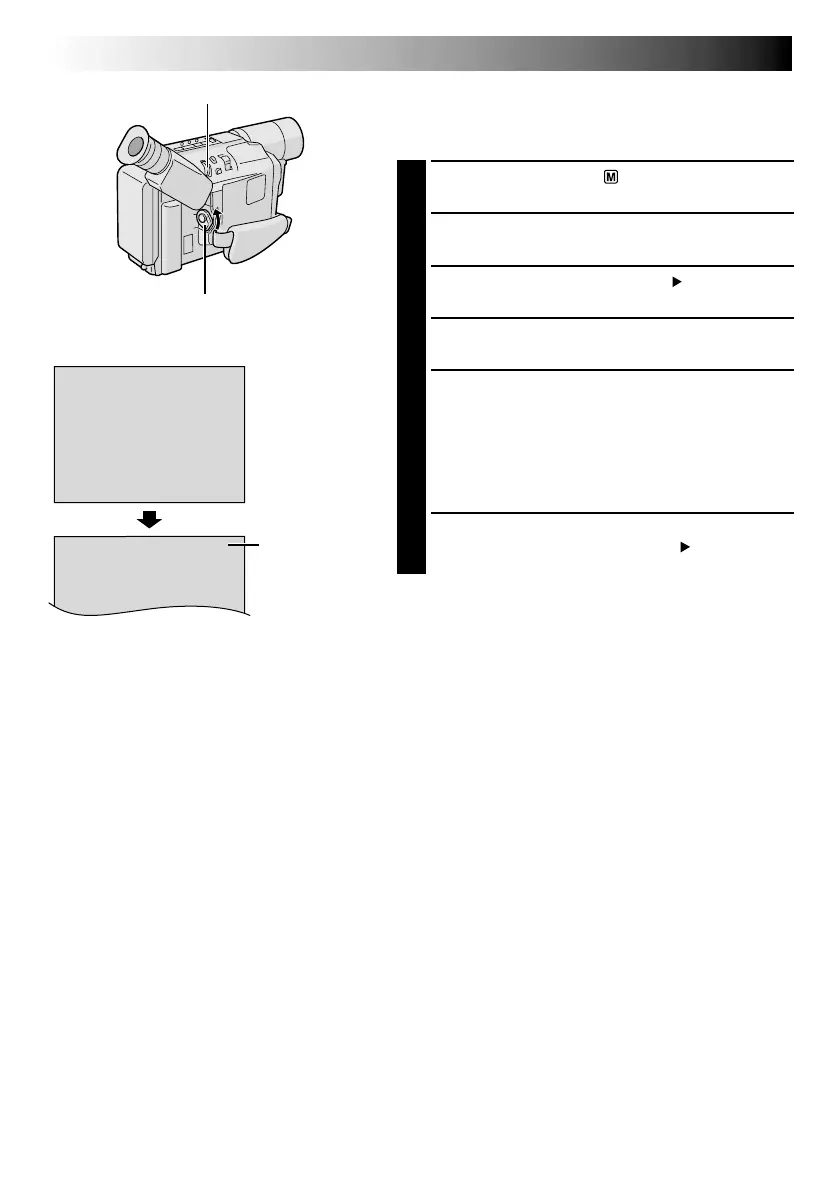
TAPE LENGTH
MENU Wheel
Power Switch
TAPE LENGTH
Menu
Tape length
indicator
Display
Tape Length Setting
Set the tape length according to the length of the tape
used.
1
Set the Power Switch to “ ”. The power lamp
comes on.
2
Press the MENU Wheel in. The Menu Screen
appears.
3
Rotate the MENU Wheel to select “ TO SYSTEM
MENU” and press it to display SYSTEM MENU.
4
Rotate the MENU Wheel to select “TAPE LENGTH”,
then press it. The TAPE LENGTH Menu appears.
5
Rotate the MENU Wheel to select the correct tape
length setting.
•T20=20 minutes
•T30=30 minutes
•T35=35 minutes
•T40=40 minutes
(in SP)
6
Press the MENU Wheel in. The Menu Screen
reappears with the highlight bar on “ RETURN”.
Press the MENU Wheel in to close the Menu Screen.
NOTE:
The tape remaining time (
墌
pg. 14) is correct only if the
correct tape length has been selected.
GETTING STARTED
(cont.)


 To Next Page