EN37
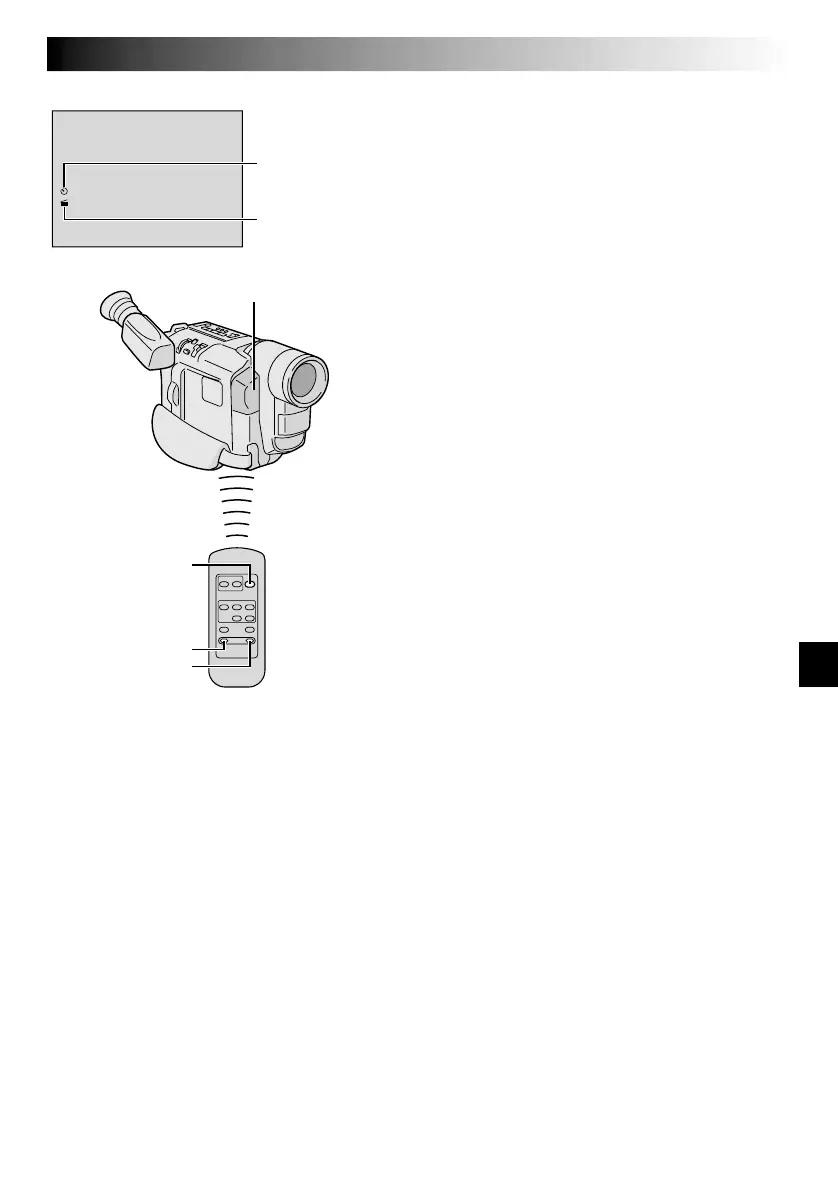
START/STOP
INT. TIME
REC. TIME
1
1
M
/
I
2
N
S
Interval time
indicator
Recording time
indicator
Remote sensor
Animation And Time-Lapse
The remote control lets you set/release Interval Time and
Recording Time without using the Menu Screen.
Animation
1) Set
Instead of performing steps 1 and 2 on pg. 26
(“Animation”), press REC TIME on the remote control.
Each time REC TIME is pressed, the Recording Time
indicator appears, changing in the following order:
1/4S, 1/2S, 1S, 5S and no indication (off).
2) Release
Instead of using the Menu in step 5 on pg. 26, press
REC TIME on the remote control until the Recording
Time indicator disappears.
Time-Lapse
1) Set
Instead of performing steps 1 and 2 on pg. 26 (“Time-
Lapse”), press REC TIME and INT. TIME on the remote
control. Each time REC TIME is pressed, the Recording
Time indicator appears, changing in the following
order: 1/4S, 1/2S, 1S, 5S and no indication (off). Each
time INT. TIME is pressed, the Interval Time indicator
appears, changing in the following order: 15S, 30S,
1MIN, 5MIN and no indication (off).
2) Release
Instead of using the Menu in step 4 on pg. 26 (“Time-
Lapse”), press REC TIME and INT. TIME on the remote
control until the indicators disappear.
NOTE:
Also refer to pg. 26.
Display


 To Next Page