32 EN
Manual White Balance Adjustment
(M.W.B.)
The white balance is usually adjusted automatically.
However, the more advanced camcorder operator would
prefer to control this function manually and achieve a
more professional colour/tint reproduction.
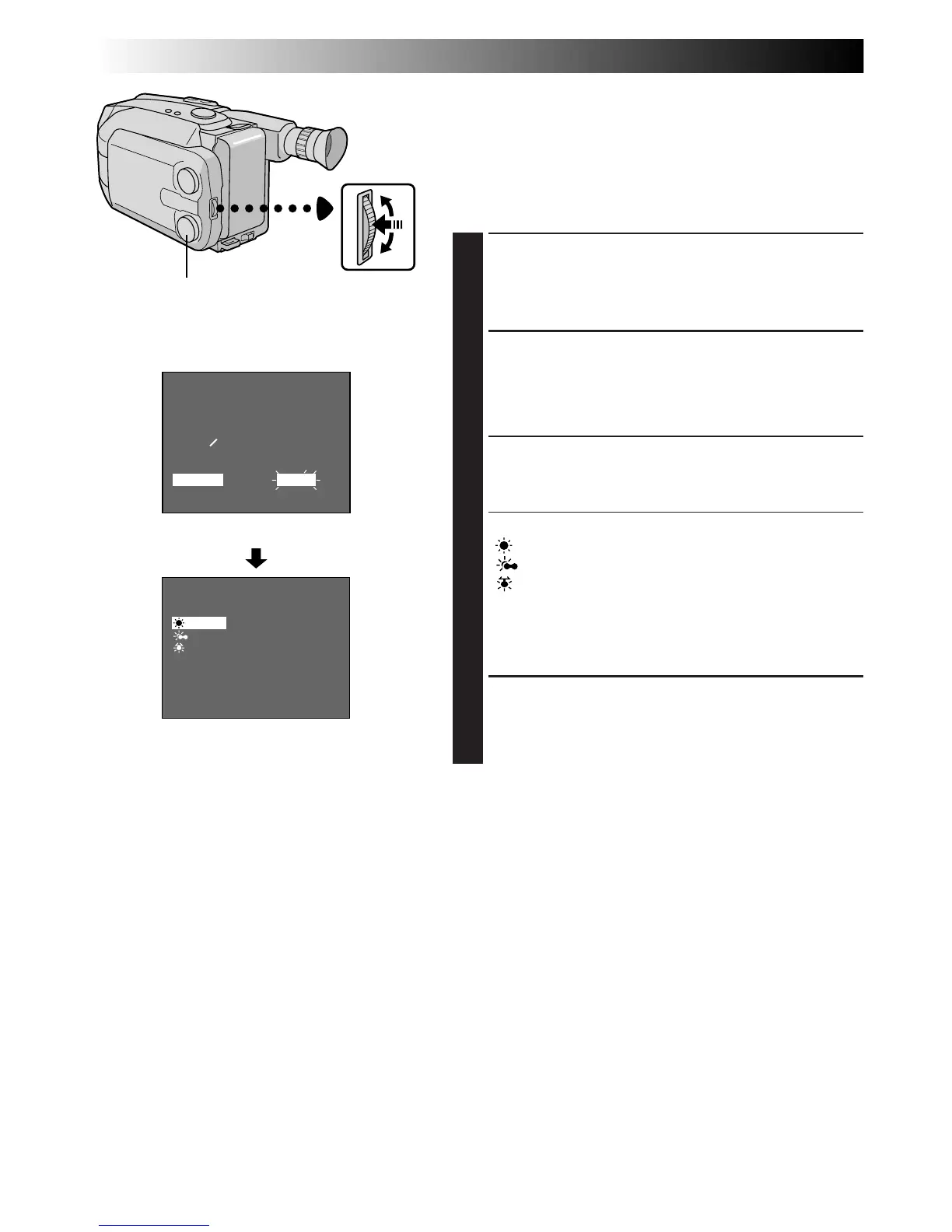
ACCESS MENU SCREEN
1
Turn the Select Dial to any position except AUTO
LOCK, then press the MENU Jog Dial. The Menu
Screen appears.
ACCESS WHITE BALANCE MENU
SCREEN
2
Rotate the MENU Jog Dial to move the highlight bar
to “M.W.B.”, then press it.
SELECT WHITE BALANCE
3
Rotate the MENU Jog Dial to move the highlight bar
to the required white balance.
“AUTO” ................... Automatic adjustment
“ : FINE” ............. Outdoors on sunny day
“ : CLOUD” ........ Outdoors on cloudy day
“ : HALOGEN” ... Light source is halogen or
tungsten lamp
“MWB” .................... When using a personal White
Balance Setting stored in
memory (Z pg. 33)
CLOSE MENU
4
Press the MENU Jog Dial. The Menu Screen
reappears. Then press the MENU Jog Dial again to
exit the Menu Screen.
MENU
4
MENU END
FOCUS
EXPOSURE
DATE TIME
TELE MACRO
TAPE LENGTH
M. W. B.
ZOOM SPEED
4
NEXT
AUTO
AUTO
25. 12. 98
OFF
T30
AUTO
FAST
AUTO
: FINE
: CLOUD
: HALOGEN
MWB
EXIT
M. W. B.
LCD monitor or viewfinder
M.W.B. Menu Screen
Menu Screen
Select Dial
MENU Jog Dial
RECORDING
Advanced Features (cont.)



 To Next Page