$
$$
$
EN
ENEN
EN
Master Page: Left
How To Attach The Core Filter
Attach the core filter(s) to the provided AC Adapter’s
cord, S-Video/Audio/Video/Editing cable and USB
cable. The core filter reduces interference.
1
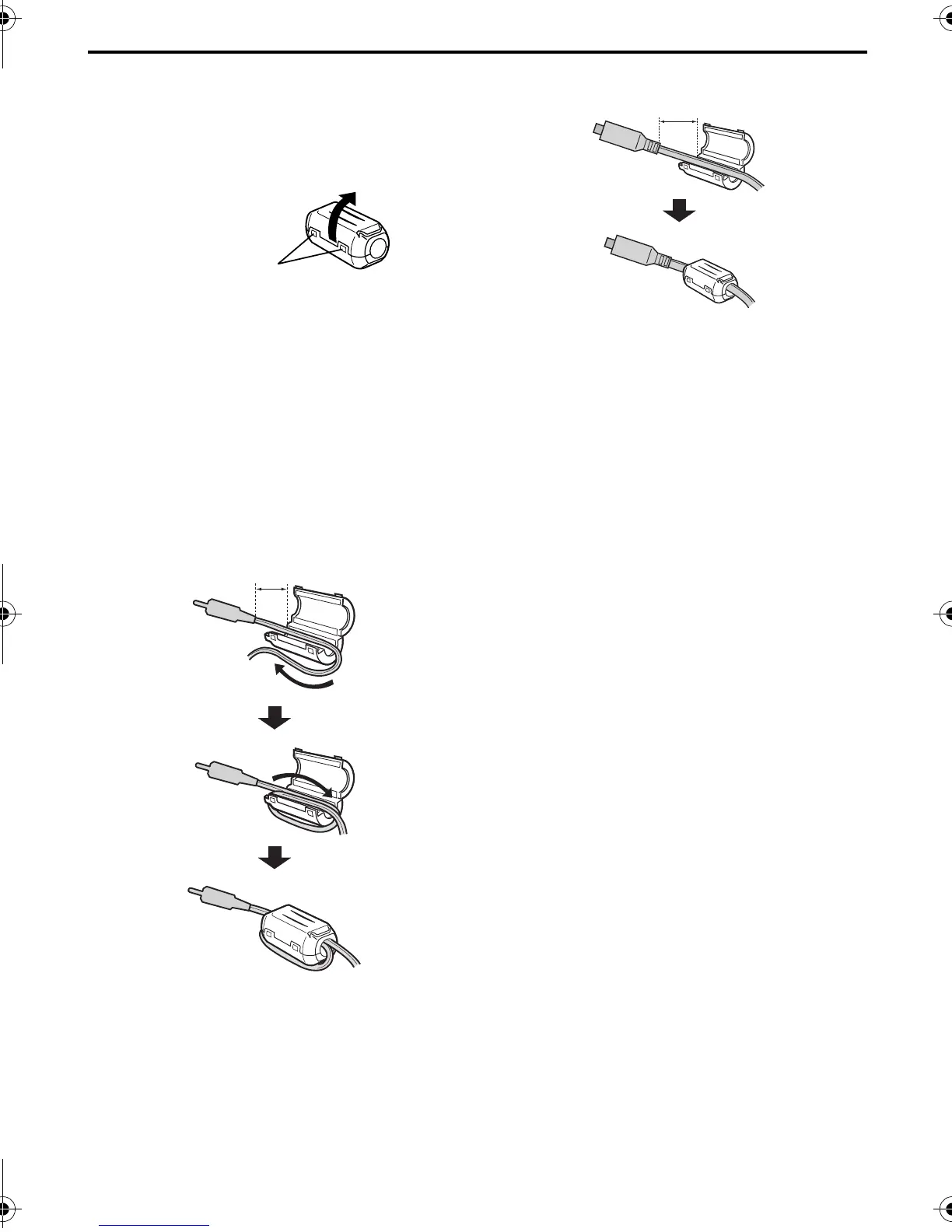
Release the stoppers on both ends of the core
filter.
2
Run the cable through the core filter, leaving
approx. 3 cm (1-3/16") of cable between the
cable plug and the core filter. If using the AC
Adapter’s cord or USB cable, be sure to wind the
cable once around the outside of the core filter as
shown in the illustration.
● Wind the cable so that it is not slack.
3
Close the core filter until it clicks shut.
NOTES:
● Take care not to damage the cable.
● When connecting cables, attach the end with the
core filter to the camcorder.
For the AC Adapter’s cord and USB cable
For the S-Video/Audio/Video/Editing cable
Stopper
3 cm (1-3/16")
Wind once
3 cm (1-3/16")
GR-D200US.book Page 6 Friday, April 11, 2003 1:05 PM


 To Next Page