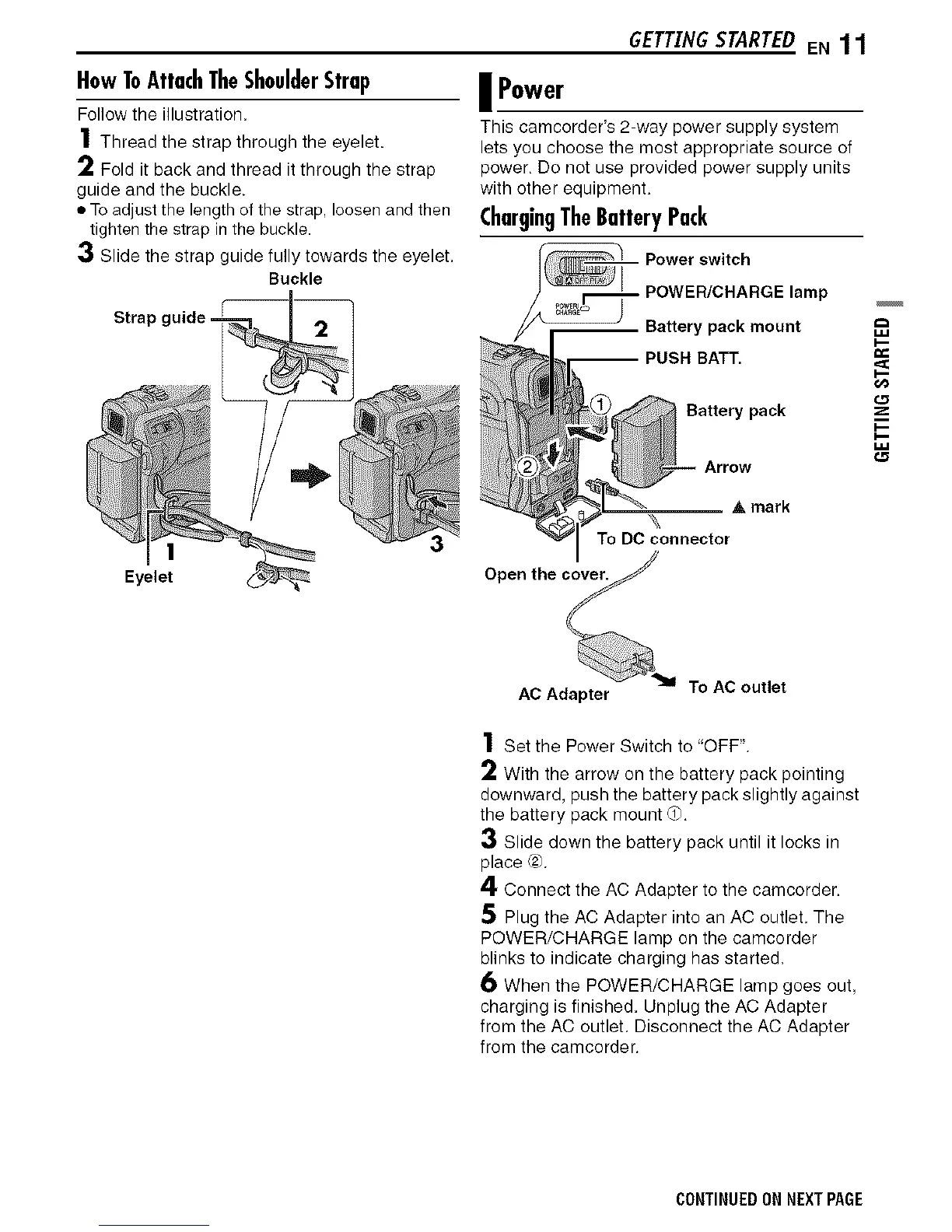
HowToAttachTheShoulderStrap
Follow the illustration.
1 Thread the strap through the eyelet.
2 Fold it back and thread it through the strap
guide and the buckle.
• To adjust the length of the strap, loosen and then
tighten the strap in the buckle.
GETTINGSTARTEDEN 1 1
Power
This camcorder's 2-way power supply system
lets you choose the most appropriate source of
power. Do not use provided power supply units
with other equipment.
ChargingTheBatteryPack
3 Slide the strap guide fully towards the eyelet.
Buckle
Strap guide =
Eyelet
Battery pack
Arrow
_, mark
"_\
To DCconnector
AC Adapter To AC outlet
1 Set the Power Switch to "OFF".
2 With the arrow on the battery pack pointing
downward, push the battery pack slightly against
the battery pack mount d).
3 Slide down the battery pack until it locks in
place (2).
4 Connect the AC Adapter to the camcorder.
5 Plug the AC Adapter into an AC outlet. The
POWER/CHARGE lamp on the camcorder
blinks to indicate charging has started.
6 When the POWER/CHARGE lamp goes out,
charging is finished. Unplug the AC Adapter
from the AC outlet. Disconnect the AC Adapter
from the camcorder.
CONTINUEDON NEXTPAGE


 To Next Page