| ViewfinderAdjustment
1 Set the Power Switch to '_" or "[]" while
pressing down the Lock Button located on the
switch.
2 Make sure the LCD monitor is closed and
locked. Pull out the viewfinder fully and adjust it
manually for best viewability,
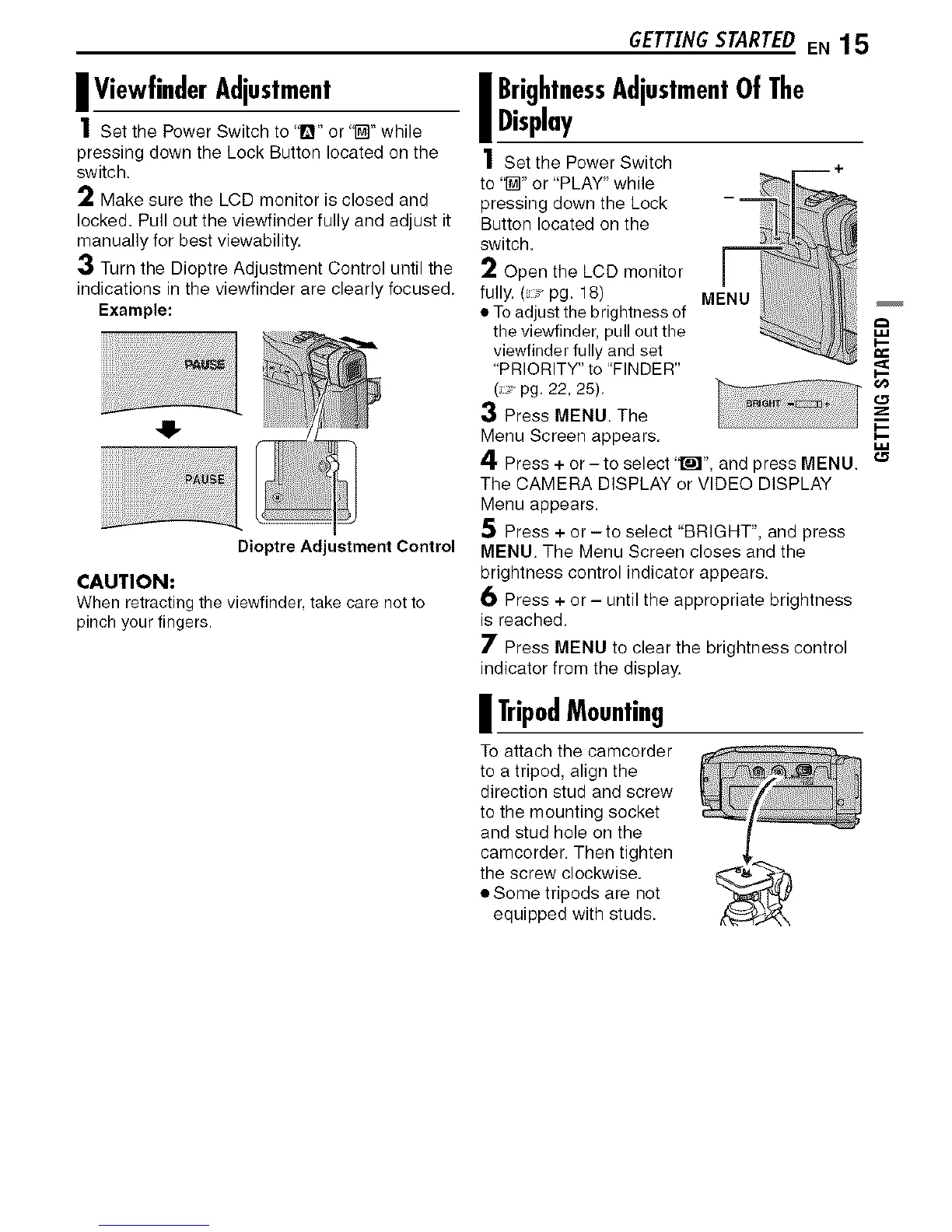
3 Turn the Dioptre Adjustment Control until the
indications in the viewfinder are clearly focused.
Example:
4!-
Dioptre Adjustment Control
CAUTION:
When retracting the viewfinder take care not to
pinch your fingers.
GETTINGSTARTEDEN 15
I BrightnessAdjustmentOf The
Display
1 Set the Power Switch
to 'I_" or "PLAY" while
pressing down the Lock
Button located on the
switch.
2 Open the LCD monitor
fully. (pg. 18) MENU
• To adjust the brightness of
the viewfinder, pull out the
viewfinder fully and set
"PRIORITY" to "FINDER"
( pg, 22, 25),
3 Press MENU. The
Menu Screen appears.
4 Press + or -to select 'tr_l" and press MENU. _
The CAMERA DISPLAY or VIDEO DISPLAY
Menu appears.
5 Press + or -to select "BRIGHT", and press
MENU. The Menu Screen closes and the
brightness control indicator appears,
6 Press + or - until the appropriate brightness
is reached.
7 Press MENU to clear the brightness control
indicator from the display.
i TripodMounting
To attach the camcorder
to a tripod, align the
direction stud and screw
to the mounting socket
and stud hole on the
camcorder. Then tighten
the screw clockwise.
• Some tripods are not
equipped with studs.


 To Next Page