EN
27
F
F
D
S
Q
P
O
I
A
I
U
R
L
L
T
Z
A
O
D
E
E
E
L
T
E
I
E
R
T
C
Y
T
:
:
:
:
:
:
1
2
1
F
O
0
7
2
I
F
0
.
8
N
F
J
0
E
V
.
X
C
0
9
G
23
6
R
DVC00110
DCF :100-0010
0
RETURN
DI SPLAY
M
E
NU
ON
OFF
1 2 3
4 5 6
7 8 9
Index Playback
You can view several different files stored on the
memory card at a time. This browsing capability
makes it easy to locate a particular file you want.
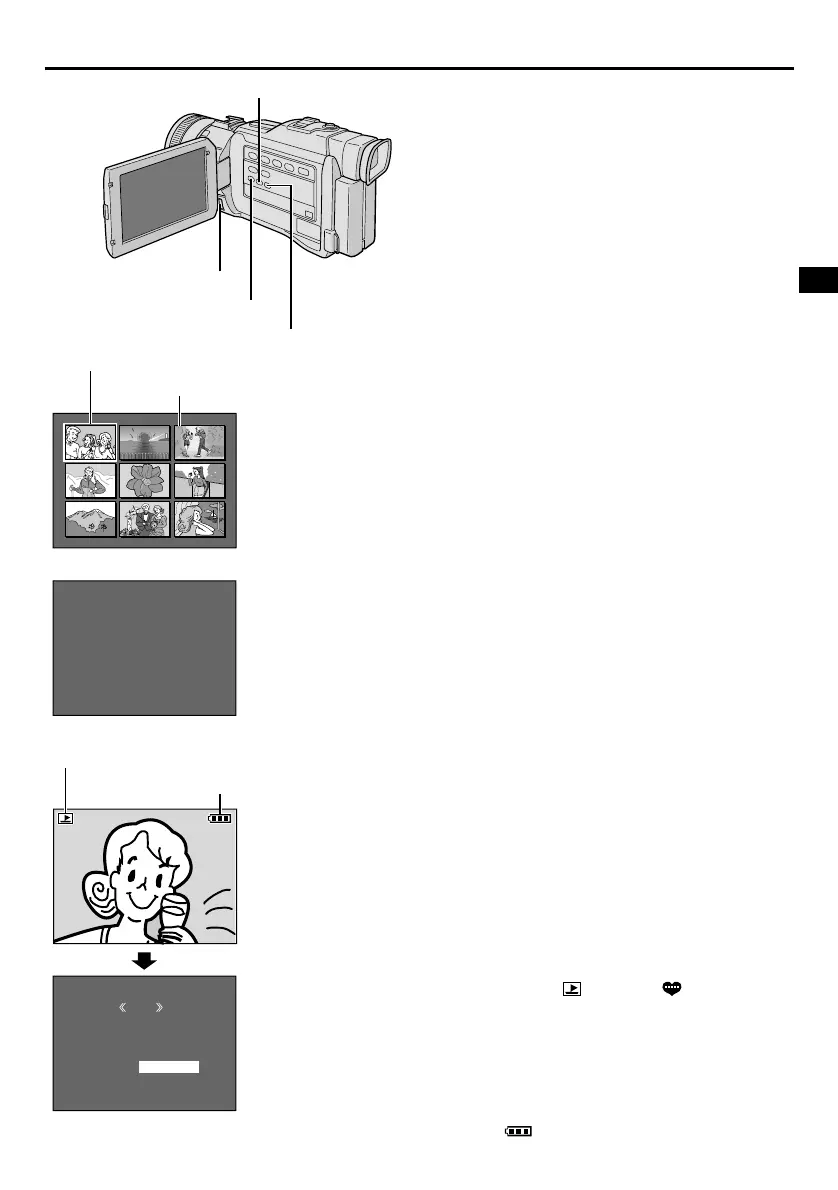
1 Perform steps 1 through 3 of “Normal Playback”.
2 Press INDEX. The Index Screen appears.
3 Rotate the MENU wheel to move the frame to the
desired file.
• Pressing
3
displays the next page and
2
displays the previous page.
• Pressing INFO gives you details on the currently
selected file (墌 “Viewing File Information”).
4 Press the MENU wheel in. The selected file is
displayed.
• Pressing INFO gives you details on the displayed file
(墌 “Viewing File Information”).
Viewing File Information
You can get the relevant file information by pressing
the INFO button during normal playback or Index
playback.
DCF : Folder and file number (IMAGE files
only)
FOLDER : Folder name (墌 pg. 51)
FILE : File name (墌 pg. 51)
DATE : Date the file was made
SIZE : Image size (except SOUND files
墌 pg. 16, 46)
QUALITY : Picture quality (IMAGE files only
墌 pg. 16)
TIME : Playback time (E-MAIL CLIP/SOUND
files only 墌 pg. 46)
PROTECT : When set to ON, the file is protected
from accidental erasure (墌 pg. 49).
• Press INFO again to close the Info Screen.
NOTE:
With images shot with another device or processed on a
PC, “QUALITY: – – –” will be displayed.
Removing On-Screen Display
1 Perform steps 1 and 2 of “Normal Playback”
(墌 pg. 26).
2 Press SELECT. The MEMORY SELECT Screen
appears. Rotate the MENU wheel to select IMAGE or
TITLE, then press it.
• A stored IMAGE ( ) or TITLE ( ) file is
displayed.
3 Press the MENU wheel in. The Menu Screen
appears. Rotate the MENU wheel to select “DIS-
PLAY”, then press it.
4 Rotate the MENU wheel to select “OFF”, then
press it. The operation mode indicator and battery
indicator ( ) disappear.
• To display the indicators again, select “ON” in step 4.
Info Screen: IMAGE
INDEX Button
Selected file
Index number
Index Screen: IMAGE
INFO Button
Menu Screen
Battery indicator
Operation mode indicator
Playback Screen
MENU Wheel
SELECT Button


 To Next Page