50 EN
Master Page: Left
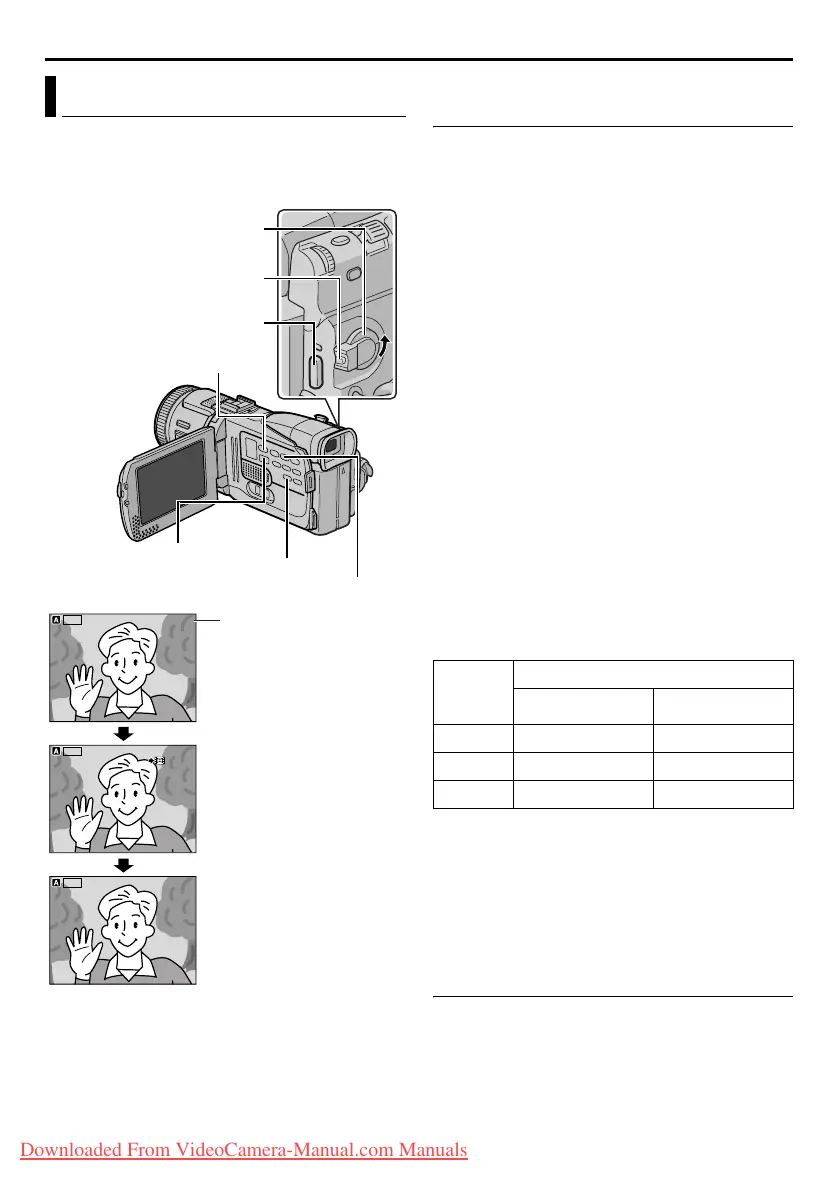
You can make video clips from real-time camera
image or recorded video footage and store them in a
memory card as files which can be conveniently
sent via E-Mail.
To make video clips from real-time camera
image
1
Load a memory card. (墌 pg. 16)
2 Set the VIDEO/MEMORY Switch to “MEMORY”.
3 Set the Power Switch to “A” or “M” while
pressing down the Lock Button located on the
switch.
4 Set “E-CLIP REC” to the desired image size.
(墌 pg. 31, 38)
5 Press E-MAIL to engage the E-Mail Clip Record-
Standby mode.
● “E-CLIP” appears.
6 Press the Recording Start/Stop Button to start
recording.
7 Press the Recording Start/Stop Button to stop
recording.
● “COMPLETED” is displayed, then the
camcorder re-enters the E-Mail Clip Record-
Standby mode.
8 Press E-MAIL to end E-Mail Clip Recording. The
normal screen reappears.
To view video clips stored in a memory card…
Refer to “Playback Of Video Clips” (墌 pg. 25).
To delete unwanted video clips stored in a memory
card…
Refer to “Deleting Files” (墌 pg. 28).
Approximate recording time
* Optional
** Provided (9 title images pre-stored)
NOTE:
It is not possible to adjust the speaker and
headphone volume during E-Mail Clip Recording
mode.
To make video clips from recorded video
footage
1
Load a cassette. (墌 pg. 15)
2 Load a memory card. (墌 pg. 16)
3 Set the VIDEO/MEMORY Switch to “VIDEO”.
4 Set the Power Switch to “PLAY” while pressing
down the Lock Button located on the switch.
5 Set “E-CLIP REC” to the desired image
size.(墌 pg. 31, 38)
E-Mail Clip Recording
VIDEO/MEMORY Switch
E-MAIL Button
Stop (8) Button
Recording Start/Stop Button
Shooting starts when the
Recording Start/Stop
Button is pressed.
Shooting stops when the
Recording Start/Stop
Button is pressed again.
Recording is complete.
Remaining time
Play/Pause Button (4 /9)
Power Switch
Lock Button
ILC
-
E P
00 : 1 5
16 0
0 : 00
STANDBY
1 06
ILC
-
EP
ILC
-
E PILC
-
EP
00:15
160
160
000:00
0h2 5m0
h
25
m
STANDBY
REC
REC
OC DPL E TM EOCDPLETME
0 : 00000:00
0h0 0m0
h
00
m
0h m0
hm
:11010
1 06
ILC
-
E PILC
-
EP
160
SD
Memory
Card
Image Size
240 x 176 160 x 120
8 MB** 2 min. 6 min.
8 MB* 3 min. 8 min.
16 MB* 6 min. 17 min.
FEATURES FOR RECORDING (cont.)
GR-DV4000US.book Page 50 Monday, January 20, 2003 10:54 AM
Downloaded From VideoCamera-Manual.com Manuals


 To Next Page