6 EN
Master Page: Left
NOTES:
● In order to maintain optimum performance of the camcorder, provided cables may be equipped with one or
more core filter. If a cable has only one core filter, the end that is closest to the filter should be connected to
the camcorder.
● Make sure to use the provided cables for connections. Do not use any other cables.
How To Attach The Lens Cap
To protect the lens, attach the provided lens cap to the camcorder as shown in the illustration. You can also
attach the lens cap to the lens hood.
NOTE:
To confirm the lens cap is on correctly make sure the cap is flush to the camcorder.
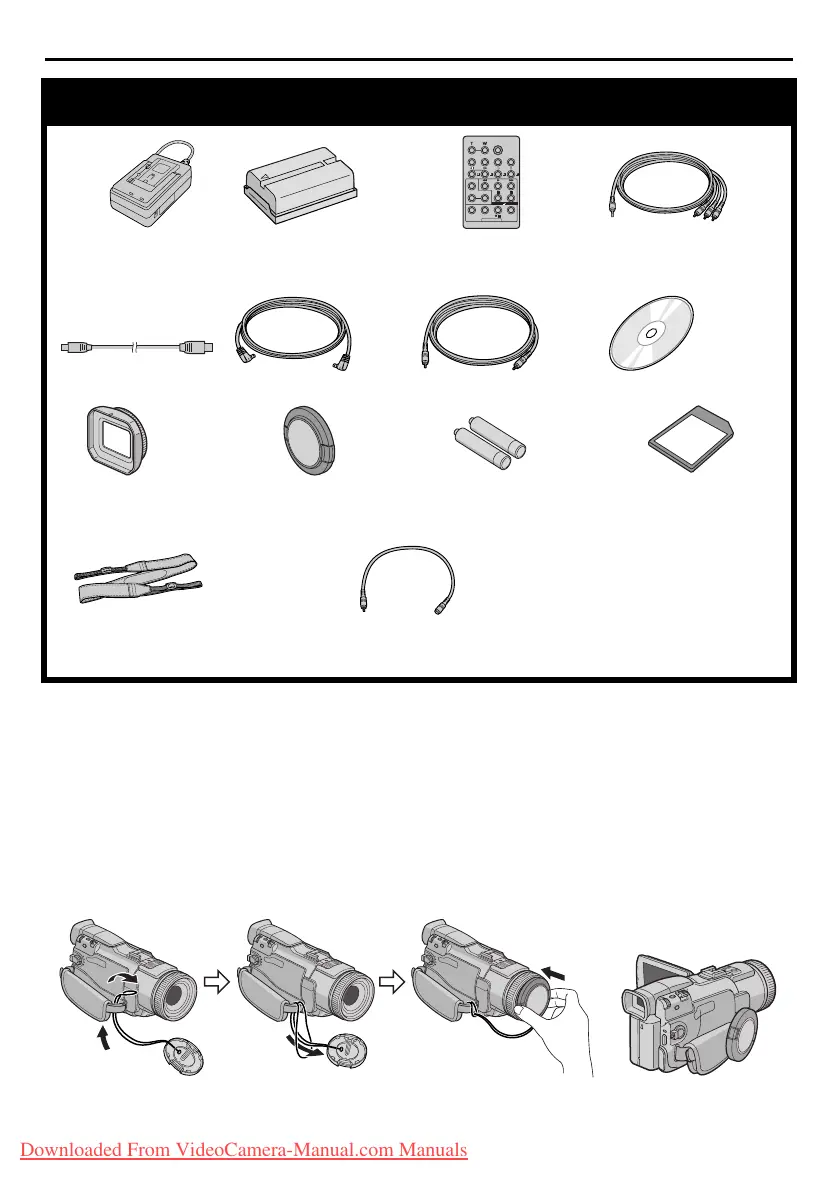
Provided Accessories
●
AC Power Adapter/
Charger AA-V40U
●
Battery Pack
BN-V408U-B
●
Remote Control Unit
RM-V717U
●
Audio/Video Cable
(ø3.5 mini-plug to RCA
plug)
●
USB Cable
● DC Cord ● Editing Cable ●
CD-ROM
●
Lens Hood
(
墌
pg. 7
for
attachment
)
●
Lens Cap
(See below for
attachment)
●
AAA (R03) Battery x 2
(for remote control unit)
●
Memory Card 8 MB
(Already inserted in the
camcorder)
● Shoulder Strap
(墌
pg. 7
for attachment)
● Audio Cable x 2
(for connection of optional headphones
and external microphone 墌 pg. 7)
During shooting
GR-DV4000US.book Page 6 Monday, January 20, 2003 10:54 AM
Downloaded From VideoCamera-Manual.com Manuals


 To Next Page