EN 7
Master Page: Right
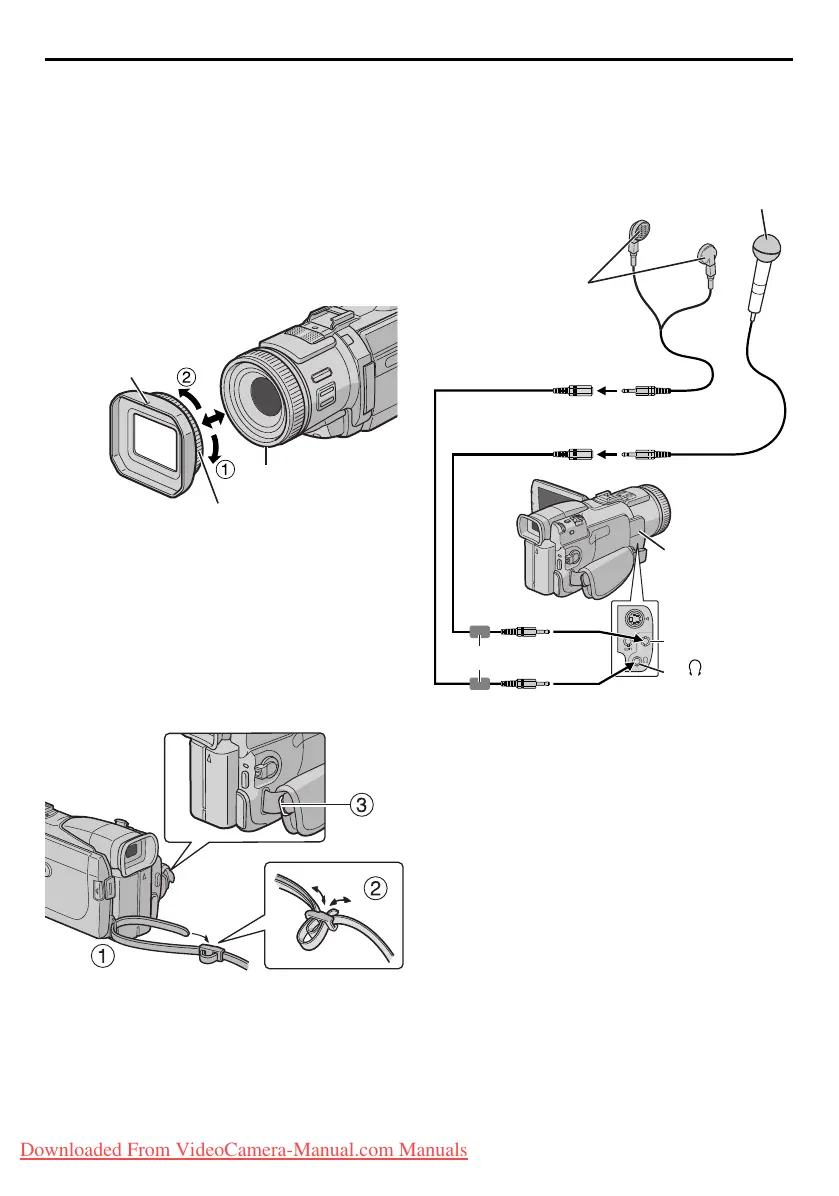
How To Attach/Detach The Lens
Hood
The provided lens hood helps block out glare when
shooting under bright sunlight, the same way
professional photographers do.
To atta ch:
Align the lens hood with the camcorder’s lens while
the index on the lens hood is facing upward, and
then screw the ring clockwise a.
To detach:
Turn the ring counterclockwise b.
How To Attach The Strap
1 Following the illustration, thread the strap
through the eyelet a.
2 Fold it back and thread it through the buckle b.
3 Repeat the procedure to attach the other end of
the strap to the other eyelet c located under the
Grip Strap.
4 Confirm the strap is not twisted.
How To Use The Audio Cable
When using optional headphones or external
microphone, connect to the provided Audio cable
(with a core filter attached), then connect the Audio
cable to the camcorder. The core filter reduces
interference.
Index
Threading
Ring
Headphones
Audio cable
(provided)
Core filter
Open the
connector cover.
To
(headphones)
Microphone
To MI C
GR-DV4000US.book Page 7 Monday, January 20, 2003 10:54 AM
Downloaded From VideoCamera-Manual.com Manuals


 To Next Page