To Next Page
S
stephanietuckerAug 27, 2025
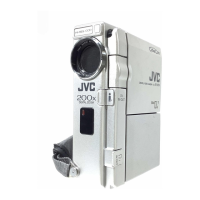
How to clean the LCD monitor, viewfinder and lens of my JVC GR-DV700 Camcorder?
- GgreersusanAug 27, 2025
Wipe them gently with soft cloth. Wiping strongly can cause damage.

How to clean the LCD monitor, viewfinder and lens of my JVC GR-DV700 Camcorder?
Wipe them gently with soft cloth. Wiping strongly can cause damage.
What to do if my JVC GR-DV700 Camcorder does not operate when connected via the DV connector?
If the camcorder does not operate when connected via the DV connector, it might be because the DV cable was plugged/ unplugged with power turned on. Turn the camcorder’s power off and on again, then operate it.
What to do if the power/charge lamp on my JVC GR-DV700 does not light when charging?
If the power/charge lamp on the camcorder does not light when charging, it could be due to the battery temperature being extremely high or low, or charging is difficult in places subject to extremely high/ low temperatures. To protect the battery, it is recommended to charge it in places with a temperature of 10°C to 35°C.
 General
| Optical Zoom | 10x |
|---|---|
| Image Sensor | CCD |
| Optical Sensor Size | 1/4 inch |
| Video Resolution | 720 x 480 |
| LCD Screen Size | 2.5 inches |
| Image Stabilizer | Electronic |
| Display Type | LCD |
| Viewfinder | Color |
| Microphone Operation Mode | Stereo |
| Battery Type | Lithium-ion |
| Video Recording Format | DV |
| Type | MiniDV |
| Recording Media | MiniDV tape |
| Focus Adjustment | Manual / Auto |
| Microphone | built-in |
| Connector Type | FireWire |