EN11
P
L
A
Y
O
F
F
4
FAD
W
W
R
O
F
F
F
E
I
I
A
F
A
A
A
R
P
P
N
F
D
D
D
/
E
E
D
E
E
E
W
–
–
O
R
R
R
I
S
S
M
–
–
–
P
C
H
W
B
M
E
R
U
H
L
O
O
T
I
A
S
L
T
T
C
A
L
E
E
K
I
R
C
1
O
D
T
C
R
N
A
I
L
D
E
T
M
O
I
T
S
E
E
C
S
U
C
/
K
P
R
R
T
C
L
N
E
I
O
A
A
E
M
D
D
Y
N
E
E
M
D
E
E
P
N
C
M
U
25
5
’
:
0
3
0
0
J.
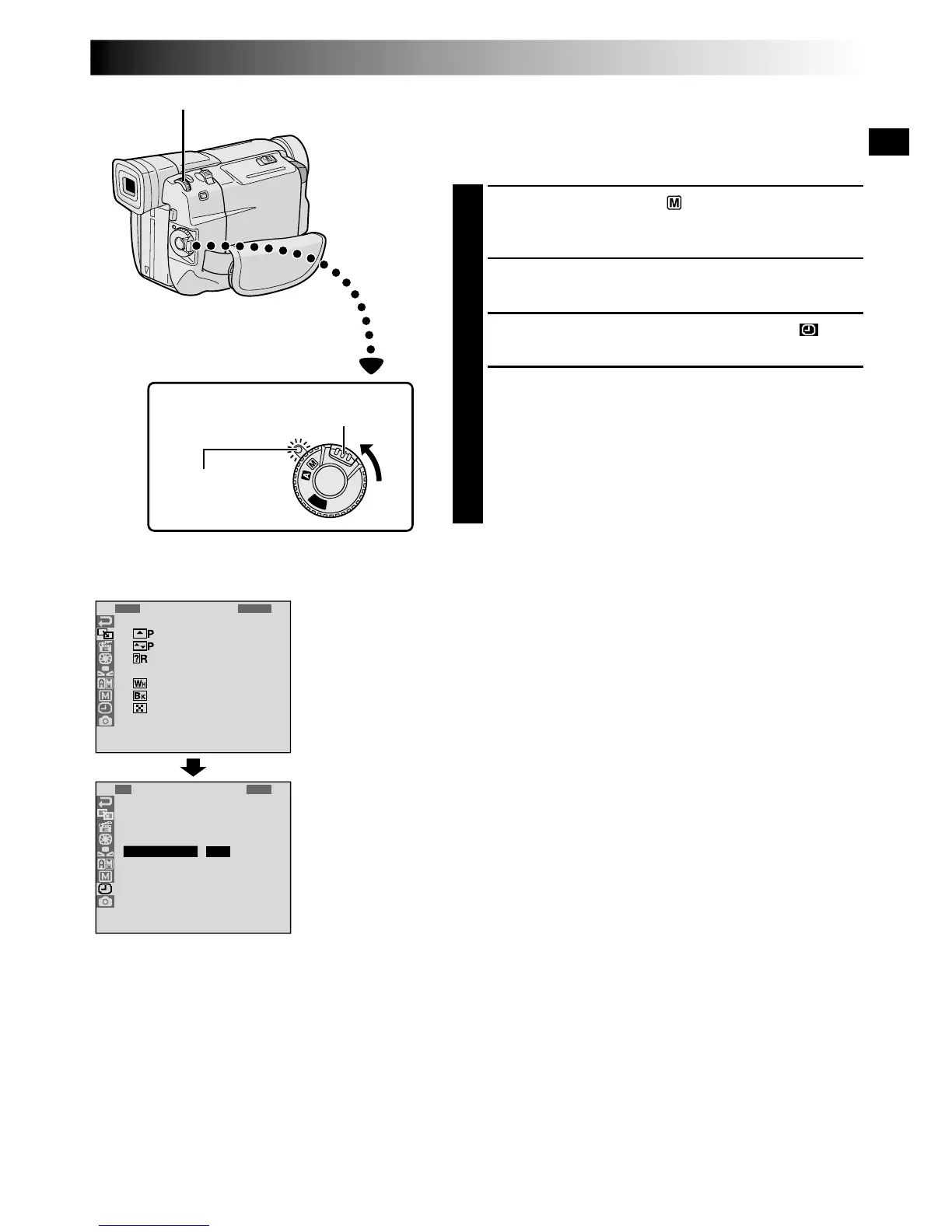
Date/Time Settings
The date/time is recorded onto the tape at all times, but its
display can be turned on or off during playback
( pg. 34).
1
Set the Power Switch to “ ” while pressing down
the Lock Button located on the switch. The power
lamp lights and the camcorder is turned on.
2
Press the MENU/BRIGHT wheel. The Menu Screen
appears.
3
Rotate the MENU/BRIGHT wheel to select “ ”.
Press it and “DISPLAY MENU” appears.
4
Rotate the MENU/BRIGHT wheel to select “CLOCK
ADJ.”. Press it and “month” is highlighted.
Rotate the MENU/BRIGHT wheel to input the month.
Press it. Repeat to input the day, year, hour and
minute.
Rotate the MENU/BRIGHT wheel to select
“
1
RETURN”, and press it twice. The Menu Screen
closes.
NOTE:
Even if you select “CLOCK ADJ.”, if the parameter is not
highlighted the camcorder’s internal clock continues to
operate. Once you move the highlight bar to the first date/
time parameter (month), the clock stops. When you finish
setting the minute and press the MENU/BRIGHT wheel,
the date and time begin operation from the date and time
you just set.
Display
MENU/BRIGHT Wheel
Power Switch
Lock Button
DISPLAY MENU
Power lamp


 To Next Page
 Loading...