38 EN
1
I
S
P
D
F
R
N
L
R
E
O
E
D
I
O
L
R
T
E
D
T
E
M
D
U
X
E
E
T
A
S
R
C
E
T
C
N
S
T
H
M
O
E
W
NU
P
L
A
Y
O
F
F
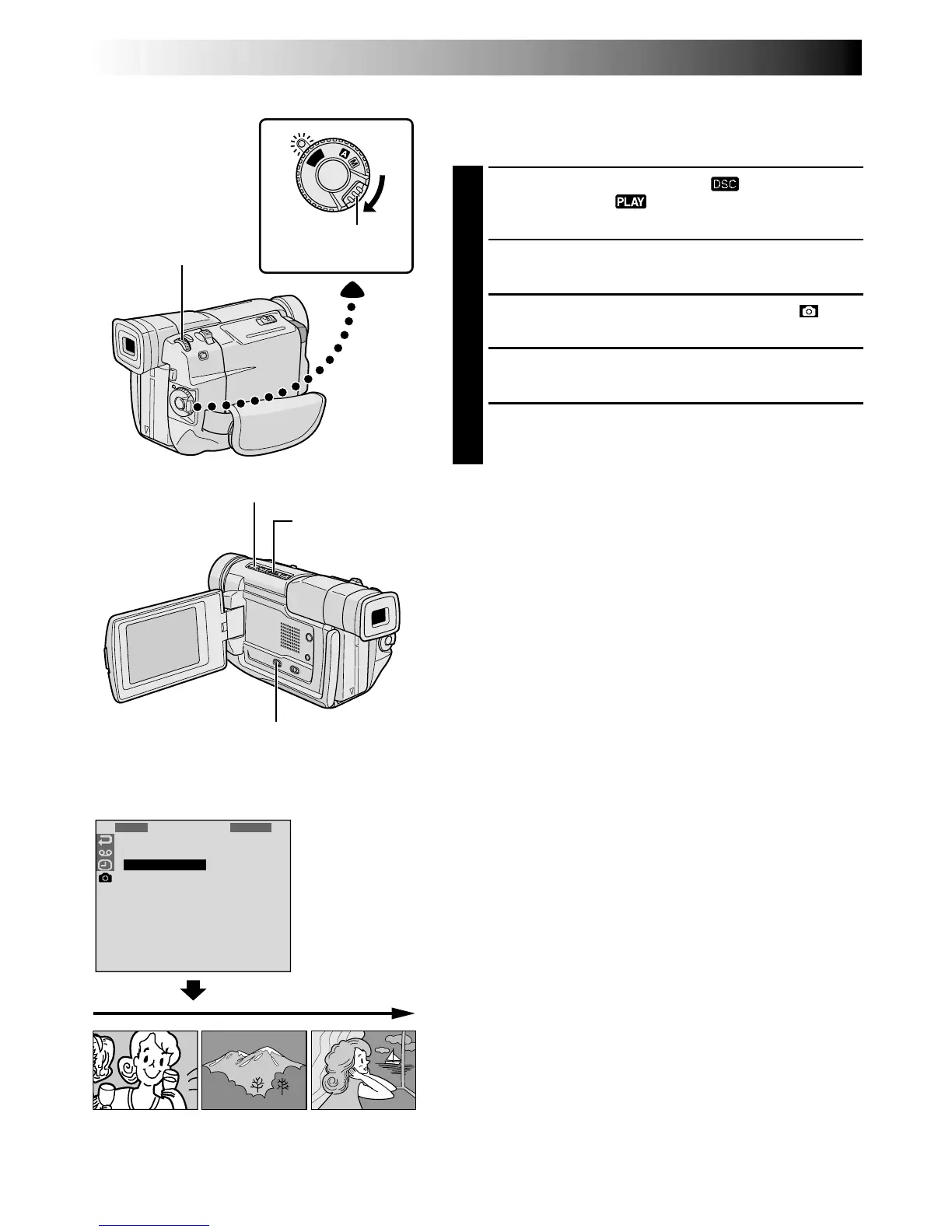
Slide Show
You can run through all the images stored in memory
automatically in numerical order.
1
Set the VIDEO/DSC Switch to “ ”, then set the
Power Switch to “ ”, while pressing down the
Lock Button.
2
Press the MENU/BRIGHT wheel. The Menu Screen
appears.
3
Rotate the MENU/BRIGHT wheel to select “ ” and
press it. “DSC MENU” appears.
4
Rotate the MENU/BRIGHT wheel to select “SLIDE
SHOW” and press it. The Slide Show starts.
5
To stop the Slide Show, press 5.
To start the Slide Show without going through the Menu
Screen . . .
.... after step 1, press
4
/6. To stop the Slide Show, press
5.
Power Switch
Display
MENU/BRIGHT Wheel
PLAYBACK
Advanced Features For D.S.C.
Lock Button
Stop (5) Button
Play/Pause (
4
/6)
Button
VIDEO/DSC Switch (Open the
LCD monitor to access this switch.)



 To Next Page
 Loading...