EN59
OFFIrTran-P
PROTECT
TITLE DELETE
FORMAT
FILE DELETE
OFF
INDEX
SLIDE SHOW
MULTI VIEW
END
4
P
L
A
Y
/
P
C
O
F
F
C
A
M
E
R
A
5
S
D
S
C
D
S
C
P
L
A
Y
001 F 002 S 003 E
005 F
004 F
EXIT INDEX
006 F
Index Playback
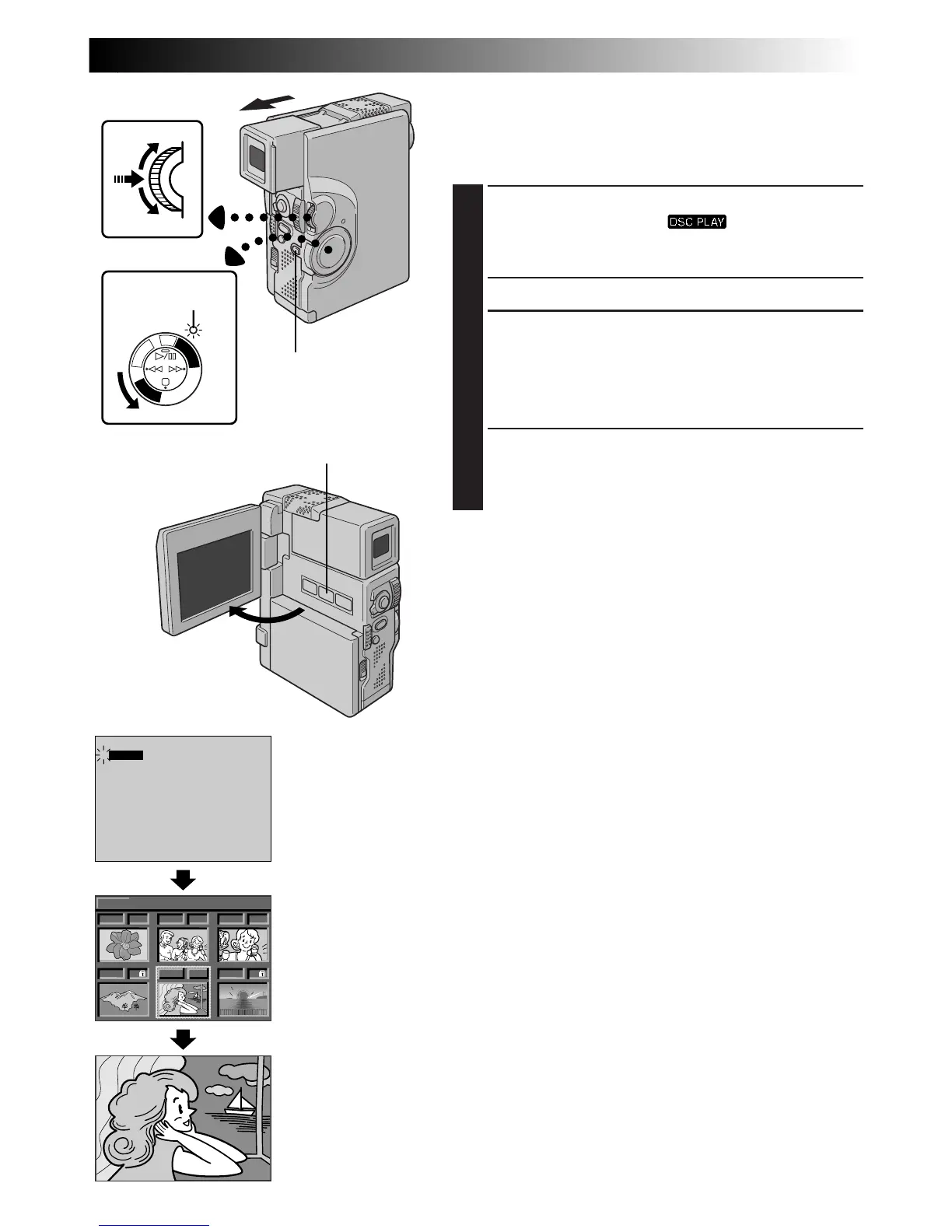
You can view the images stored in memory six at a time.
Use this mode when looking for an image you wish to
view.
1
SELECT OPERATION MODE
Set the Power Switch to “ ” while pressing
down the Lock Button. Open the LCD monitor fully
or pull out the viewfinder fully.
•A stored image is displayed.
2
ACCESS INDEX SCREEN
Press MULTI SCREEN. The INDEX Screen appears.
OR
Select “INDEX” in the Playback Menu (To access the
Playback Menu, press MENU/SET).
3
DISPLAY DESIRED IMAGE
Rotate MENU/SET to move the green frame to the
desired image and press it. The image selected in the
INDEX Screen is displayed.
Display
Power Switch
INDEX Screen
MENU/SET Dial
Lock Button
Power lamp
MULTI SCREEN Button
Playback Menu
Playback Screen



 To Next Page