EN77
SP
4
P
L
A
Y
/
P
C
O
F
F
C
A
M
E
R
A
5
S
D
S
C
D
S
C
P
L
A
Y
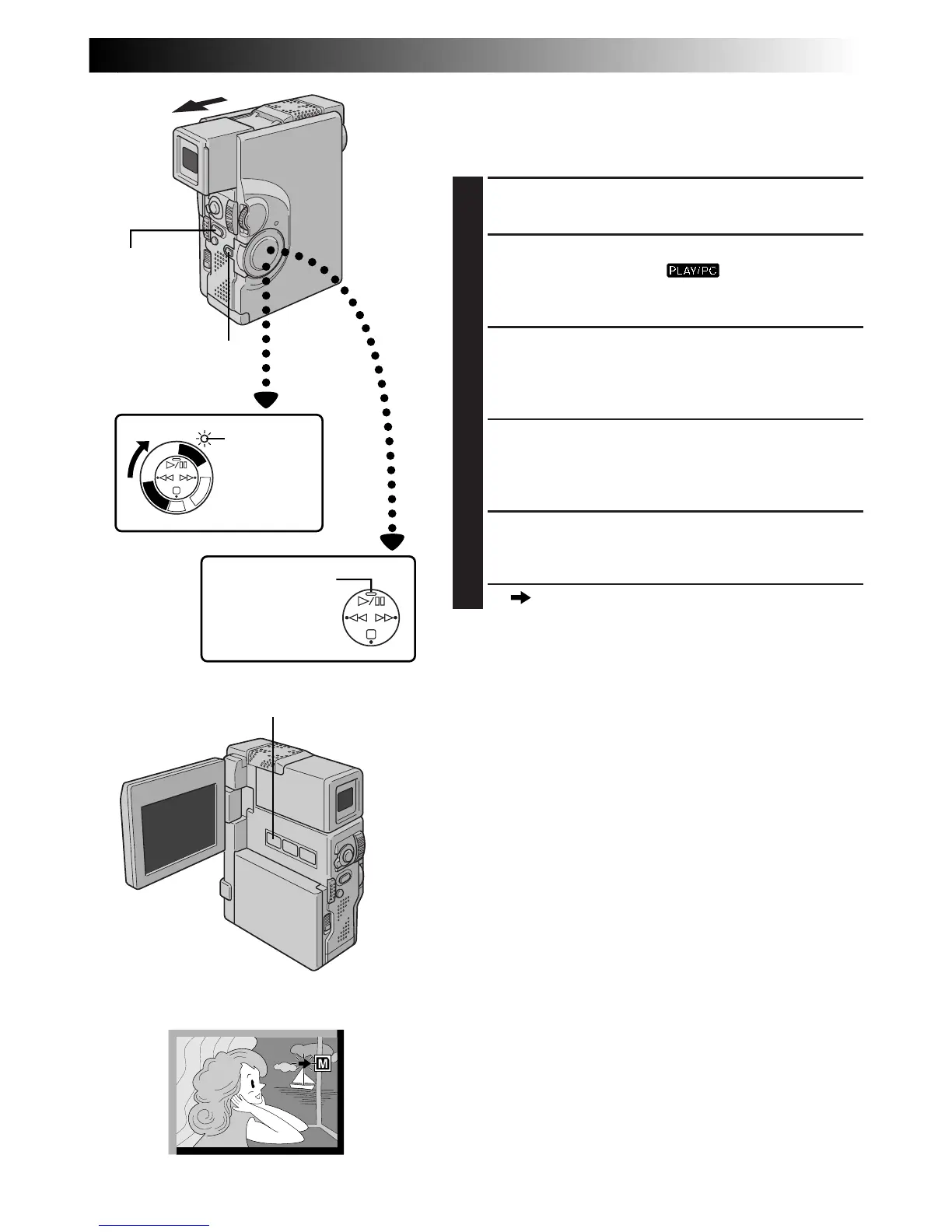
SNAPSHOT MODE Button
Dubbing Images Recorded On A Tape To A
MultiMediaCard
Images can be dubbed from a tape to a MultiMediaCard.
1
LOAD CASSETTE AND
MULTIMEDIACARD
2
SELECT OPERATION MODE
Set the Power Switch to “ ” while pressing
down the Lock Button. Open the LCD monitor fully
or pull out the viewfinder fully.
3
SELECT IMAGE TO BE DUBBED
Press
4
/6 to start playback. At the moment you find
the image you wish to dub, press it again to engage
Still Playback.
4
SELECT SNAPSHOT MODE
Press SNAPSHOT MODE to select the Snapshot
mode to use for dubbing the image to the
MultiMediaCard.
5
START COPYING
Press PHOTO (SNAPSHOT). The image is stored in
the MultiMediaCard.
•“ ” blinks during dubbing.
NOTES:
●
If PHOTO (SNAPSHOT) is pressed in step 5 when a
MultiMediaCard is not loaded, the message “COPYING
FAILED” is displayed.
●
If an image recorded on the tape using the WIDE mode
(
Z
pg. 37) is dubbed to a MultiMediaCard, the WIDE
mode identifying signal is not dubbed with it.
Play/Pause (
4
/6)
Button
Display
Power Switch
PHOTO
(SNAPSHOT)
Button
Power lamp
Lock Button



 To Next Page