EasyManua.ls Logo

JVC HR-D210E - In Case of Difficulty; Recording from an External Source; Head Cleaning

JVC HR-D210E
8 pages
Print Icon
To Previous Page IconTo Previous Page
Loading...
Timer
recording
operation
@
When
the
preset
start
time
is
reached,
recording
starts.
@
After
timer
recording,
the
power
is
switched
off.
If
the
tape
end
is
reached
during
timer
recording,
the
cassette
is
automatically
ejected
and
the
power
is
switched
off.
©
After
all
preset
programmes
have
been
executed,
the
Timer
Standby
mode
is
cancelled.
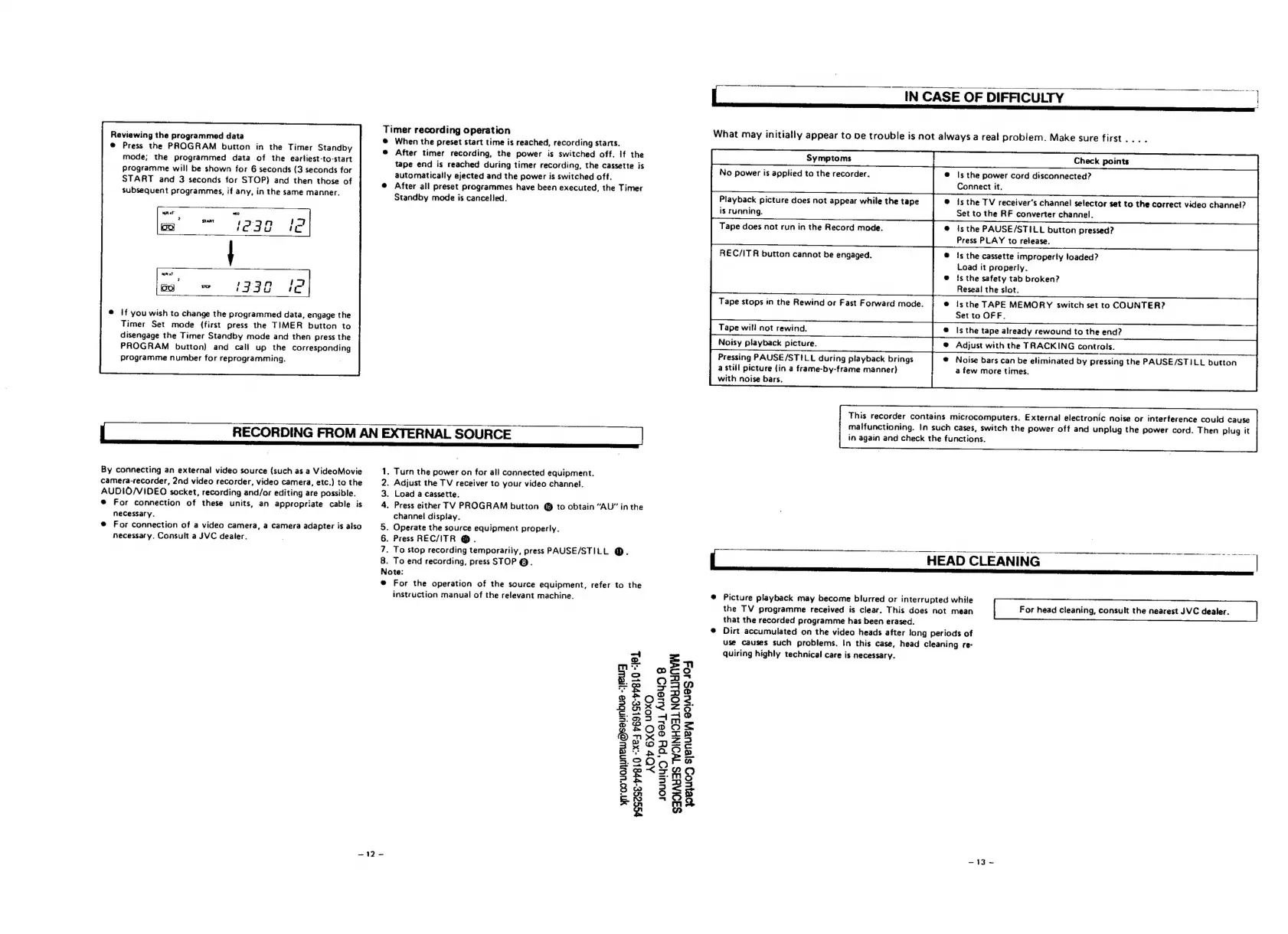
Reviewing
the
programmed
data
@
Press
the
PROGRAM
button
in
the
Timer
Standby
mode;
the
programmed
data
of
the
earliest-to-start
programme
will
be
shown
for
6
seconds
(3
seconds
for
START
and
3
seconds
for
STOP)
and
then
those
of
subsequent
programmes,
if
any,
in
the
same
manner.
(332
12]
If
you
wish
to
change
the
programmed
data,
engage
the
Timer
Set
mode
(first
press
the
TIMER
button
to
disengage
the
Timer
Standby
mode
and
then
press
the
PROGRAM
button)
and
call
up
the
corresponding
programme
number
for
reprogramming.
RECORDING
FROM
AN
EXTERNAL
SOURCE
By
connecting
an
external
video
source
(such
as
a
VideoMovie
camera-recorder,
2nd
video
recorder,
video
camera,
etc.)
to
the
AUDIO/VIDEO
socket,
recording
and/or
editing
are
possible.
®
For
connection
of
these
units,
an
appropriate
cable
is
necessary.
®@
For
connection
of
a
video
camera,
a
camera
adapter
is
also
necessary.
Consult
a
JVC
dealer.
.
Turn
the
power
on
for
all
connected
equipment.
.
Adjust
the
TV
receiver
to
your
video
channel.
.
Load
a
cassette.
.
Press
either
TV
PROGRAM
button
@
to
obtain
“AU”
in
the
channel
display.
.
Operate
the
source
equipment
properly.
.
Press
REC/ITR
@.
.
To
stop
recording
temporarily,
press
PAUSE/STILL
@.
.
To
end
recording,
press
STOP
@.
Note:
@
For
the
operation
of
the
source
equipment,
refer
to
the
instruction
manual
of
the
relevant
machine.
mW
=
On
mo
yn'co"uanUNeW@seyinbue
--EWy
PSSZSE-PPB10
--XEJ
pE9ISE-PHBLO
“1OL
~12-
ADP
6XO
YOXO
JOU
‘Pty
9011
AUEYD
8
SIOAYAS
WOINHOSL
NOBLIUNVIN
yRIUCD
sjenuey
edies
40-4
IN
CASE
OF
DIFFICULTY
What
may
initially
appear
to
be
trouble
is
not
always
a
real
problem.
Make
sure
first...
.
Check
points
No
power
is
applied
to
the
recorder.
@
Is
the
power
cord
disconnected?
Connect
it.
Playback
picture
does
not
appear
while
the
tape
@
isthe
TV
receiver’s
channel
selector
set
to
the
correct
video
channel?
is
running.
Set
to
the
RF
converter
channel.
Tape
does
not
run
in
the
Record
mode.
@
isthe
PAUSE/STILL
button
pressed?
Press
PLAY
to
release.
REC/ITR
button
cannot
be
engaged.
@
is
the
cassette
improperly
loaded?
Load
it
properly.
@
ts
the
safety
tab
broken?
Reseal
the
slot.
Tape
stops
in
the
Rewind
or
Fast
Forward
mode.
@
isthe
TAPE
MEMORY
switch
set
to
COUNTER?
Set
to
OFF.
Tape
will
not
rewind.
®
Is
the
tape
already
rewound
to
the
end?
Noisy
playback
picture.
@
Adjust
with
the
TRACKING
controls.
Pressing
PAUSE/STILL
during
playback
brings
®@
Noise
bars
can
be
eliminated
by
pressing
the
PAUSE/STILL
button
a
still
picture
(in
a
frame-by-frame
manner)
a
few
more
times.
with
noise
bars.
This
recorder
contains
microcomputers.
External
electronic
noise
or
interference
could
cause
malfunctioning.
In
such
cases,
switch
the
power
off
and
unplug
the
power
cord.
Then
plug
it
in
again
and
check
the
functions.
HEAD
CLEANING
For
head
cleaning,
consult
the
nearest
JVC
dealer.
@
Picture
playback
may
become
blurred
or
interrupted
while
the
TV
programme
received
is
clear.
This
does
not
mean
that
the
recorded
programme
has
been
erased.
Dirt
accumulated
on
the
video
heads
after
long
periods
of
use
causes
such
problems.
In
this
case,
head
cleaning
re-
quiring
highly
technical
care
is
necessary.
fee,
ec
fe

Related product manuals