EasyManua.ls Logo

JVC HR-D210E - Clock Setting

JVC HR-D210E
8 pages
Print Icon
To Next Page IconTo Next Page
To Previous Page IconTo Previous Page
Loading...
CLOCK
SETTING
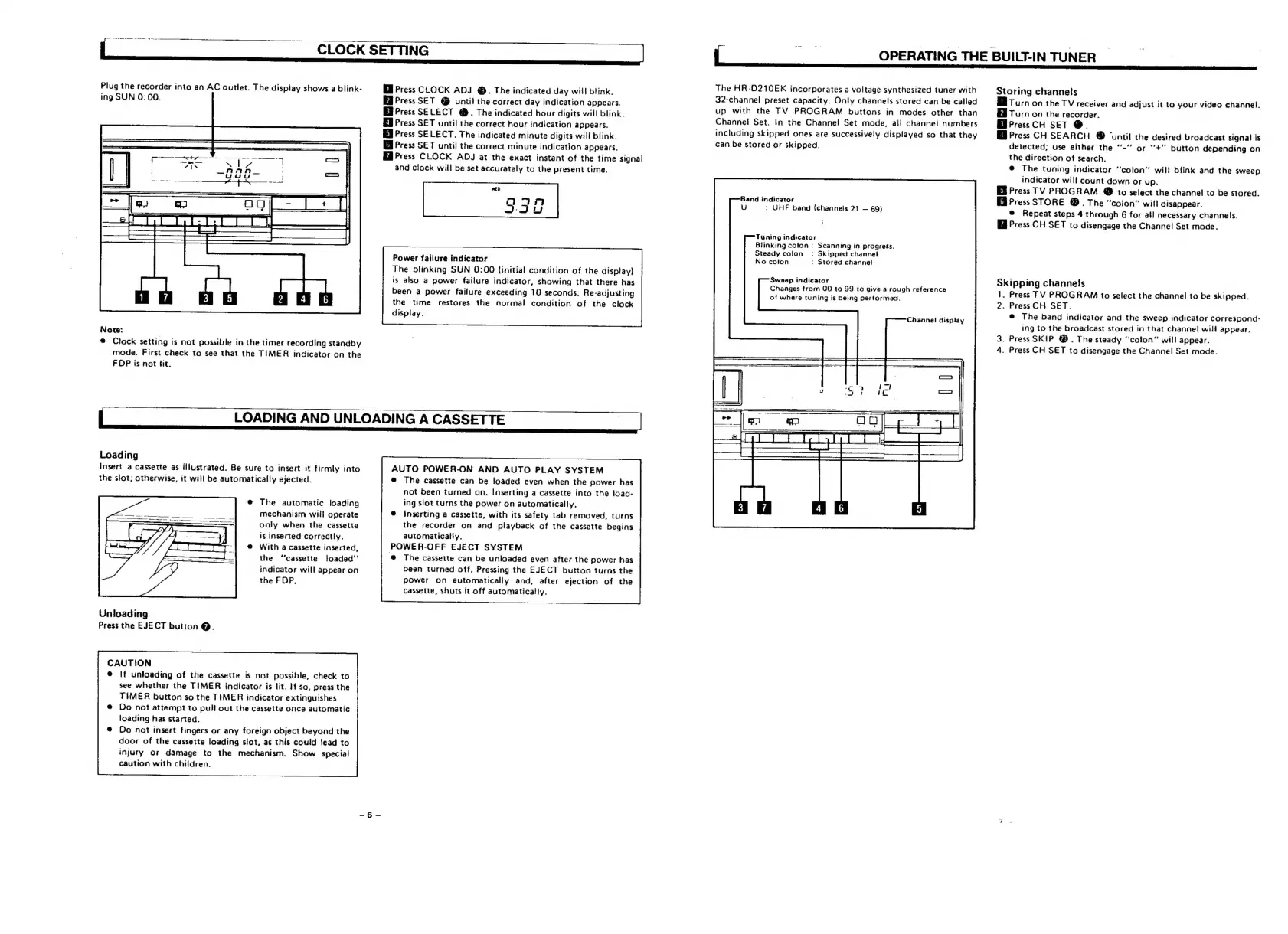
Plug
the
recorder
into
an
AC
outlet.
The
display
shows
a
blink-
ing
SUN
0:00.
Note:
@
Clock
setting
is
not
possible
in
the
timer
recording
standby
mode.
First
check
to
see
that
the
TIMER
indicator
on
the
FDP
is
not
fit.
Ml
Press
CLOCK
ADJ
@.
The
indicated
day
will
blink.
Ed
Press
SET
@
until
the
correct
day
indication
appears.
Eb
Press
SELECT
@.
The
indicated
hour
digits
will
blink.
Press
SET
until
the
correct
hour
indication
appears.
Press
SELECT.
The
indicated
minute
digits
will
blink.
Il
Press
SET
until
the
correct
minute
indication
appears,
Ha
Press
CLOCK
ADJ
at
the
exact
instant
of
the
time
signal
and
clock
will
be
set
accurately
to
the
present
time.
wEo
330
Power
failure
indicator
The
blinking
SUN
0:00
(initial
condition
of
the
disptay)
is
also
a
power
failure
indicator,
showing
that
there
has
been
a
power
failure
exceeding
10
seconds.
Re-adjusting
the
time
restores
the
normal
condition
of
the
clock
display.
;
LOADING
AND
UNLOADING
A
CASSETTE
|
|
Loading
Insert
a
cassette
as
illustrated.
Be
sure
to
insert
it
firmly
into
the
slot;
otherwise,
it
will
be
automatically
ejected.
®
The
automatic
loading
mechanism
will
operate
only
when
the
cassette
is
inserted
correctly.
@
With
a
cassette
inserted,
the
‘“‘cassette
foaded''
indicator
will
appear
on
the
FDP.
Unloading
Press
the
EJECT
button
@.
CAUTION
®@
If
unloading
of
the
cassette
is
not
possible,
check
to
see
whether
the
TIMER
indicator
is
lit.
If
so,
press
the
TIMER
button
so
the
TIMER
indicator
extinguishes.
Do
not
attempt
to
pull
out
the
cassette
once
automatic
loading
has
started.
Do
not
insert
fingers
or
any
foreign
object
beyond
the
door
of
the
cassette
loading
slot,
as
this
could
lead
to
injury
or
damage
to
the
mechanism.
Show
special
caution
with
children.
AUTO
POWER-ON
AND
AUTO
PLAY
SYSTEM
@
The
cassette
can
be
loaded
even
when
the
power
has
not
been
turned
on.
Inserting
a
cassette
into
the
load-
ing
slot
turns
the
power
on
automatically.
Inserting
a
cassette,
with
its
safety
tab
removed,
turns
the
recorder
on
and
playback
of
the
cassette
begins
automatically.
POWER-OFF
EJECT
SYSTEM
@
The
cassette
can
be
unloaded
even
after
the
power
has
been
turned
off.
Pressing
the
EJECT
button
turns
the
power
on
automatically
and,
after
ejection
of
the
cassette,
shuts
it
off
automatically.
The
HR-D210EK
incorporates
a
voltage
synthesized
tuner
with
32-channel
preset
capacity.
Only
channels
stored
can
be
called
up
with
the
TV
PROGRAM
buttons
in
modes
other
than
Channel
Set.
In
the
Channel
Set
mode,
all
channel
numbers
including
skipped
ones
are
successively
displayed
so
that
they
can
be
stored
or
skipped.
Band
indicator
U
:
UHF
band
(channels
21
69)
i
Tuning
indicators
Blinking
colon
:
Scanning
in
progress.
Steady
colon
:
Skipped
channel
No
coion
:
Stored
channei
Sweep
indicator
Changes
from
O00
to
99
to
give
a
rough
reference
of
where
tuning
is
being
performed.
Channel
display
OPERATING
THE
BUILT-IN
TUNER
Storing
channels
BB
Turn
on
the
TV
receiver
and
adjust
it
to
your
video
channel.
Ed
Turn
on
the
recorder.
HB
PressCH
SET
@.
Press
CH
SEARCH
@
‘until
the
desired
broadcast
signal
is
detected;
use
either
the
‘’-"
or
‘+’
button
depending
on
the
direction
of
search.
@
The
tuning
indicator
“colon”
wilt
blink
and
the
sweep
indicator
will
count
down
or
up.
EB
Press
TV
PROGRAM
@
to
select
the
channel
to
be
stored.
Ei
Press
STORE
®.
The
“colon”
will
disappear.
@
Repeat
steps
4
through
6
for
atl
necessary
channels.
Press
CH
SET
to
disengage
the
Channel
Set
moae.
Skipping
channels
1.
Press
TV
PROGRAM
to
select
the
channel
to
be
skipped.
2.
Press
CH
SET.
®@
The
band
indicator
and
the
sweep
indicator
correspond-
ing
to
the
broadcast
stored
in
that
channel
will
appear.
3.
Press
SKIP
@.
The
steady
“colon”
will
appear.
4.
Press
CH
SET
to
disengage
the
Channel
Set
mode.

Related product manuals