EasyManua.ls Logo

JVC HR-D210E - Automatic Timer Recording; Next-Function Memory

JVC HR-D210E
8 pages
Print Icon
To Next Page IconTo Next Page
To Previous Page IconTo Previous Page
Loading...
i
.
INDEX
SEARCH
AND
COUNTER
SEARCH
|
Counter
Search
The
counter
reading
of
“‘0000"'
can
be
located
automatically.
(1]Press
CLOCK/COUNTER/LAP
©
to
obtain
the
Counter
mode.
{2]Press
COUNTER
RESET
@
during
playback
or
recording
at
a
point
which
you
wish
to
locate
Jater.
{3]Set
TAPE
MEMORY
to
COUNTER.
VHS
Index
Search
System
When
you
start
recording
from
the
Stop
or
Timer
Stand-
by
mode,
an
index
code
is
marked
on
the
tape.
These
index
codes
can
be
detected
in
the
Shuttle
Search
mode.
GB
Set
TAPE
MEMORY
@
to
INDEX.
Press
PLAY
@
to
start
playback.
ElPress
REW
or
FF
SHUTTLE
SEARCH
@
depending
on
the
direction
of
search.
@
While
the
tape
is
being
scanned,
“INDX’’
will
be
dis-
played
on
the
FDP.
El
When
the
first
index
code
is
detected,
normal
playback
resumes
automatically.
To
search
for
the
next
index
code,
press
the
sarne
button
once
again.
[4]Press
REW
or
FF
when
you
need
to
return
to
the
designated
puint.
@
The
tape
will
stop
automatically
at
about
‘0000’.
@
When
used
in
conjunction
with
the
Memory
Play
func-
tion,
this
offers
more
convenience.
See
below.
i
|
ELAPSED
RECORDING
TIME
INDICATOR
|
The
tape
counter
is
switchable
to
the
elapsed
recording
time
indicator.
1.
Press
CLOCK/COUNTER/LAP
to
obtain
the
Lap
mode.
@
The
lap
time
is
counted
up
to
9
hours
59
minutes.
2.
To
reset
the
lap
time
to
‘0:00’,
press
COUNTER
RESET.
Notes:
@
Uniess
the
COUNTER
RESET
button
is
pressed
in
the
Lap
mode,
the
count
is
maintained
even
after
the
power
is
switched
off
(as
long
as
the
unit
remains
plugged
in
to
an
AC
outlet).
@
When
the
Lap
mode
is
engaged
during
playback,
cgunting
does
not
take
place,
even
though
the
current
count
is
displayed.
NEXT-FUNCTION
MEMORY
Memory
Play
function
@
{f
you
want
to
watch
the
tape
from
its
beginning
after
rewinding,
press
REW
and
then
PLAY
within
2
seconds.
Playback
will
start
automatically
at
the
beginning
of
the
tape.
(The
TAPE
MEMORY
switch
must
be
in
the
OFF
position.)
@
If
you
want
to
watch
the
tape
from
the
counter
reading
of
*“*Q000"",
set
TAPE
MEMORY
to
COUNTER,
press
REW
(or
FF)
and
then
PLAY
within
2
seconds.
Memory
Eject/Power-Off/Timer
Standby
If
you
are
going
to
eject
the
cassette,
turn
the
power
off
or
engage
the
Timer
Standby
mode
after
rewinding
the
tape,
you
do
not
have
to
wait
for
completion
of
rewind
to
press
the
corresponding
button.
@
To
eject
the
cassette
after
rewind,
press
REW
and
then
EJECT
within
2
seconds.
®
To
turn
the
power
off
after
rewind,
press
REW
and
then
OPERATE
within
2
seconds.
@
To
engage
the
Timer
Standby
mode
after
rewind,
press
REW
and
then
TIMER
within
2
seconds.
—10—
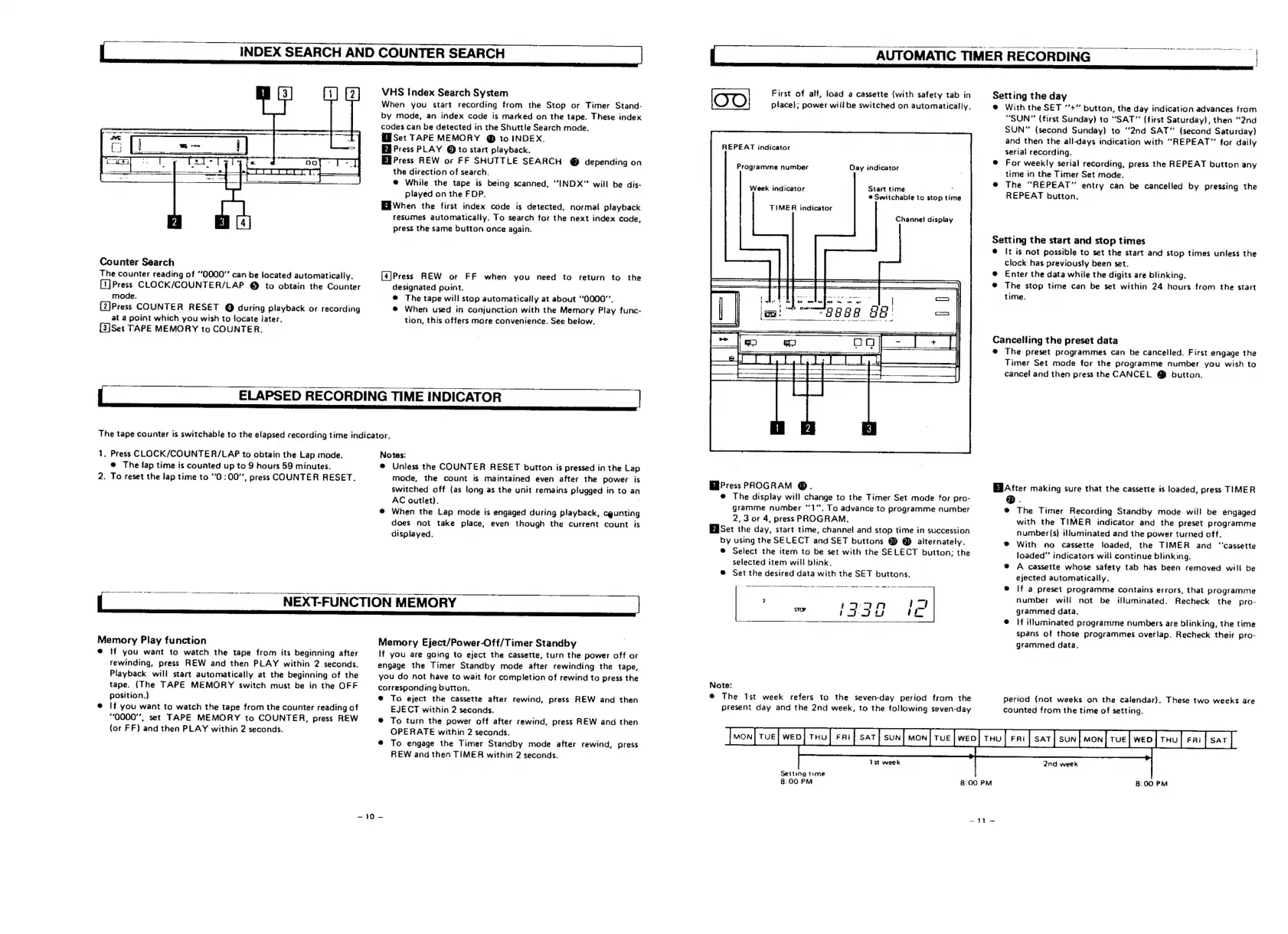
First
of
all,
load
a
cassette
(with
safety
tab
in
place);
power
willbe
switched
on
automatically.
REPEAT
indicator
Programme
number
Day
indicator
Start
time
:
®
Switchable
to
stop
tim
Week
indicator
TIMER
indicator
Channel
display
EBPress
PROGRAM
@.
@
The
display
will
change
to
the
Timer
Set
mode
for
pro-
gramme
number
‘1.
To
advance
to
programme
number
2,3
or
4,
press
PROGRAM.
EaSet
the
day,
start
time,
channel
and
stop
time
in
succession
by
using
the
SELECT
and
SET
buttons
@
@
alternately.
®
Select
the
item
to
be
set
with
the
SELECT
button;
the
selected
item
will
blink.
®
Set
the
desired
data
with
the
SET
buttons.
Note:
@
The
Ist
week
refers
to
the
seven-day
period
from
the
present
day
and
the
2nd
week,
to
the
following
seven-day
AUTOMATIC
TIMER
RECORDING
Setting
the
day
®
With
the
SET
‘‘+”
button,
the
day
indication
advances
from
“SUN”
(first
Sunday)
to
“SAT”
(first
Saturday),
then
“2nd
SUN”
(second
Sunday)
to
“2nd
SAT"
(second
Saturday)
and
then
the
all-days
indication
with
“REPEAT”
for
daily
serial
recording.
®
For
weekly
serial
recording,
press
the
REPEAT
button
any
time
in
the
Timer
Set
mode.
@
The
“REPEAT”
entry
can
be
cancelled
by
pressing
the
REPEAT
button.
Setting
the
start
and
stop
times
@
It
is
not
possible
to
set
the
start
and
stop
times
unless
the
clock
has
previously
been
set.
@
Enter
the
data
while
the
digits
are
blinking.
@
The
stop
time
can
be
set
within
24
hours
from
the
start
time.
Cancelling
the
preset
data
@
The
preset
programmes
can
be
cancelled.
First
engage
the
Timer
Set
mode
for
the
programme
number
you
wish
to
cancel
and
then
press
the
CANCEL
@
button.
El
After
making
sure
that
the
cassette
is
loaded,
press
TIMER
@.
@
The
Timer
Recording
Standby
mode
will
be
engaged
with
the
TIMER
indicator
and
the
preset
programme
number(s}
illuminated
and
the
power
turned
off.
®
With
no
cassette
loaded,
the
TIMER
and
“‘cassette
loaded”
indicators
will
continue
blinking.
®
A
cassette
whose
safety
tab
has
been
removed
wil!
be
ejected
automatically.
@
If
a
preset
programme
contains
errors,
that
programme
number
wil!
not
be
illuminated.
Recheck
the
pro-
grammed
data,
©
If
illuminated
programme
numbers
are
blinking,
the
time
spans
of
those
programmes
overlap.
Recheck
their
pro-
grammed
data.
Period
(not
weeks
on
the
calendar).
These
two
weeks
are
counted
from
the
time
of
setting.
Setting
time
}
8:00
PM
8:00
PM
8:00
PM
=41
=

Related product manuals