24
Using the TV's menu
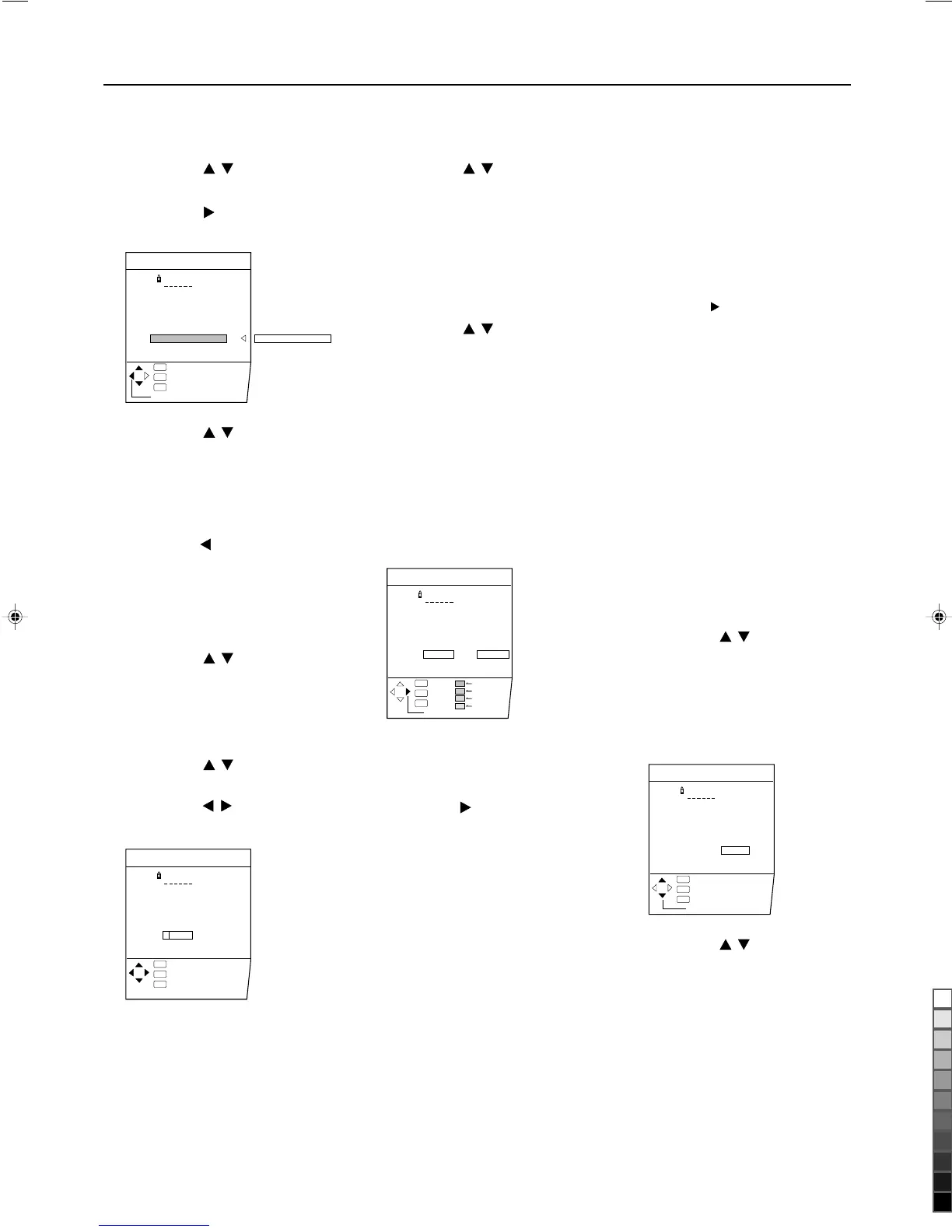
MOVE
1 Press the
buttons to
choose a TV channel.
2 Press the button to
start the MOVE function.
3 Press the
buttons to
choose a new programe
number.
To cancel the MOVE function:
Press the DISPLAY button.
4 Press the button to
change the programme
number of a TV channel to
a new programme number.
ID
1 Press the
buttons to
choose a TV channel.
2 Press the red button to
start the ID function.
3 Enter a channel name (ID).
Press the
buttons to
choose a character.
press the
buttons to
move the cursor.
To cancel the ID function:
Press the DISPLAY button.
4 Press the MENU/OK but-
ton to register a channel
name to a TV channel.
CH/CC
PR ID
AV
01
02
03
04
05
06
07
08
09
CH
CH
CH
CH
CH
CH
CH
CC
CC
21
22
23
24
25
26
02
03
STORE
EDIT
:EXIT
:OK
OK
TV
:BACK
DISP
CC 01
CH/CC
PR ID
AV
01
02
03
04
05
06
07
08
09
CH
CH
CH
CH
CH
CH
CC
CC
CC
21
22
23
24
25
26
01
02
03
EDIT
:EXIT
:OK
OK
TV
:BACK
DISP
M
DELETE
1 Press the
buttons to
choose a TV channel.
2 Press the yellow button to
delete the TV channel.
The TV channel is deleted from
the programme numbers list.
MANUAL
1 Press the
buttons to
choose a programme
number to which you
want to register a new TV
channel.
2 Press the bule button to
activate the MANUAL
function.
At the right side following the
CH/CC number, the SYSTEM
(sound system) of the TV
channel appears.
To cancel the MANUAL func-
tion:
Press the DISPLAY button.
3 Press the button to
choose the system (sound
system) for a TV channel
you want to register.
•For the sound systems in
each country or region, see
the table "BROADCASTING
SYSTEMS" on page 11.
4 Press the green or red
button to search for a TV
channel.
Scanning stops when the TV
finds a TV channel. Then the
TV channel is displayed.
5 Press the green or red
button repeatedly until the
to TV channel you want
appears.
CH/CC
PR ID
AV
01
02
03
04
05
06
07
08
09
CH
CH
CH
CH
CH
CH
CC
CC
CC
21
22
23
24
25
26
01(B/G)
02
03
MANUAL
:EXIT
:OK
OK
TV
:BACK
DISP
SYSTEM
SEARCH+
SEARCH-
FINE+
FINE-
If the TV channel reception is
poor:
Press the bule or yerrow button
to finetune the TV channel.
If you cannot hear the normal
sound even when the picture
of the TV channel appers
normally:
The SYSTEM setting is worong.
Press the button and choose
a SYSTEM that has normal
sound.
6 Press the MENU/OK
button and register the TV
channel to a programme
number.
The normal EDIT menu is
resumed.
INSERT
PREPARATION
•Find the CH/CC number
corresponding to the channel
number of the TV channel from
the on page 25.
1 Press the
buttons to
choose a programme
number for which you will
register a new TV channel.
2 Press the green button to
start the INSERT function.
3 Press the
buttons to
choose "CC" or "CH"
according to the CH/CC
number of the TV channel.
To cancel the INSERT function:
Press the DISPLAY button.
CH/CC
PR ID
AV
01
02
03
04
05
06
07
08
09
CH
CH
CH
CH
CH
CH
CC
CC
CC
21
22
23
24
25
26
**
02
03
EDIT
:EXIT
:OK `-9
OK
TV
:BACK
DISP
CH/CC
EDIT/MANUAL FUNCTIONS
LCT1078-001A_p16-33 11/2/01, 2:10 PM24
Black


 To Next Page