Playing a USB device
.
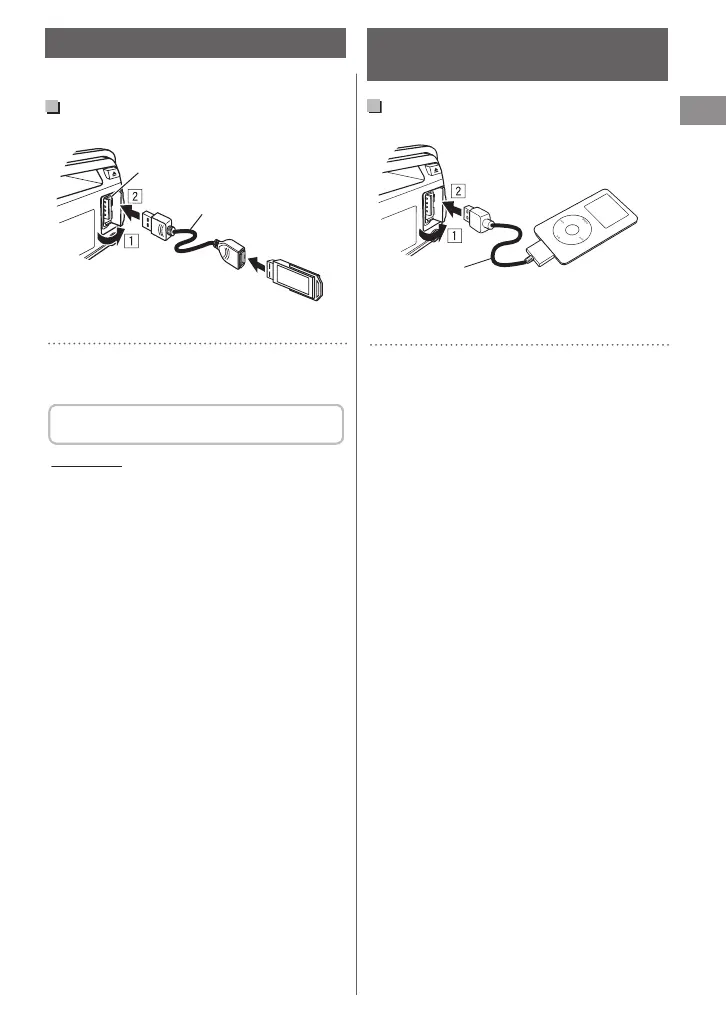
USB 2.0 cable
(not supplied)
USB input terminal
The source changes to “USB” and playback starts.
.
0
This unit can play MP3/WMA/AAC files stored
in a USB mass storage device (such as a USB
memory, Digital Audio Player, etc.).
You can operate the USB device in the same
way you operate the files on a disc. (A page 10)
Cautions
0
Make sure all important data has been backed
up.
0
Do not pull out and attach the USB device
repeatedly while “READING” is shown on the
display.
0
Electrostatic shock at connecting a USB device
may cause abnormal playback of the device. In
this case, disconnect the USB device then reset
this unit and the USB device.
0
Do not leave a USB device in the car, expose to
direct sunlight, or high temperature. Failure to
do so may result in deformation or cause
damages to the device.
0
For more details about USB operation,
A page 21.
Listening to an iPod/iPhone
(KD-DB52 only)
Playing an iPod/iPhone
.
USB 2.0 cable (accessory of the
iPod/iPhone)
USB input terminal
Apple iPod/iPhone
The source changes to “USB” B “USB-IPOD” and
playback starts.
.
0
iPod/iPhone that can be connected to this unit:
- iPod touch (4th generation)
- iPod touch (3rd generation)
- iPod touch (2nd generation)
- iPod touch (1st generation)
- iPod classic
- iPod with video (5th generation)*
- iPod nano (6th generation)
- iPod nano (5th generation)
- iPod nano (4th generation)
- iPod nano (3rd generation)
- iPod nano (2nd generation)
- iPod nano (1st generation)*
- iPhone 4
- iPhone 3GS
- iPhone 3G
- iPhone
*<IPOD MODE/EXT MODE> are not applicable.
0
It is not possible to browse video files on the
“Videos” menu in <HEAD MODE>.
0
The song order displayed on the selection
menu of this unit may differ from that of the
iPod.
0
When operating an iPod/iPhone, some
operations may not be performed correctly or
as intended. In this case, visit the following JVC
website:
<http://www.jvc.jp/english/car/index.html>
(English website only).
Listening to a USB device
ENGLISH |
11



 To Next Page
 Loading...