EasyManua.ls Logo

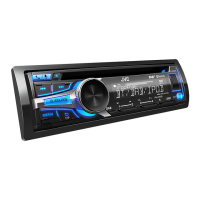
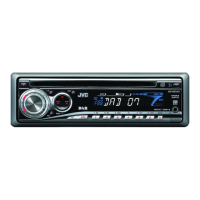
JVC KD-DB902BT - User Manual

JVC KD-DB902BT
152 pages
Print Icon
To Next Page IconTo Next Page
Loading...
Data Size: B6L (182 mm x 128 mm)
Book Size: B6L (182 mm x 128 mm)
ENGLISH
ESPAÑOL
NEDERLANDS
PORTUGUÊS
B5A-2624-00 [E]
KD-DB902BT
CD RECEIVER
INSTRUCTION MANUAL
RECEPTOR CON CD
MANUAL DE INSTRUCCIONES
CD-RECEIVER
GEBRUIKSAANWIJZING
RECEPTOR CD
MANUAL DE INSTRUÇÕES
JS_JVC_KD_DB902BT_E_C.indd 1JS_JVC_KD_DB902BT_E_C.indd 1 21/6/2018 4:20:07 PM21/6/2018 4:20:07 PM

Other manuals for JVC KD-DB902BT

Questions and Answers

  • T
    Timothy DixonSep 3, 2025
    How to reduce echo during calls on JVC KD-DB902BT Car Receiver?
    • S
      Stacey GeorgeSep 3, 2025
      If you hear echo or noise during a phone conversation using your JVC Car Receiver, adjust the microphone unit’s position and check the [ECHO CANCEL] setting.
  • J
    jbryantSep 18, 2025
    What to do if 'IN DISC' appears and disc can't be ejected from JVC KD-DB902BT Car Receiver?
    • J
      johnhopkinsSep 18, 2025
      If “IN DISC” appears and the disc cannot be ejected from your JVC Car Receiver, make sure nothing is blocking the loading slot when you eject the disc.
  • S
    Samuel GriffinSep 16, 2025
    What does 'USB HUB IS NOT SUPPORTED' mean on JVC Car Receiver?
    • E
      Elizabeth SanfordSep 16, 2025
      If “USB HUB IS NOT SUPPORTED” appears on your JVC Car Receiver, this unit cannot support a USB device connected via a USB hub.
  • K
    Kim RamosSep 14, 2025
    How to improve voice calling on JVC KD-DB902BT Car Receiver?
    • C
      Crystal SanchezSep 14, 2025
      If the voice calling method is not successful on your JVC Car Receiver, use voice calling in a quieter environment, reduce the distance from the microphone when you speak the name, and make sure the same voice as the registered voice tag is used.
  • B
    bterrySep 12, 2025
    What to do if 'DISCONNECTED' appears on JVC Car Receiver?
    • S
      sextonemilySep 13, 2025
      If “DISCONNECTED” appears on your JVC Car Receiver, ensure the device is properly connected through USB, as the USB is disconnected from the head unit.
  • D
    daviskatherineSep 12, 2025
    What does 'CONNECTING' mean on JVC KD-DB902BT?
    • R
      Richard SavageSep 12, 2025
      If “CONNECTING” appears on your JVC Car Receiver, and you are connected via USB, the device is connecting to the head unit. Please wait. If connected via Bluetooth, the Bluetooth is disconnected. Please check the Bluetooth connection and make sure both the device and unit are paired and connected.
  • A
    arroyolisaSep 9, 2025
    Why are correct characters not displayed on my JVC KD-DB902BT?
    • K
      Kimberly ChurchSep 9, 2025
      If correct characters are not being displayed on your JVC Car Receiver, note that this unit can only display uppercase letters, numbers, and a limited number of symbols. Also, depending on the display language you have selected, some characters may not be displayed correctly.
  • L
    Lucas ShawSep 7, 2025
    How to improve phone sound quality on JVC KD-DB902BT?
    • C
      Christopher RiveraSep 7, 2025
      If the phone sound quality is poor on your JVC Car Receiver, reduce the distance between the unit and the Bluetooth device and move the car to a place where you can get better signal reception.
  • R
    Rachael HoweSep 5, 2025
    Why does the sound skip on my JVC KD-DB902BT Car Receiver?
    • R
      Ronald SandersSep 5, 2025
      If playback is intermittent or the sound skips on your JVC Car Receiver, turn off the power saving mode on your Android device.
  • S
    Samantha MorenoAug 20, 2025
    How to fix no sound on my JVC KD-DB902BT Car Receiver?
    • S
      Sara HerreraAug 21, 2025
      If you cannot hear any sound from your JVC Car Receiver, first, adjust the volume to the desired level. If the issue persists, check all cords and connections to ensure they are properly connected.

JVC KD-DB902BT Specifications

General IconGeneral
TypeCar Receiver
BrandJVC
ModelKD-DB902BT
DIN Size1 DIN
Detachable Face PlateYes
BluetoothYes
USB PortYes
Max Power Output50W x 4
RMS Power Output22W x 4
DisplayLCD
Equalizer13-Band Graphic EQ
Preamp Voltage2.5V
Button IlluminationVariable Color
HD RadioNo
Satellite Radio ReadyNo
USB InputYes
AUX InputYes
Memory Card SlotNo
Subwoofer Preamp OutputYes
DAB+Yes
AM/FM TunerYes
MP3 PlaybackYes
WMA PlaybackYes
AAC PlaybackYes
Remote ControlYes
Built-in MicrophoneYes
Steering Wheel ControlYes
TunerFM/AM
Peak Output50W
EQ Settings13-band

Related product manuals