3
ENGLISH
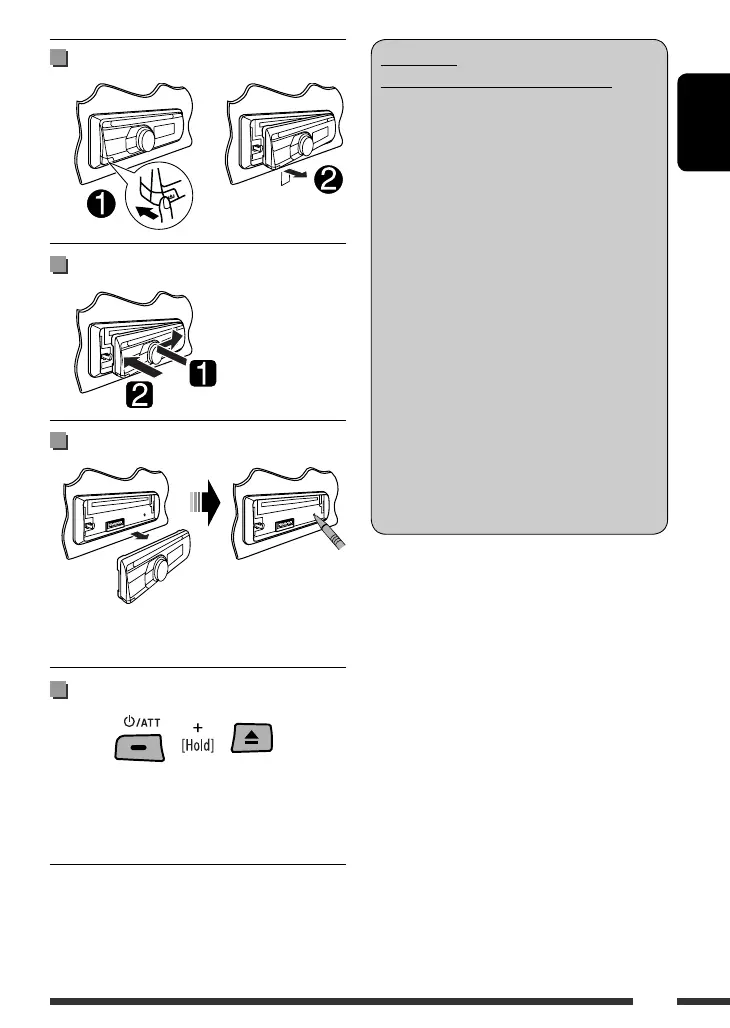
Detaching the control panel
Attaching the control panel
How to reset your unit
• Your preset adjustments will also be erased (except the
registered Bluetooth device, see page 26).
How to forcibly eject a disc
• You can forcibly eject the loaded disc even if the disc is
locked. To lock/unlock the disc, see page 14.
• Be careful not to drop the disc when it ejects.
• If this does not work, reset your unit.
WARNINGS:
(To prevent accidents and damage)
• DO NOT install any unit or wire any cable in
a location where;
– it may obstruct the steering wheel and
gearshift lever operations.
– it may obstruct the operation of safety
devices such as air bags.
– it may obstruct visibility.
• DO NOT operate the unit while driving.
• If you need to operate the unit while
driving, be sure to look around carefully.
• The driver must not watch the monitor
while driving.
If the parking brake is not engaged,
“DRIVER MUST NOT WATCH THE MONITOR
WHILE DRIVING.” appears on the monitor,
and no playback picture will be shown.
– This warning appears only when the
parking brake lead is connected to the
parking brake system built in the car
(refer to the Installation/Connection
Manual).
EN02-09_KD-DV5507[EE]1.indd 3EN02-09_KD-DV5507[EE]1.indd 3 2/6/09 11:18:58 AM2/6/09 11:18:58 AM



 To Next Page