51REFERENCES
ENGLISH
Continued on the next page
About sounds reproduced through the rear
terminals
• Through the analog terminals (Speaker
out/LINE OUT):
2-channel signal is emitted. When playing a
multi-channel encoded disc, multi-channel
signals are downmixed. (AUDIO—DOWN MIX:
see page 45.)
• Through DIGITAL OUT (optical):
Digital signals (Linear PCM, Dolby Digital, MPEG
Audio) are emitted through this terminal. (For
more details, see table on page 52.)
To reproduce multi-channel sounds such as Dolby
Digital and MPEG Audio, connect an amplifier or
a decoder compatible with these multi-channel
sources to this terminal, and set “DIGITAL AUDIO
OUTPUT” correctly. (See page 45.)
On-screen guide icons
During playback, the following guide icons may
appear for a while on the monitor.
: Playback
: Pause
: DVD-Video/DVD-VR/VCD: Forward
slow motion
: DVD-Video: Reverse slow motion
: Forward search
: Reverse search
DVD: The following icons appear at the beginning of
a scene containing:
: Multi-subtitle languages
: Multi-audio languages
: Multi-angle views
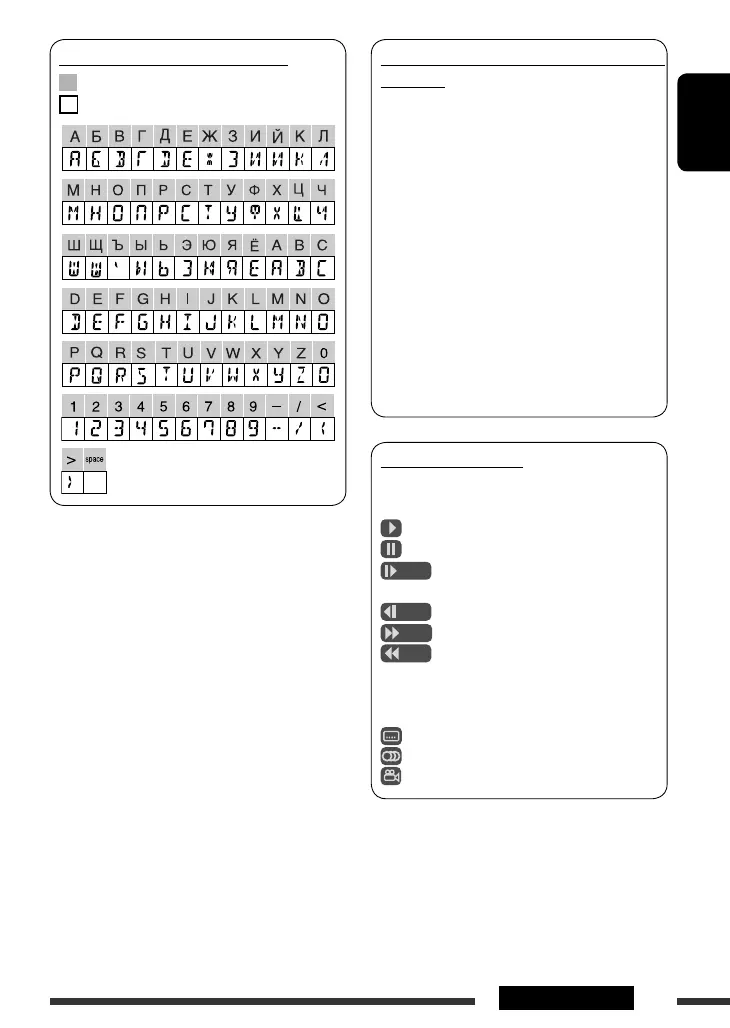
Available characters on the display
Available characters
Display indications
EN48-55_KD-DV5507[EE]f.indd 51EN48-55_KD-DV5507[EE]f.indd 51 3/17/09 12:02:15 PM3/17/09 12:02:15 PM



 To Next Page