16
ENGLISH
To adjust a preset mode of SRS Circle
Surround Auto
TM
You can adjust the SRS FOCUS®
and the SRS
TruBass® of each preset CS-A mode.
1 Select your desired CS-A mode to
adjust, referring
“To select a preset
mode of SRS Circle Surround Auto
TM
” on
page 15,
then...
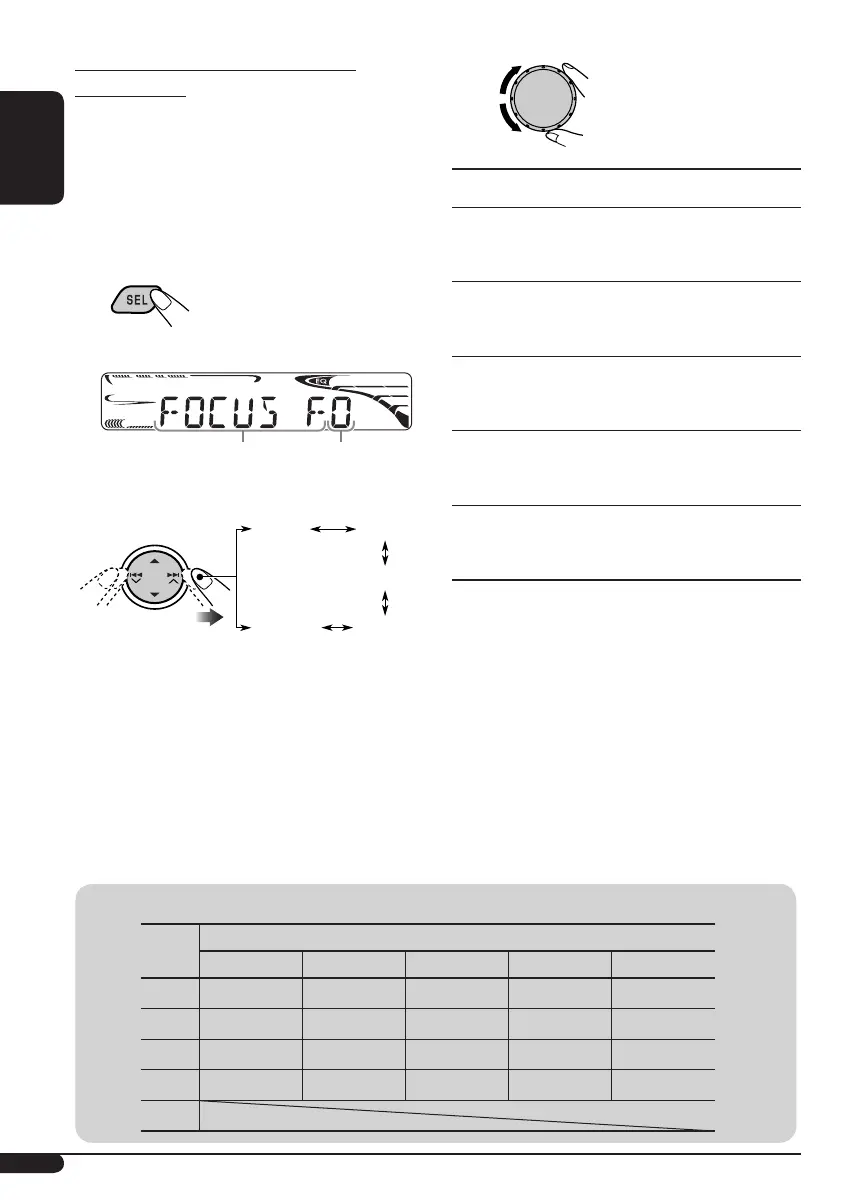
Adjustable item appears.
2 Select an item to adjust.
3
Adjusted settings will be
stored.
Indication [Range]
FOCUS F (SRS FOCUS® Front)
Adjust the SRS FOCUS® of the front speaker.
[0 to 9]
FOCUS R (SRS FOCUS® Rear)
Adjust the SRS FOCUS® of the rear speaker.
[0 to 9]
TBASS F
(SRS TruBass® Front)
Adjust the SRS TruBass® of the front speaker.
[0 to 9]
TBASS R (SRS TruBass® Rear)
Adjust the SRS TruBass® of the rear speaker.
[0 to 9]
TBASS W (SRS TruBass® Subwoofer)
Adjust the SRS TruBass® of the subwoofer.
[0 to 9]
4 Repeat the procedure from steps 2
and 3 to change other item.
FOCUS F
FOCUS R
TBASS F
TBASS RTBASS W
Selected item name appears
Level number (0-9.)
Mode
Initial level of each item
FOCUS F FOCUS R TBASS F TBASS R TBASS W
TYPE A
34343
TYPE B
48565
TYPE C
79787
USER
00000
OFF
Initial settings of preset CS-A mode
EN_KD-HDR1[J].indb 16EN_KD-HDR1[J].indb 16 06.1.23 10:07:10 AM06.1.23 10:07:10 AM



 To Next Page