20
ENGLISH
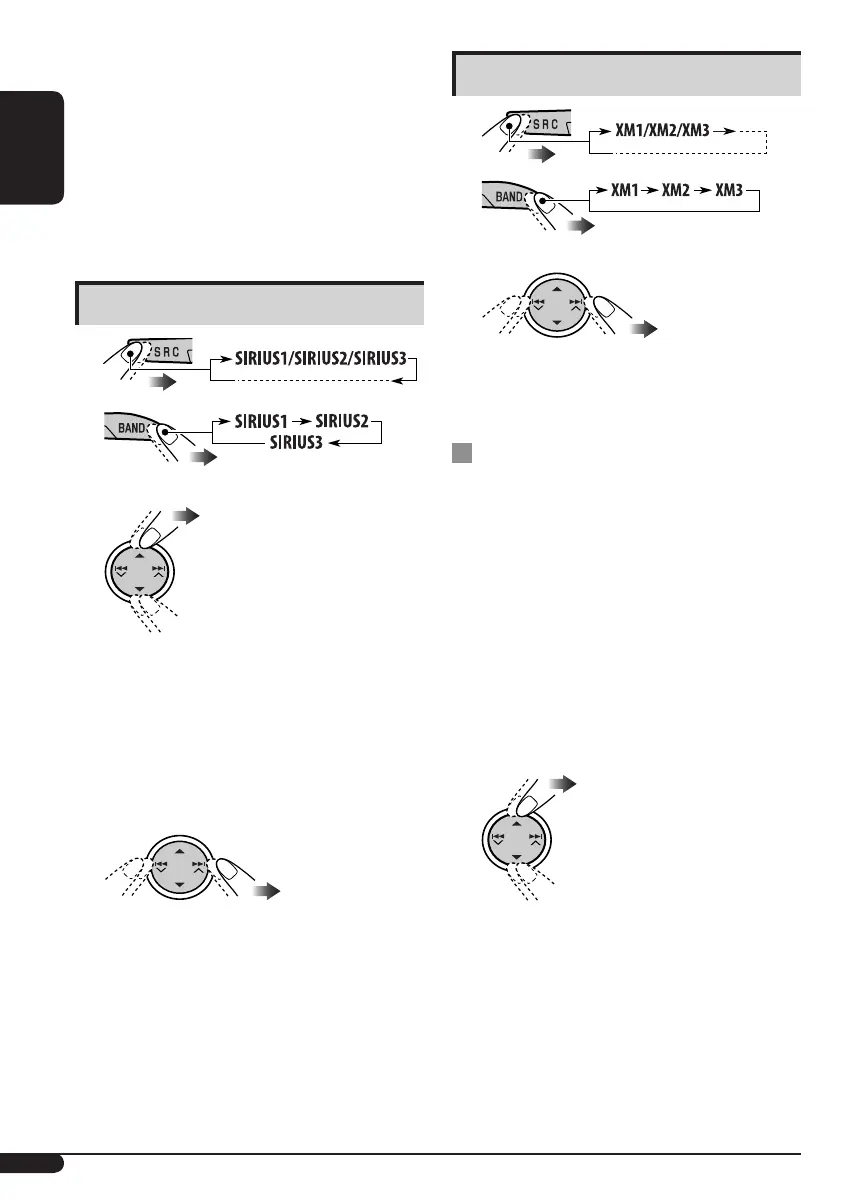
Listening to the XM Satellite radio
1
2
3 Select a channel for listening.
Holding the button changes the channels
rapidly.
Searching for category/channel
You can search for programs by category
(Category Search) or channel number (Channel
Search).
• In Category Search, you can tune in to the
channels of the selected category. Category
Search begins from the currently selected
channel. The selected channel number flashes
on the display.
• In Channel Search, you can tune in to
all channels (including non-categorized
channels).
1 Select a category (Category Search).
• For Channel Search, skip
this step.
4
Contact XM Satellite radio on
the internet at <http://xmradio.
com/activation/> to activate your
subscription, or you can call 1-800-
XM-RADIO (1-800-967-2346).
Once completed, the unit tunes in to one
of the available channels (Channel 4 or
higher).
Listening to the SIRIUS Satellite radio
1
2
3 Select a category.
You can tune in to all the channels of every
category by selecting “ALL.”
Selecting a particular category (SPORTS,
ENTERTAINMENT, etc.) allows you to
enjoy only the channels from the selected
category.
4 Select a channel for listening.
Holding the button changes the channels
rapidly.
• When changing the category or channel,
invalid and unsubscribed channels are
skipped.
EN_KD-HDR1[J].indb 20EN_KD-HDR1[J].indb 20 06.1.23 10:07:14 AM06.1.23 10:07:14 AM



 To Next Page