ENGLISH
30
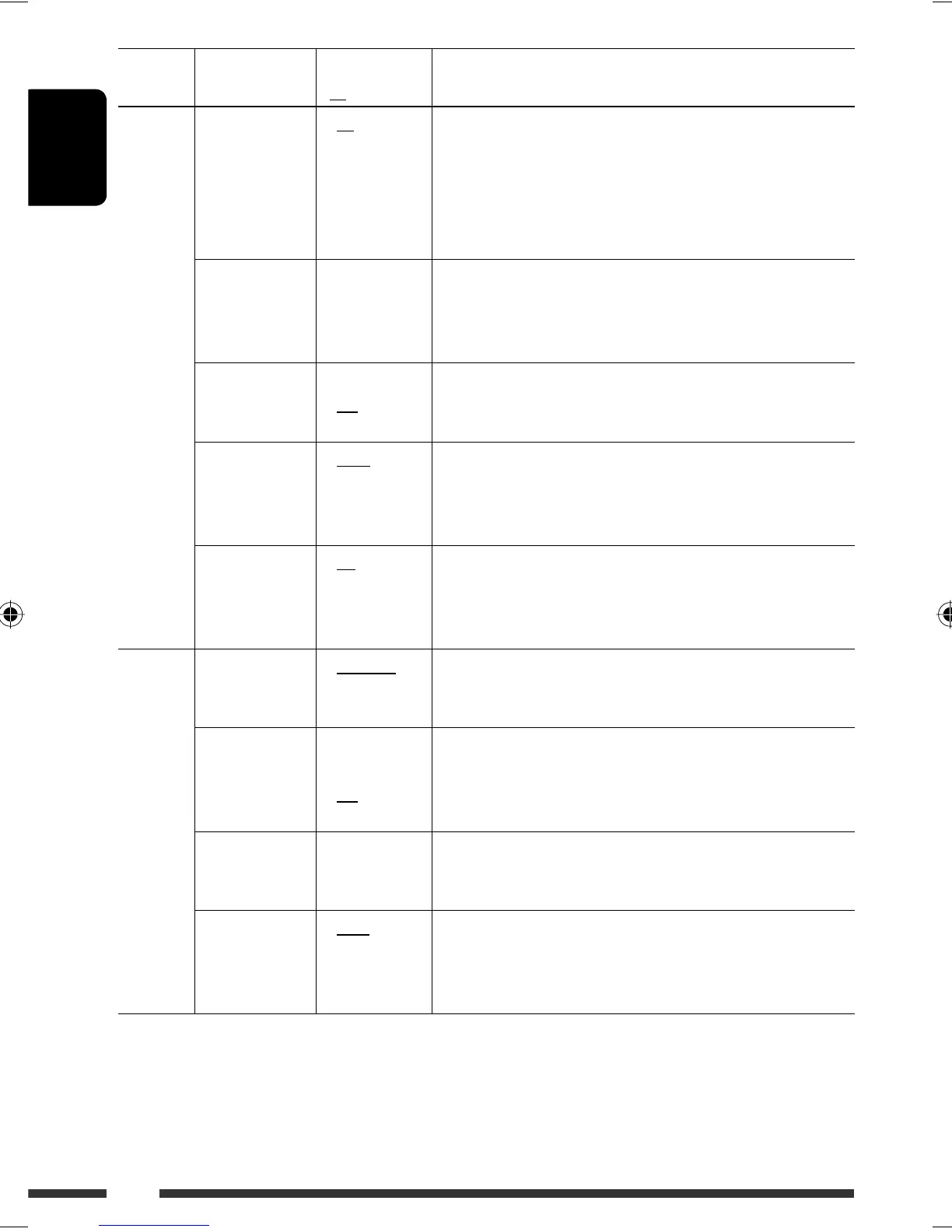
Category Indication Item
( : Initial)
Setting, [reference page]
TUNER
AF-Regn‘l
Alternative
frequency/
regionalization
reception
• AF
• AF REG
• Off
: When the currently received signals become weak, the unit
switches to another station or service (the programme may
differ from the one currently received), [10].
: When the currently received signals become weak, the unit
switches to another station broadcasting the same programme.
: Cancels (not selectable when “DAB AF” is set to “On”).
TA Volume
Traffic
announcement
volume
• Volume 0 –
Volume 30
• Volume 0 –
Volume 50 *
5
: Initial: Volume 15
P-Search
Programme
search
• On
• Off
: Activates Programme Search, [10].
: Cancels.
IF Band
Intermediate
frequency band
• Auto
• Wide
: Increases the tuner selectivity to reduce interference noises
between adjacent stations. (Stereo effect may be lost.)
: Subject to interference noises from adjacent stations, but sound
quality will not be degraded and the stereo effect will remain.
DAB AF *
6
Alternative
frequency
reception
• On
• Off
: Traces the programme among DAB services and FM RDS
stations, [24].
: Cancels.
AUDIO
Ext Input *
7
External input
• Changer
• Ext In
: To use a JVC CD changer, [19], JVC DAB tuner, [22], or an Apple
iPod, [20].
: To use any other external component, [25].
Telephone
Telephone
muting
• Muting1/
Muting2
• Off
: Select either one which mutes the sounds while using a cellular
phone.
: Cancels.
• Playback pauses/mutes while telephone muting is working.
AudioBooks *
8
Speed control of
“Audiobook”
• Normal
• Faster
• Slower
: You can select the playback speed of the “Audiobook” sound
file in your iPod.
• Initial selected item depends on your iPod setting.
L/O Mode
Line output
mode
• Rear
• Woofer
: Select if the REAR LINE OUT terminals are used for connecting
the rear speakers (through an external amplifier).
: Select if the REAR LINE OUT terminals are used for connecting a
subwoofer (through an external amplifier).
*
5
Depends on the amplifier gain control.
*
6
Displayed only when DAB tuner is connected.
*
7
Displayed only when one of the following sources is selected—TUNER, DAB, CD, USB, or Bluetooth.
*
8
Displayed only when an iPod is connected to the USB input jack and playback is controlled from the unit.
EN22-31_PDR61_003A_4.indd 30EN22-31_PDR61_003A_4.indd 30 12/31/07 11:08:59 AM12/31/07 11:08:59 AM








 To Next Page